Key Features
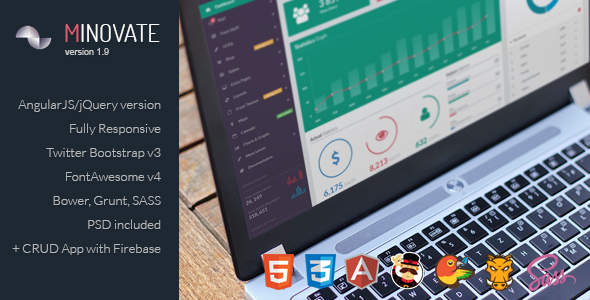
- AngularJS Foundation: Built on the robust AngularJS framework, Minovate provides a dynamic and structured environment for developing single-page applications. This architecture ensures smooth data binding and a maintainable codebase for complex admin interfaces.
- Responsive & Cross-Browser Ready: The template is fully responsive, adapting seamlessly to any device or screen size. It is tested on all modern browsers, guaranteeing a consistent and functional experience for every user, whether on a desktop, tablet, or smartphone.
- Built on Bootstrap 3: Leveraging the popular Twitter Bootstrap v3 framework, Minovate offers a familiar and reliable grid system and UI components. This foundation ensures compatibility with a vast ecosystem of plugins and simplifies customization for developers.
- Multiple Layout Options: You can choose from a variety of pre-made layouts, including a horizontal navigation bar, a boxed layout, and a right-to-left (RTL) layout for international audiences. This flexibility allows you to tailor the interface to your specific project needs.
- Customizable Color Schemes: The dashboard offers six distinct color options for the header, branding, navbar, and active elements. This feature enables you to match the admin panel to your company’s branding or client preferences without deep CSS edits.
- CRUD Demo Application: A fully functional CRUD (Create, Read, Update, Delete) demo application is included, utilizing Firebase as a backend database and Amazon S3 for file storage. This provides a practical, real-world example of how to build data-driven features.
- Rich Selection of UI Components: The template comes packed with numerous example pages and ready-to-use elements. From charts and tables to forms and widgets, you have a comprehensive toolkit to accelerate development.
- Extensive Plugin Integration: Minovate integrates a wide array of popular Angular and jQuery plugins, including Angular Material, Dragula for drag-and-drop, Leaflet for maps, and several advanced table and form libraries. This saves significant time on integration and testing.
Who Is This For? Use Cases
Web Developers & Freelancers
For developers who need to deliver a professional, feature-rich admin panel quickly, Minovate is an excellent starting point. Its modular AngularJS structure allows for rapid prototyping and customization. Freelancers can leverage the pre-built components and CRUD application to reduce project timelines and offer clients a polished, modern interface without starting from scratch.
SaaS Startups
Startups building a software-as-a-service platform require a robust and scalable admin dashboard. Minovate provides the necessary infrastructure for managing users, analytics, and content. The inclusion of a Firebase-backed CRUD application is particularly valuable for startups needing to implement user management or data entry modules efficiently.
Agencies & Design Teams
Digital agencies managing multiple client projects can benefit from the template’s customization options. The ability to quickly change color schemes and layout structures means that a single template can be adapted to fit different brand identities. The clean, flat design language ensures the interface looks modern and uncluttered, which is often a key requirement for agency clients.
Enterprise IT Departments
Internal IT teams tasked with building custom management tools for their organization will find Minovate’s comprehensive feature set useful. The support for various data tables, charts, and form elements makes it suitable for creating dashboards that monitor KPIs, manage inventories, or oversee employee data. The template’s responsive design ensures that these tools are accessible on mobile devices for on-the-go management.
Technical Details & Compatibility
Minovate is built on a modern web technology stack, ensuring compatibility with current development workflows. The core framework is AngularJS (version 1.x), which is well-suited for building dynamic single-page applications. It is constructed on the Bootstrap 3 grid system, providing reliable responsive behavior and a familiar CSS framework.
The template uses HTML5 and CSS3 standards, ensuring clean, semantic markup. For build automation and dependency management, it supports Grunt and Bower, which are standard tools for managing assets and tasks in an AngularJS project. The template is designed to work on any modern browser, including Chrome, Firefox, Safari, and Edge, and is fully responsive across all screen sizes.
A significant technical feature is the included CRUD demo application. This application requires a Firebase database and an Amazon S3 storage account to function fully. Configuration variables are located in the index.html file for Firebase and in scripts/services/s3upload.js for S3, making the setup process clear for developers. The changelog indicates that the template has been updated to use the latest Firebase SDK, showing attention to compatibility with evolving third-party services.
Performance considerations are addressed through the use of ngAnnotate for dependency injection safety and the option to use a Gruntfile without minification/uglify tasks for easier debugging. The template’s dependencies, such as Angular Bootstrap and Angular Material, have been updated to their latest versions in past releases, which helps maintain security and performance.
Pros and Cons
Pros
- Exceptional Value for Money: Priced at $24.00, Minovate offers a comprehensive set of features, including multiple layouts, color schemes, and a CRUD demo, making it a cost-effective solution for professional admin panels.
- Strong Social Proof: With over 2,223 sales on ThemeForest, the template has a proven track record and a community of users, indicating reliability and popularity within the market.
- Practical CRUD Demo: The inclusion of a working CRUD application with Firebase and S3 integration provides a real-world blueprint for building data-driven features, which is invaluable for developers learning or implementing similar functionality.
- High Customizability: The ability to switch between six color schemes, multiple layouts (horizontal, boxed, RTL), and toggle fixed elements gives developers significant control over the final look and feel without heavy coding.
- Comprehensive Component Library: The template includes a vast array of pre-built pages and UI elements, such as charts, tables, forms, maps, and widgets, which drastically reduces development time for standard admin features.
Cons
- AngularJS (1.x) Framework: The template is built on AngularJS (version 1.x), which is an older version of the framework. Developers seeking to use the latest Angular (2+) or React may need to look for a different solution or undertake a significant migration effort.
- Conditional Update Policy: The developer has stated that future updates beyond bug fixes are dependent on the item’s profitability and specific sales milestones. This means that major feature updates are not guaranteed and are tied to community adoption.
- Dependency on Third-Party Services: The CRUD application requires external accounts (Firebase and Amazon S3) to function fully. This adds an extra setup step and potential ongoing costs for those services, which may not be ideal for all users.
- Older Build Tools: The use of Grunt and Bower for build management is less common in modern development workflows, which have largely shifted to tools like Webpack and npm. This may require some adjustment for developers accustomed to newer tooling.
Frequently Asked Questions
Does Minovate work with the latest version of Angular?
No. Minovate is specifically built on AngularJS (version 1.x), not the newer Angular (version 2 and above). It is a mature, stable framework for building single-page applications, but it is not compatible with the modern Angular CLI or component-based architecture. If your project requires the latest Angular version, this template is not the correct choice.
How do I set up the CRUD demo application included with Minovate?
To get the CRUD application working, you need to set up your own Firebase database and Amazon S3 storage. First, create a Firebase project and replace the database variables in the index.html file with your own. Second, for file storage, set up an Amazon S3 bucket and configure the settings in the scripts/services/s3upload.js file. The documentation provides guidance, and you can find detailed tutorials online for configuring S3 uploads.
What support and updates are provided for this template?
Support is provided by the developer, Tattek, through the ThemeForest comments section. The developer has committed to providing bug fixes for free. However, major feature updates (such as an e-commerce front page or a pure HTML version) are tied to the item reaching specific sales milestones. As of the last changelog, the template has received multiple updates including new pages and dependency upgrades, but future feature additions are not guaranteed.
Final Verdict
Minovate – Angular Admin Dashboard stands as a robust and feature-rich solution for developers and agencies who need a professional admin interface built on the AngularJS framework. With over 2,200 sales, it has demonstrated its value and reliability within the Envato marketplace. The template’s strength lies in its extensive customization options, practical CRUD demo, and the sheer volume of pre-built components that can accelerate development significantly.
While its reliance on the older AngularJS framework and its conditional update policy are important considerations, the price point of $24.00 makes it an exceptionally low-risk investment. For projects that are already aligned with AngularJS or that require a stable, feature-complete dashboard without the need for bleeding-edge framework features, Minovate delivers substantial value. It is a practical, well-tested tool that can save dozens of hours of development time.
If you are building a data-driven admin panel and want a proven, customizable, and affordable foundation, Minovate – Angular Admin Dashboard is a smart choice. Purchase it today from ThemeForest and start building your next project with a head start.