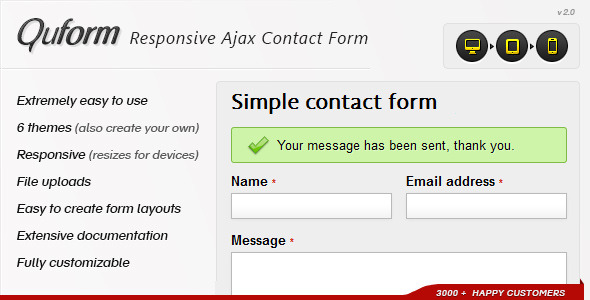
Quform Forms is a self-hosted PHP form builder sold on CodeCanyon by the developer ThemeCatcher. It lets a site owner assemble contact, quote, registration or enquiry forms, validate and filter the submitted data, send email notifications and autoresponders, and optionally save every submission to a database, all without a page reload. It suits freelancers, agencies and site owners running PHP hosting who want full control over form markup and data rather than a monthly SaaS subscription.
The listing carries a 4.64 out of 5 rating across 956 reviews and has recorded 8,152 sales, which places it among the more established form scripts in the CodeCanyon PHP scripts category. The current price is $9.00, and the vendor last updated the item in October 2025.
What Quform actually does well
The core proposition is a form that submits asynchronously. Instead of a full page refresh, the form posts in the background and returns errors or a success message in place. That matters most on mobile, where a reload interrupts whatever the visitor was doing and often loses their place on the page. Quform also scrolls the viewport to error messages that sit outside the visible area, which solves a common usability failure on long forms where validation feedback happens off-screen.
Validation and filtering are handled by a framework the vendor says was inspired by Zend Framework. In practice this means each field can carry rules about what it will accept, and submitted values can be cleaned before they reach an inbox or database. The default configuration covers ordinary cases, but the framework exists for the situations where a field must reject malformed input rather than simply pass it through. Fields can be reordered and repurposed, so the same script becomes a quote request form, a registration form or a multi-section enquiry form without changing products.
Spam handling offers three separate mechanisms: a static image CAPTCHA, Google reCAPTCHA (including v3 support), and a honeypot field that is invisible to humans but catches automated submissions. Having all three available is genuinely useful, because reCAPTCHA v3 is unobtrusive but requires a Google account and adds a third-party dependency, while the honeypot adds nothing to the user experience at the cost of catching fewer bots. The choice can be made per project.
Submissions can go to email, to a database table, or both. File upload fields are supported, and uploaded files can either be attached to the notification email or stored in a folder on the server. Autoresponder emails are configurable, so a visitor can receive a tailored confirmation rather than a generic acknowledgement. UTF-8 encoding is the default, which matters for any site collecting names, addresses or messages in non-Latin scripts.
On the presentation side, three themes ship with the script, offering six style variations in total. CSS grouping allows related fields to be arranged into columns and more complex layouts. The markup is valid HTML5, and the form is designed to work whether or not JavaScript is available in the browser, which is a meaningful accessibility and resilience consideration that many Ajax-only form scripts skip.
The underlying PHP is object oriented and unit tested according to the vendor, and the source files included are JavaScript, HTML, CSS and PHP. Browser support is declared from Internet Explorer 7 upward through Firefox, Safari, Opera, Chrome and Edge. The IE7 and IE8 entries are largely historical at this point, but their presence indicates how long the codebase has been maintained.
Where Quform fits, and where it does not
This is a good fit for a freelancer or small agency building brochure sites, service business sites or small ecommerce front ends on PHP hosting. It is also a reasonable choice for anyone who has been burned by a hosted form service that charges per submission, caps monthly entries, or holds the submission data on someone else’s infrastructure. Because the script runs on the site’s own server, the data stays there.
It suits developers who want to control the HTML output rather than accept whatever markup a plugin generates. The three included themes are a starting point, and the CSS can be replaced entirely to match an existing design system.
It is the wrong choice for anyone on a hosting stack without PHP, which rules out fully static sites deployed to a CDN unless a serverless function or separate endpoint is added. It is also a poor fit for WordPress users who want a form inside the WordPress admin: Quform is a standalone PHP script that gets embedded into a page, not a WordPress plugin, so it will not appear in the plugins list or integrate with WordPress hooks without custom work. Finally, anyone who wants a drag-and-drop visual builder with no code exposure at all should look at hosted form products instead, because adapting Quform beyond the defaults assumes at least a working familiarity with PHP.
Strengths and limitations
Strengths
- Submissions arrive by email and can simultaneously be written to a database, so nothing is lost if an email fails to deliver.
- Three independent spam controls, including an invisible honeypot, allow the level of friction to be tuned per site.
- Works without JavaScript, which keeps the form usable in constrained or script-blocked environments.
- UTF-8 by default, so non-English submissions are not mangled in transit.
- File upload fields with a choice of email attachment or server-side storage.
- Long maintenance history and an active update as recently as October 2025.
- Documentation is repeatedly praised in customer reviews, and the debug output reportedly identifies configuration mistakes precisely.
- At $9.00 it is a one-time cost with no per-submission pricing.
Limitations
- Adapting the form beyond its defaults assumes PHP knowledge. The vendor states a basic understanding of PHP is recommended, and the documentation does not remove that requirement entirely.
- The three bundled themes are functional rather than distinctive. Most sites will need custom CSS to make the form look native to their design.
- There is no native WordPress integration. Using it on a WordPress site means embedding it manually and accepting that it sits outside the CMS’s plugin architecture.
- reCAPTCHA v3 introduces a Google dependency and requires an external account, which some privacy-conscious projects will not want.
- The declared browser support list reaches back to IE7, which suggests a legacy-tolerant codebase rather than one built purely around modern front-end tooling.
- The vendor does not state a maximum submission volume or performance ceiling, so high-traffic deployments cannot be sized from the listing alone.
How it compares with the wider form-script category
The form tooling market splits into three broad groups: hosted SaaS form builders, CMS plugins, and standalone scripts like this one. Hosted builders win on setup speed and on features like payment collection, conditional logic interfaces and team collaboration, but they meter submissions, hold data off-site and stop working if the subscription lapses. CMS plugins win on integration with a specific platform but are tied to it.
Standalone PHP scripts occupy a narrower position. They require a PHP server and manual embedding, and they offer no visual builder. In exchange, the buyer owns the code outright, pays once, controls the markup, and keeps submission data on their own infrastructure. Within that group, Quform’s differentiators are the validation and filtering framework, the database storage option, the three-way spam handling, and the fact that it degrades gracefully without JavaScript. A script that only works with JavaScript enabled is simpler to build but fails in more environments.
The trade-off is real: a hosted builder will have a form live in ten minutes with no server access, while Quform needs a PHP environment, an embed step and some styling work. The question is whether ownership and control are worth that setup cost for the specific project.
Frequently Asked Questions
Does Quform work with WordPress?
Not natively. Quform is a standalone PHP script, not a WordPress plugin, so it does not install through the WordPress admin or register shortcodes. It can be embedded into a WordPress page template manually if the theme allows PHP edits, but most WordPress users are better served by a dedicated form plugin that integrates with the CMS properly.
Can Quform save form submissions to a database?
Yes. Alongside sending notification emails, Quform can write submitted data to a database table. This is useful as a backup when email delivery is unreliable, and it allows submissions to be reviewed, exported or processed later rather than living only in an inbox.
What PHP version does Quform require?
The vendor lists a PHP-enabled server running version 7.1 or later, and declares compatibility with both PHP 7.x and PHP 8.x. A basic knowledge of PHP is recommended for adapting the form, though the documentation is extensive enough that some users manage without it.
How does Quform stop spam submissions?
Three options are available: a static image CAPTCHA, Google reCAPTCHA including v3, and a honeypot field that is hidden from human visitors. The honeypot adds no friction for real users but catches fewer automated bots, while reCAPTCHA v3 is more effective but depends on a Google account.
Verdict
Quform Forms is worth buying for developers and site owners running PHP hosting who want a form they own outright, with database storage, configurable validation and no recurring fees. The $9.00 price, the 4.64 rating across 956 reviews and the October 2025 update all point to a product that has been maintained rather than abandoned. It is not the right pick for WordPress users wanting an in-admin solution, for static sites without a PHP runtime, or for anyone who needs a visual drag-and-drop builder and no code at all. Buyers should also budget time for CSS work, since the bundled themes are unlikely to match an existing design without adjustment.