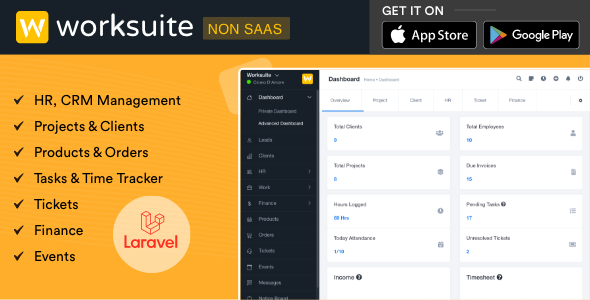
WORKSUITE is a self-hosted business application built on the Laravel PHP framework that combines human resources, customer relationship management and project delivery in a single installation. It gives an organisation one login for handling leads, client projects, invoices, employee attendance, leave requests, support tickets and internal chat, rather than stitching together separate subscriptions for each function. The product is sold on CodeCanyon for $60 and is aimed at small to mid-sized agencies, consultancies and service businesses that want to own their data and their billing stack outright.
The listing carries 4,788 sales and a 4.83 out of 5 rating across 325 reviews, which places it well inside the established tier of CodeCanyon project management tools rather than at the experimental end. It is authored by ajay138 and was last updated in September 2026.
What WORKSUITE Actually Covers
The feature set splits into three overlapping areas, and the value comes from how they share data rather than from any single module.
Client-facing commercial work
Customer and lead records sit at the centre of the CRM side. From a single client profile, a team can raise proposals or estimates, convert them into invoices, track payment against multiple gateways, and issue credit notes when a job needs adjusting. Contracts support e-signature, which removes the print-sign-scan loop from onboarding. A product catalog module lets recurring line items be stored once and reused across quotes, which matters for anyone selling the same handful of services repeatedly.
Project delivery
Projects can be tracked with progress indicators, a Kanban taskboard for day-to-day movement of work, and a Gantt chart for scheduling and dependencies. That combination covers both the visual “what is in progress right now” view and the longer-range planning view. Tasks, files and discussion live against the project, so the delivery record and the billing record reference the same entity instead of being reconciled by hand at month end.
People and internal operations
Employee records include attendance logging and leave tracking, which is the part that most standalone project tools omit entirely. There is a ticket management system for support requests, internal chat for staff, and real-time notifications that can be routed through Slack, Pusher or One Signal. Roles and permissions are configurable, so a freelancer, a project manager and a finance user can be given genuinely different views rather than sharing an admin account. A reporting layer and broad configuration options sit across all of it, and theme settings allow basic visual customisation.
Where It Fits, and Where It Does Not
A digital agency running ten to fifty people is the clearest fit. Such a business typically needs to quote, win, deliver and invoice the same client without re-entering data, and it usually needs to know who is on leave before assigning the next sprint. WORKSUITE covers that loop in one place.
It also suits consultancies and professional services firms that bill by time or by milestone and want the proposal, the contract signature and the invoice to live in the same system. Internal IT or operations teams that handle employee requests through tickets will find the HR and helpdesk modules useful even if they rarely raise an invoice.
It is the wrong choice for a single freelancer. The HR, attendance and role management layers are dead weight when there is one user, and a hosted tool with a monthly fee would cost less in time than maintaining a server and applying updates. It is also a poor fit for product teams doing continuous software delivery. WORKSUITE is built around client engagements, invoices and proposals; it has no repository integration, no CI pipeline hooks and no backlog model aimed at shipping software releases. Teams that live in that world will find the commercial scaffolding irrelevant.
One practical caveat applies to anyone evaluating the demo. The vendor states plainly that some modules visible in the demo must be purchased separately, and that this is indicated within the demo itself. Buyers should confirm which modules are included in the $60 price before committing, because the demo experience is broader than the base licence.
Strengths and Limitations
Strengths
- Genuine consolidation of CRM, HR and project delivery in one Laravel application, so client, project and invoice records share a single database rather than being synchronised between tools.
- E-signature contracts and proposal-to-invoice conversion remove two of the most common manual handoffs in agency administration.
- Attendance and leave tracking are included, which is unusual at this price point and removes the need for a separate HR tool.
- Configurable roles and permissions allow differentiated access for staff, clients and administrators.
- Notification routing through Slack, Pusher and One Signal means alerts reach people where they already work.
- Source files are included and the stack is standard PHP and Laravel, so an in-house developer can extend it.
- A 4.83 rating across 325 reviews is a substantial sample, not a handful of early adopters.
Limitations
- Self-hosting is mandatory. There is no managed cloud option, so the buyer is responsible for servers, backups, SSL, PHP version upgrades and security patching. The vendor recommends DigitalOcean and Hostinger and offers a $20 installation service, which signals that setup is not trivial for non-technical buyers.
- Some modules shown in the demo require separate purchase. The base price does not necessarily deliver everything a buyer sees during evaluation.
- The listing does not state limits on licence usage, the number of permitted installations, or the length of the included support and update period. Those terms need checking on the item page before purchase.
- No mobile application is mentioned. Access is browser-based across Firefox, Safari, Opera and Chrome, so field staff depend on a responsive web interface rather than a native app.
- Requires PHP 8.x. Hosts still running older PHP versions will need to upgrade before installation, which can break other sites on the same server.
- No high-resolution assets are supplied, which matters if the installation is being white-labelled for clients.
How It Compares With the Wider Category
Buyers researching this space generally choose between three approaches: per-seat SaaS subscriptions, open-source self-hosted suites, and commercial CodeCanyon scripts like this one.
SaaS tools win on zero maintenance. There is no server to patch, updates arrive automatically, and mobile apps are usually included. The trade-off is cumulative cost and data residency. Once a team passes roughly a dozen users, annual subscription spend for a comparable CRM plus project plus HR stack will exceed the one-off licence fee here, and the data sits on someone else’s infrastructure.
Open-source self-hosted suites avoid the licence fee entirely but typically require developer time to configure, and the modules are often maintained by separate communities with inconsistent interfaces. The appeal of a commercial script is that the modules were designed to work together and there is a single vendor accountable for updates.
Against other CodeCanyon business scripts, the differentiator is breadth. Many items in this category do project management well or CRM well; fewer attempt HR, helpdesk, chat and billing in the same codebase. That breadth is also the main risk, since a wider surface area means more to configure and more to keep updated. Buyers who only need task tracking are paying for modules they will never open.
Frequently Asked Questions
Does WORKSUITE require coding knowledge to install?
No, but it does require server administration rather than coding. The vendor offers an installation service for $20 and publishes a server requirements checker, which suggests the setup process is the main hurdle. Buyers comfortable with cPanel or a cloud host dashboard can handle it; those who have never configured a database should budget for the paid install.
Is everything shown in the WORKSUITE demo included in the purchase?
No. The vendor states that some modules displayed in the demo must be purchased separately and that this is labelled within the demo. This is the single most important thing to verify before buying, because the demo presents a fuller product than the base licence delivers. Check the item page for the current module list.
Can WORKSUITE replace separate CRM, HR and invoicing subscriptions?
For a small agency or consultancy, largely yes. Client records, proposals, e-signature contracts, invoices, credit notes and payment gateways are covered, alongside employee attendance, leave tracking and support tickets. The main gaps are payroll processing and accounting-grade financial reporting, which most businesses still handle in dedicated software.
What happens to WORKSUITE when the vendor stops updating it?
Because source files are included, the installation keeps running and can be maintained independently. The stack is standard Laravel with PHP, JavaScript, HTML and CSS, so any competent PHP developer can take it over. The vendor does not state a support or update period on the listing, so buyers should confirm the current terms before relying on ongoing releases.
Verdict
WORKSUITE is a sensible purchase for an agency, consultancy or service business with enough staff to justify HR tracking and enough client turnover to justify integrated billing. The combination of e-signature contracts, proposal-to-invoice flow and attendance management in one Laravel codebase is difficult to match at a $60 one-off price, and the 4.83 rating from 325 buyers suggests it delivers on that promise in practice.
It is not the right product for solo freelancers, product engineering teams, or anyone unwilling to manage a server. Those buyers will get better value from a hosted subscription with no maintenance burden.
The decisive step before purchase is confirming which demo modules are included and what support period applies, since the listing does not state either clearly.