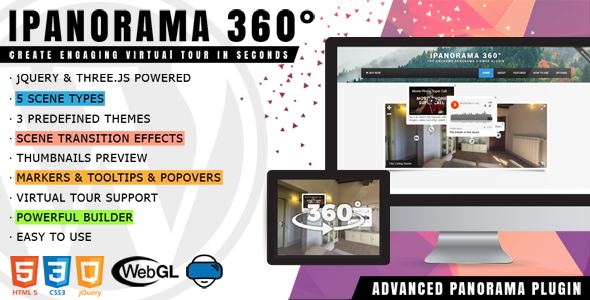
iPanorama 360° Media is a WordPress plugin that builds interactive virtual tours from panoramic photographs, without requiring any programming knowledge. It ships with a visual builder for placing scenes, hotspots and information windows, and it is aimed at agencies, photographers, real estate marketers and site owners who need to publish navigable 360-degree walkthroughs inside an existing WordPress installation. The plugin is sold on CodeCanyon by the developer Avirtum for $39, and it has accumulated 4,348 sales and a 4.86 out of 5 rating across 166 reviews.
What the plugin actually does with panoramic imagery
The core workflow is straightforward. Panoramic images are uploaded to the WordPress media library, a scene is created from each one, and the builder places markers on the image that link scenes together. Clicking a marker moves the visitor to the next scene, which is what turns a set of separate photographs into a continuous tour.
Five scene types are supported: sphere, cube, little planet, flat and Google Street View. The distinction matters because not every panorama is a full equirectangular capture. A flat scene suits a wide architectural elevation or a scanned artwork, while a little planet rendering produces the distinctive curled-planet projection that works well as a landing visual. Cube scenes are the traditional format for six-face panoramas. Google Street View scenes let a tour pull in existing Street View coverage rather than requiring original photography.
Markers are the navigation layer. Each one can carry a tooltip, which appears on hover or on enter, and a popover, which opens a larger panel that behaves like a lightbox. Both tooltips and popovers accept text, images, video and other embedded media, so a marker on a doorway can open a video walkthrough of the room behind it. The vendor supplies more than 50 show and hide animations for each, and more than 20 scene transition effects including zoom, fade and swirl, plus a Perlin noise transition. A separate marker style creator allows custom marker graphics rather than the stock set.
Beyond navigation, the plugin covers the presentation details that separate a polished tour from a bare one. Thumbnails give visitors a quick visual index of every scene. A preview image can be assigned to a scene before it finishes loading. Fullscreen toggling, mouse wheel zoom, arrow-key navigation and an optional compass are all available. Touch input and device gyroscope support mean mobile visitors can pan by moving the phone rather than dragging. Scenes can autorotate, and background audio can be attached, including a streaming radio URL.
Two predefined themes, light and dark, are included. Tours can be embedded on other sites through an iframe, exported and imported as a configuration file for backup or migration between installations, and controlled through an API exposing more than 45 options. Gutenberg block support was added in version 1.6.19, so tours can be placed through the block editor as well as shortcodes. Three widget layouts are demonstrated by the vendor: Modern, Civic and List.
Where a WordPress virtual tour plugin fits, and where it does not
The strongest fit is an organisation that already runs WordPress and wants 360-degree content on its own domain. Hotels showing rooms and grounds, universities presenting campuses, museums offering gallery walkthroughs, real estate agents handling multiple listings, and restaurants previewing a dining room all match the feature set. Photographers who shoot panoramas commercially can deliver a finished, self-hosted tour rather than handing over a file or paying a monthly hosting platform.
Agencies building client sites benefit from the export and import of tour configurations, since a layout can be assembled once and reused. The shortcode and Gutenberg block options mean a tour can be dropped into a page, post or widget area without touching theme templates.
There are situations where this is the wrong tool. A project that needs a single, simple 360-degree image with no navigation between scenes does not need a tour builder; a lightweight panorama viewer will load faster and cost less. Anyone who needs a hosted tour platform with built-in analytics, lead capture and a public gallery for discovery should look at a dedicated service instead, because iPanorama 360° Media is a self-hosted plugin and the vendor does not state that it provides those features. Teams without a WordPress site, or those who cannot manage plugin updates and hosting, should also look elsewhere.
Strengths and limitations
Strengths
- Five scene types cover the common panorama formats, including flat images and Google Street View, rather than assuming every input is a sphere.
- Navigation is genuinely interactive: markers link scenes, and tooltips and popovers carry rich media without leaving the tour.
- Deep customisation of animation, marker appearance and transitions, with 50-plus tooltip and popover animations and 20-plus scene transitions.
- Mobile handling is taken seriously, with touch navigation, gyroscope support and a responsive layout.
- Export and import of tour configuration makes backup, staging and reuse practical.
- Broad WordPress compatibility, listed from 4.9.x through 6.9.x, and the plugin has been maintained consistently, with the most recent update dated 21 April 2025.
- Strong buyer feedback: 4.86 out of 5 from 166 reviews is a high average for a CodeCanyon item at this price.
Limitations
- The change log shows a run of security fixes over several releases, including SQL injection issues patched in versions 1.8.0 and 1.8.1, and a cross-site scripting fix in 1.6.30. That is a sign of active maintenance, but it also means older, unpatched installations carry real risk and the plugin should be kept current.
- Source files are provided as JavaScript, HTML, CSS, LESS and PHP, but the vendor lists high-resolution as “No,” so assets are not supplied in a high-DPI variant.
- Only two predefined themes ship with the plugin. Sites needing a bespoke visual identity will spend time in the marker style creator and the API rather than picking from a large theme library.
- There is no stated limit on tour size, but large panoramas are heavy files. Performance depends on the hosting setup and on how the images are prepared, and the plugin cannot compensate for oversized source images.
- Support is listed as help via email only. There is no indication of a community forum or documentation portal beyond that channel.
How it compares with the wider category of tour tools
Virtual tour options fall into three rough groups: hosted SaaS platforms, standalone JavaScript panorama libraries, and WordPress plugins. Hosted platforms usually bundle analytics, lead forms and public tour galleries, and they charge recurring fees. They are easier to start with but the content lives on someone else’s domain and the cost never stops.
Standalone libraries such as the Three.js foundation this plugin is built on give developers total control, but they require writing the viewer, the marker system, the editor and the WordPress integration from scratch. That is a substantial project, and it is the work this plugin removes.
Within the WordPress plugin group, the differentiators are scene type coverage, the depth of the marker and popover system, and how the editing experience feels. iPanorama 360° Media is strong on the first two. It supports five scene types where many alternatives handle only spherical panoramas, and the tooltip, popover and animation options are unusually extensive. It also carries Gutenberg support, which some older competitors in this category still lack. The trade-off is that a self-hosted plugin puts responsibility for updates, backups and security patching on the site owner, which is exactly the burden a hosted service absorbs.
Frequently Asked Questions
Does iPanorama 360° Media require coding to build a tour?
No. The plugin includes a visual builder where panoramas are uploaded, scenes are created and markers are positioned by pointing and clicking. Shortcodes and a Gutenberg block handle placement on the page. Developers who want finer control can use the API, which exposes more than 45 options, but that is optional rather than required.
What image formats work as a panorama scene?
The plugin works with standard panoramic image files, and the vendor does not publish a restricted format list. What matters more is the projection of the source image matching the scene type. A full equirectangular capture suits a sphere scene, six-face cube images suit a cube scene, and a wide flat image suits the flat type.
Can a tour be moved to a different WordPress site?
Yes. The export and import configuration feature saves a tour to a file that can be loaded into another installation. This is useful for staging environments, client handovers and rebuilding a tour after a site migration. The panorama images themselves live in the media library, so those transfer with the site as normal.
Is the plugin compatible with the latest WordPress versions?
The vendor lists compatibility from WordPress 4.9.x through 6.9.x, which covers a wide range of current and older installations. The most recent update was released on 21 April 2025, so the plugin is being maintained against recent WordPress releases. As with any plugin, testing on a staging site before updating is sensible.
Verdict
iPanorama 360° Media is a well-established choice for anyone who needs self-hosted virtual tours inside WordPress. The scene type coverage, the marker and popover system, and the animation depth put it ahead of simpler panorama viewers, and a 4.86 rating across 166 reviews suggests buyers are satisfied with what they receive for $39. It suits photographers, agencies, hotels, campuses and real estate marketers who want the tour on their own domain and are prepared to keep the plugin updated.
It is not the right purchase for someone who wants a single static 360-degree image, or who would rather pay a monthly fee to avoid managing hosting, updates and security patches. Buyers who need built-in analytics, lead capture or a public tour directory should confirm those features exist before purchasing, because the vendor does not state that they do.