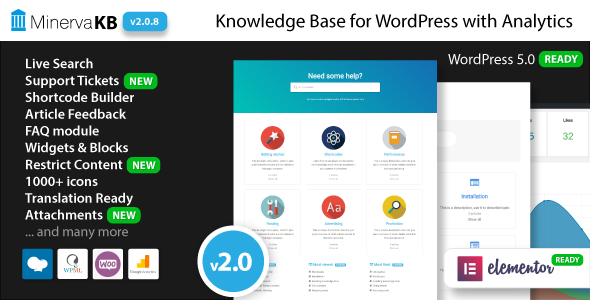
MinervaKB Knowledge Base for WordPress with Analytics is a self-hosted documentation and support plugin that adds a searchable knowledge base, a ticketing system and usage analytics to an existing WordPress site. It is aimed at software vendors, agencies and service businesses that want customer-facing help content on their own domain rather than on a third-party help desk. The plugin sells on CodeCanyon for $69 and has been purchased 2,582 times, with an average rating of 4.84 from 107 reviews.
What the plugin actually does
The core of the product is a structured content layer. Topics and articles behave like a custom post type with nested categories, so a documentation tree can be several levels deep without turning into a flat blog archive. Both topics and articles can be reordered by drag and drop, which matters more than it sounds: documentation hierarchies usually need manual curation rather than reverse-chronological sorting.
Search is the feature most knowledge base plugins live or die by, and MinervaKB implements it as an Ajax live search, meaning results update as the visitor types without a page reload. Search runs across articles and topic pages, supports tag-based lookups, and has multiple visual themes. The vendor also exposes search analytics, which records the queries visitors typed and the results they were shown. That is the single most useful diagnostic in the plugin: a report of searches that returned nothing tells a site owner exactly which documentation gaps to fill next.
The analytics dashboard extends beyond search. It tracks article views, likes and dislikes, and presents them as weekly and monthly graphs. Individual counts can be hidden or shown per element with custom icons, so a site that does not want public dislike counts can suppress them without disabling the underlying tracking.
Several features push the plugin past a pure documentation tool:
- Support tickets. A built-in ticketing system with guest and registered-user tickets, separate agent and manager roles, and email notifications on new tickets. Ticket events also expose WordPress actions and filters, so developers can hook into creation, replies and closures.
- Content restriction. Articles can be limited by user role, with a login prompt and teaser shown to visitors who are not signed in. This suits premium support documentation that only paying customers should read.
- Frontend submission. Guest posting and frontend article submission let contributors add content without accessing the WordPress admin.
- FAQ and glossary modules. A filterable FAQ module with categories and an instant filter, plus glossary tooltips that explain terminology inline inside articles.
- Feature requests. A dedicated module with permissions, categories, drag-and-drop sorting, a public submission form and email notification on new requests.
- WooCommerce integration. A knowledge base tab appears when editing products, connecting documentation to specific items in a store catalogue.
Presentation and layout are handled with more care than most plugins in this bracket. There is a home page box or list layout in two, three or four columns, a dynamic table of contents inside articles, breadcrumbs on topic and article pages, estimated reading time, article attachments, software version labels, over 600 icons for topics and articles, and tip, info and warning shortcodes for callouts. Multiple sidebars can be assigned per page type, and the plugin ships with its own templates while also allowing a switch to the active theme’s templates or template overrides from a child theme.
Editor and builder support covers the Block Editor, Elementor and Elementor Pro, WPBakery Page Builder and WPML for multilingual sites. A shortcode builder generates the markup for topics, articles and search, and a one-click demo import is included for evaluation. Source files for JavaScript, CSS and PHP ship with the purchase. RTL support and a thousand-plus Google Fonts with configurable loading round out the front-end options.
Where it fits, and where it does not
The strongest fit is a WordPress-based software or SaaS business that already sells through its own site. Documentation, FAQs, feature requests and support tickets all live under one roof, styled to match the brand, with no per-agent monthly fee. A WooCommerce store selling physical or digital goods is a close second, because product-specific documentation can be attached directly to product pages.
Agencies building client sites benefit from the role-based content restriction and the ticket roles. Handing a client a documentation portal with a manager account is a cleaner arrangement than granting administrator access to a general-purpose plugin. Freelancers maintaining documentation for several clients can reuse the same licence on a single site and lean on the template override system to keep each build visually distinct.
The plugin is the wrong choice for a team that needs a multi-channel help desk. There is no email piping, no SLA tracking, no live chat and no social channel integration. Organisations already committed to a hosted support platform will find the ticketing module redundant. It is also a poor fit for anyone who needs active vendor support right now: the developer states plainly in the listing that they have joined the military and will not be providing support in the near future. The plugin was tested against recent WordPress versions, but buyers should treat this as a purchase of existing code rather than an ongoing relationship.
Strengths and limitations
Strengths
- Search analytics that record both the query and the results shown, which turns documentation maintenance into a data-driven task rather than guesswork.
- Documentation, FAQ, glossary, feature requests and ticketing in one plugin, avoiding the cost and styling conflicts of stacking several single-purpose plugins.
- Genuinely broad builder support across Gutenberg, Elementor, Elementor Pro and WPBakery, with WPML readiness for multilingual deployments.
- Template override support means a developer can restyle output from a child theme without editing plugin files and losing changes on update.
- Role-based content restriction with teasers is uncommon at this price point and useful for gated customer documentation.
- Strong reception on the marketplace: 4.84 out of 5 across 107 reviews and more than 2,500 sales.
Limitations
- No vendor support for the foreseeable future. The developer has stated this explicitly, so bug fixes and compatibility patches cannot be relied upon.
- The last listed update was February 2023. WordPress moves quickly, and while the plugin reportedly works with recent versions, there is no guarantee of compatibility with future releases or with newer versions of Elementor, WPBakery or WooCommerce.
- Ticket notifications are limited to email. There is no Slack, Teams or webhook delivery out of the box, so routing alerts into a team chat requires custom development against the available action hooks.
- The analytics are first-party and stored in the WordPress database. There is Google Analytics integration, but no export, scheduled reporting or dashboard sharing, so reporting means logging into WordPress.
- Search is keyword-based. The listing makes no claim of fuzzy matching, synonyms or typo tolerance, which matters for public-facing documentation where visitors misspell product terms.
- The feature roadmap in the listing is aspirational. Items such as code highlight shortcodes and an external site widget are marked as planned, not delivered.
How it compares with the wider category
Knowledge base plugins generally fall into two groups: lightweight content organisers that add a documentation post type and search, and full support suites that bundle ticketing and reporting. MinervaKB sits in the second group, and its closest competitors are either hosted platforms billed monthly per agent or premium plugins that charge separately for a FAQ module, a glossary and a ticket system.
Against hosted platforms, the trade-off is control versus convenience. MinervaKB keeps all data on the buyer’s own server, has no recurring fee and no per-seat pricing, but it also has no vendor team maintaining it. Against lighter WordPress documentation plugins, it wins on breadth: the analytics, ticketing, feature requests and glossary are usually separate purchases or missing entirely. Against a general-purpose help desk plugin, it loses on workflow depth but wins on front-end presentation and on tight integration with the site’s theme and page builder.
The practical comparison point is maintenance appetite. A buyer who wants a set-and-forget tool with a support contract should look at hosted options. A buyer who wants a one-time purchase, is comfortable with PHP and CSS, and accepts that they may need to patch compatibility issues themselves will get considerably more functionality per dollar here.
Frequently Asked Questions
Does MinervaKB still receive updates and support?
No. The developer, KonstruktStudio, states in the product listing that they have joined the military and will not provide support in the near future. The most recent changelog entry is dated February 2023. The plugin was tested against a recent WordPress release and is expected to work, but buyers should plan on self-support.
Can MinervaKB replace a help desk like Zendesk or Freshdesk?
Only partially. It handles documentation, FAQs, feature requests and basic ticketing with agent and manager roles, which covers internal and small-scale customer support. It does not offer email piping, SLA tracking, live chat, social channel integration or multi-brand reporting, so larger support teams will still need a dedicated platform alongside it.
Does the plugin work with Elementor and WooCommerce?
Yes. MinervaKB ships dedicated Elementor widgets and WPBakery elements, is optimised for the Gutenberg block editor, and integrates with WooCommerce by adding a knowledge base tab when editing products. The vendor lists compatibility with WooCommerce 5.x through 7.x and WordPress 4.9 through 6.1, so very recent versions of either are untested.
What kind of analytics does it collect?
Two kinds. The dashboard reports article views, likes and dislikes as weekly and monthly graphs. Search analytics record what visitors typed and which results they received, which reveals content gaps. Data is stored in the WordPress database, and Google Analytics can be connected for additional tracking. There is no built-in export or scheduled email reporting.
Verdict
MinervaKB is a well-built, feature-dense documentation plugin that has earned its 4.84 rating across more than a hundred reviews, and at $69 it undercuts the cost of assembling the same functionality from separate FAQ, glossary and ticketing plugins. The combination of search analytics, role-based content restriction and multi-builder support is genuinely useful for WordPress-based software vendors, agencies and WooCommerce stores.
The decision hinges on one fact. The developer has stepped away from support indefinitely and the last update was in early 2023, so this is a purchase of working code as it stands, not a subscription to ongoing maintenance. Buyers who are comfortable with PHP, CSS and template overrides, and who treat the plugin as a foundation to maintain themselves, will get strong value. Buyers who need guaranteed compatibility with future WordPress releases, prompt bug fixes or a support contract should choose a maintained alternative or a hosted platform instead.