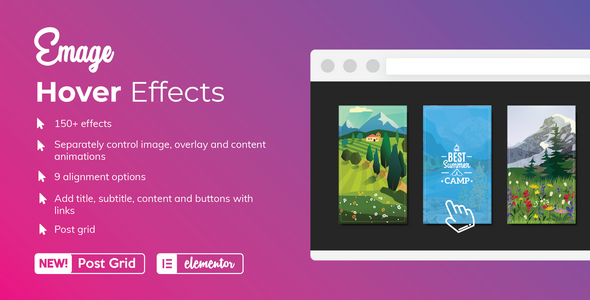
Emage is an Elementor add-on that adds animated hover effects to images, overlays and content blocks on WordPress sites. It ships with more than 150 individual effects that can be layered and combined, plus a separate post grid widget for building magazine-style article listings. It is aimed at designers, freelancers and agencies who want motion-led visuals without writing CSS or JavaScript by hand.
The plugin comes from Blocksera, the developer behind several Elementor extensions on CodeCanyon, and it has been downloaded 2,444 times with a 4.95 out of 5 rating across 19 reviews. At $16 for a single licence, Emage Add-ons sits in the impulse-purchase tier of the marketplace, which makes the question less about budget and more about whether its particular approach to hover animation matches the way a project is actually built.
What Emage Add-ons actually does well
The core of the plugin is a single Elementor widget that behaves more like a small layout tool than a preset picker. Most hover plugins hand over a fixed menu of finished effects: pick one, apply it, move on. Emage instead splits the animation into three independent layers — the image itself, the overlay that sits on top of it, and the content block containing text, buttons or links. Each layer accepts its own effect, its own timing and its own alignment, and the combinations multiply from there. That separation is the real feature, because it means a designer can keep the image still while the overlay slides in from the left and the caption fades up from below, rather than accepting whatever the preset decided.
Content editing happens inside the widget rather than in a separate settings panel. Headings, body copy, buttons and links are all added through standard Elementor controls, which means colours, typography, spacing and borders follow the site’s global styles if those have been configured. There are nine alignment options for positioning that content, covering the usual corners, edges and centre positions. For teams already using a design system in Elementor, this is the difference between an effect that looks bolted on and one that looks native.
The Post Grid widget is the second half of the offer and arguably the more interesting one for content sites. It pulls posts dynamically and applies the same hover treatment to each item in the grid, with toggles for title, post meta, author, comment count, excerpt and category tags. Images in the grid are equalised in height automatically, so rows stay flush without manual cropping. Elementor’s own column controls handle the responsive breakpoints, which keeps the grid consistent with the rest of the page rather than introducing a second layout system.
On the technical side, the plugin declares compatibility with WordPress 4.9 through 6.9 and with both the free and Pro versions of Elementor. It lists support for Chrome, Firefox, Safari, Edge, Opera and IE11, and ships with layered PNG source files alongside the JavaScript, CSS and PHP, which matters if a project needs custom iconography in the same visual language. High-resolution output is supported, so effects stay sharp on retina displays.
Where this fits, and where it does not
The strongest use case is a marketing or portfolio site where imagery carries the message. Agency landing pages, photography portfolios, restaurant menus, product category tiles and team pages all benefit from a hover layer that reveals a secondary piece of information — a price, a job title, a short description — without adding permanent clutter to the page.
Content publishers get a second, distinct use case from the Post Grid. A magazine-style homepage or a category archive built in Elementor can pull recent articles into a grid and animate each card on hover, which adds perceived polish without a page builder theme or a dedicated blog plugin.
Freelancers building client sites on a fixed scope will find the licence economics straightforward: one $16 purchase, applied to a single project, with the visual result visible in the editor rather than in code review. Agencies maintaining many client sites should note that the price listed here covers a single licence; the vendor’s marketplace page is the place to confirm terms for multiple installations, since the source data does not state them.
There are situations where Emage is the wrong pick. If a site’s design language is deliberately flat and static — a documentation portal, a SaaS dashboard, a text-heavy news site where animation would read as noise — the plugin adds weight without adding value, and a lighter image widget would be the better choice. It is also a poor fit for anyone who needs block editor support outside Elementor: the vendor explicitly marks the plugin as not Gutenberg-optimised, so a site built with native WordPress blocks rather than Elementor gets nothing from it. Finally, anyone who needs hover effects on non-image elements such as pricing tables, icon boxes or form fields should check the demo first, because the widget is built around images and post grids rather than a general-purpose animation layer.
Strengths and limitations
Strengths
- Layered control over image, overlay and content means effect combinations run far beyond the headline count of 150.
- Content is edited with standard Elementor controls, so global typography and colour settings carry through.
- The Post Grid widget extends the same hover treatment to dynamic content, which most single-purpose hover plugins do not attempt.
- Broad WordPress version support, from 4.9 through 6.9, reduces friction on older client sites that cannot be updated.
- Layered PNG source files are included, which is unusual at this price point and useful for matching custom graphics.
- Nineteen reviews averaging 4.95 suggests buyers are broadly satisfied, though the sample is small.
Limitations
- Everything depends on Elementor. There is no shortcode, no block and no standalone fallback, so the effects disappear if a site ever migrates away from the builder.
- The vendor marks the plugin as not Gutenberg-optimised, which rules it out for mixed-editor workflows.
- IE11 support is listed, but that browser is end-of-life, and the claim says nothing about how the effects degrade on very old mobile browsers.
- Nineteen reviews is a thin base for a 4.95 rating. The score is encouraging but not statistically strong.
- The source data does not state whether updates and support are included for a defined period, which is worth confirming before purchase.
- Animation-heavy hover effects can hurt perceived performance on image-dense pages if assets are not optimised separately.
How it compares with the wider category
Hover effect plugins for Elementor generally fall into two groups. The first is the preset library: dozens of finished animations, applied with one click, with limited control beyond speed and colour. These are fast to use and predictable, but two sites using the same plugin tend to look related. The second group is the layer-based approach, where the animation is assembled from parts. Emage belongs firmly to the second group, and that is its main differentiator.
The trade-off is time. A preset library gets a page finished in minutes; a layered tool asks the designer to think about which element moves, in what direction, and in what order. For a one-off landing page that difference may not be worth it. For an agency producing several sites a year, or a publisher who wants a recognisable house style across a grid, the extra control pays back.
Against the general run of image-focused add-ons, Emage also covers more ground by including dynamic post grids in the same package. Buyers weighing a dedicated blog grid plugin against a hover plugin usually have to choose one; here the two overlap, which simplifies the plugin stack even if neither half is the deepest option available in its own category.
Frequently Asked Questions
Does Emage work with the free version of Elementor?
Yes. The vendor lists compatibility with both Elementor and Elementor Pro, so the plugin functions on the free builder. Some Elementor Pro features, such as theme builder templates and dynamic tag controls, will not be available in the editor, but the hover effects and the Post Grid widget themselves do not require the paid version.
Can Emage apply hover effects to blog posts automatically?
Yes, through the included Post Grid widget. It pulls posts dynamically and applies the hover treatment to each card, with optional display of title, post meta, author, comment count, excerpt and category tags. Images within the grid are equalised in height so rows align cleanly without manual cropping.
Is Emage compatible with the WordPress block editor?
No. The vendor explicitly marks the plugin as not Gutenberg-optimised. All functionality is delivered through Elementor widgets, so a site built primarily with native WordPress blocks will not be able to use the effects. The plugin is intended for Elementor-built pages from the outset.
What is included in the download besides the plugin files?
The package includes JavaScript, CSS and PHP files, plus layered PNG source files for the graphics. The vendor does not state in the listing whether documentation is bundled or hosted separately, though a demo site is available for previewing every effect before purchase.
Verdict
Emage Add-ons is a sensible purchase for Elementor users who treat hover animation as a design decision rather than a decoration. The layer-based model rewards anyone willing to spend a little time tuning direction, timing and alignment, and the bundled Post Grid widget gives content-driven sites a reason to choose it over a narrower hover plugin. The 4.95 rating and 2,444 sales point to a product that does what it claims, even if the review count is small.
It is the wrong choice for sites not built in Elementor, for anyone who needs block editor support, and for projects where a static, restrained visual style is the point. Buyers in those categories will find the plugin adds weight without benefit. For everyone else, $16 buys a flexible tool that stays out of the way once the effects are configured.