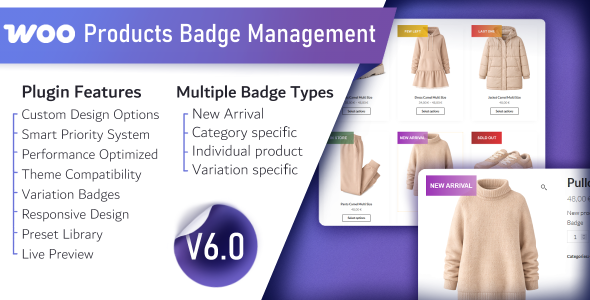
WooCommerce Products Badge Management is a WordPress plugin that adds a rule-based badge system to a WooCommerce store, letting a shop owner attach labels such as “New Arrival”, category promotions or product-specific callouts to catalogue items without editing theme templates. It is built for store owners, freelancers and agencies who want visual merchandising control from the WordPress dashboard rather than through custom CSS or a page builder. The plugin is sold on CodeCanyon for $21 and has been developed by Gema75.
The core idea behind WooCommerce Products Badge Management eCommerce use is straightforward: instead of hard-coding a “Sale” or “New” ribbon into a product image template, the store owner defines badge rules once and the plugin decides which label appears on which product, and in what order of precedence. That makes it a merchandising tool as much as a design one, and it is the reason the plugin has attracted a meaningful install base rather than being a one-off snippet.
What the plugin actually does: badge types, design controls and a priority engine
The feature set splits into three areas that matter to a store owner: where badges come from, how they look, and which one wins when several could apply.
Five sources of badges, from global rules to individual products
Badges can be generated automatically or assigned by hand. A global badge applies store-wide as a fallback. Category badges fire based on the product’s assigned categories, which is useful for seasonal campaigns where an entire department needs a label. Product badges are attached manually to specific items, and new arrival badges are driven by a configurable day threshold, so anything published within that window is flagged without further work. Variation badges sit at the top of the stack and let a specific size, colour or configuration carry its own label. Between them, these cover most of the labelling scenarios a typical catalogue needs.
A drag-to-position live preview
Design is handled through a preview panel rather than a settings form alone. The vendor states that changes to text, colour, padding, margins, border radius and opacity render in real time, and the badge can be dragged into position on the product image. Custom image upload is also supported for stores that want a graphic badge rather than a text one. For anyone who has spent an afternoon tweaking CSS values and refreshing a product page to check the result, an in-dashboard preview is the single most practical part of the plugin.
A preset library of SVG badges
The plugin ships with more than 33 pre-designed SVG badges, grouped by type. SVG (scalable vector graphics) means the badge artwork stays sharp at any size and on high-density screens, which matters because product images are often displayed at several dimensions across a catalogue, a category archive and a mobile view. The presets give a store a usable starting point without design work; the custom controls take over when a brand needs something specific.
A priority system that resolves conflicts
Only one badge is shown per product at a time, and the plugin ranks the candidates. Variation badges outrank everything, followed by new arrival, then product-specific, then category, then global. This is a sensible ordering: the most specific rule wins, and the broadest rule acts as a default. The trade-off is that stacking two badges on one product is not what the plugin is designed to do, which is covered in more detail below.
Performance and compatibility claims
The vendor describes a built-in caching layer and minimal database queries, and states the plugin is optimised for block themes. Compatibility is declared for WordPress 4.9 through 6.9 and WooCommerce 5.x through 9.x, with source files in PHP, JavaScript and CSS included. That is an unusually wide version range for a plugin still receiving updates, and the most recent vendor update is dated March 2026. The vendor does not publish query counts or load-time benchmarks, so the performance claim should be treated as a design intention rather than a measured figure.
Where this plugin fits, and where it does not
The clearest fit is a store with a large or frequently changing catalogue where manual labelling does not scale. A clothing retailer that wants every product published in the last 21 days flagged automatically, plus a “Summer” badge across one category and a “Limited” badge on a handful of hero items, can express all of that as rules and let the plugin handle the rest. Agencies building client stores benefit too: badge rules live in the dashboard, so a non-technical client can adjust the new-arrival window or swap a campaign badge without touching code.
It also suits stores running a block-based theme where the product image markup is generated by the block editor rather than a classic template. Because badges are injected by the plugin rather than baked into a theme file, switching themes does not wipe out the merchandising setup.
The wrong choice is a store that needs several badges visible on the same product simultaneously — for example a “New” ribbon in the corner and a “Best Seller” strip across the bottom. The priority system is explicitly single-badge, so that requirement would need a different approach or custom development. Stores whose badge design is already handled by their theme or page builder should also check for overlap before buying, since two systems competing over the same image container can produce doubled or misplaced labels.
Strengths and limitations in plain terms
Strengths
- Rule-based automation reduces ongoing labour. New arrival badges and category badges update themselves as the catalogue changes, so seasonal labelling does not become a manual checklist.
- The priority order is logical and documented. Specific rules beat general ones, which is what most store owners would expect and removes guesswork about which label appears.
- Design work happens in the dashboard. Live preview and drag positioning mean a badge can be placed and styled without a developer or a CSS edit.
- SVG presets keep badges sharp. Vector artwork holds up across image sizes and high-density displays.
- Broad version support and active maintenance. Declared compatibility spans WordPress 4.9 to 6.9 and WooCommerce 5.x to 9.x, with a recent update date, which reduces the risk of buying into an abandoned script.
- Source files are included. PHP, JavaScript and CSS are shipped, so an agency can extend behaviour if a client needs something outside the built-in rules.
Limitations
- One badge per product. The priority engine resolves conflicts by choosing a winner rather than displaying multiple labels, which rules out layered badge designs.
- Rating sits in the middle of the range. A 4.13 average from 134 reviews suggests a solid but not frictionless experience; buyers should read recent reviews for specifics rather than assuming a flawless install.
- Performance claims are unverified. Caching and query optimisation are described but not quantified, so stores with very large catalogues should test on a staging copy before rolling out.
- Design controls are badge-level, not per-device. The vendor lists text, colour, spacing, radius and opacity options, but does not state that badge position or size can be set differently for mobile and desktop.
- CodeCanyon delivery model. Support and updates are tied to the item licence and any included support period, which is a different arrangement from a standalone plugin with its own subscription.
How it compares with the wider badge plugin category
Badge plugins on WordPress generally fall into three groups. The first is the lightweight snippet or single-purpose plugin that adds a “Sale” or “New” flag with a couple of colour settings — cheap or free, but with no category logic, no priority handling and no preview. The second is the all-in-one product label tool that bundles badges with ribbons, countdown timers and stock urgency messages; broader, but often heavier and more opinionated about how the product card should look.
This plugin sits between those poles. It is narrower than an all-in-one merchandising suite — there are no countdown timers or stock-urgency messages in the declared feature set — but considerably more capable than a snippet, because of the five-tier rule system and the design preview. Compared with building badges into a child theme, it trades a small amount of layout freedom for the ability to change badges without a deploy, which is usually the right trade for a store that runs promotions regularly.
The honest positioning is this: if a store needs exactly one well-designed badge per product, chosen by rules, this is a well-matched tool at a low one-off price. If it needs a full promotional overlay system, a broader plugin is the better comparison.
Frequently Asked Questions
Can WooCommerce Products Badge Management show more than one badge on a product?
No. The plugin displays a single badge per product and uses a priority order to decide which one appears. Variation badges take precedence, then new arrival, product-specific, category and finally global badges. Stores that need two labels visible at once on the same product would need a different plugin or custom template work.
Does it work with block themes and the WordPress block editor?
Yes. The vendor lists the plugin as Gutenberg optimised and states it is optimised for block themes, which means badges are added by the plugin rather than requiring edits to theme template files. Declared compatibility runs from WordPress 4.9 to 6.9, so both classic and block-based setups are covered.
How does the new arrival badge decide which products to flag?
It uses a configurable day threshold. Any product published within the number of days set in the plugin settings receives the new arrival badge automatically, and it drops off once the product ages past that window. This removes the need to manually add and remove badges as the catalogue turns over.
Is it safe to use on a large WooCommerce store?
The vendor states the plugin includes a caching system and is written to keep database queries low, but no query counts or load benchmarks are published. On a large catalogue, the sensible approach is to install it on a staging copy, measure page performance, and only then deploy to the live store.
Verdict
WooCommerce Products Badge Management is a good buy for store owners and agencies who want rule-driven product labels — new arrivals, category campaigns, individual product callouts — managed from the WordPress dashboard with a live design preview. The 1,837 sales and 4.13 rating from 134 reviews indicate a product with a real user base and a broadly positive but not universally smooth reception. It is the wrong purchase for stores that need multiple badges stacked on one product, or that already have badge styling deeply wired into a theme or page builder. At $21 as a one-off CodeCanyon purchase, the risk is low and the time saved on manual labelling is the main return. Buyers should verify the single-badge constraint against their design brief before committing.