Advance Post Grid/List with custom filtering for Visual Composer is a WordPress add-on that turns any post query into a filterable grid or list layout inside the Visual Composer page builder. It pulls from standard posts, pages, custom post types and WooCommerce products, then renders them with front-end filters, sort controls and an Ajax switch between grid and list views. It suits site owners already committed to Visual Composer who want archive-style browsing without hand-coding a loop or buying a separate filtering plugin.
What the plugin actually does
The core of the product is a single Visual Composer element that queries content and outputs it as a styled collection. Everything is configured through the builder’s own interface, so no template files need editing.
Query building from the element panel
The query controls are the most useful part. A site owner can choose the data source — posts, pages, or any registered custom post type — then narrow the results by category, tag, custom taxonomy, author, or an explicit list of individual post IDs. Post count accepts a number or the word “All”, and sorting follows the standard WordPress orderby parameters. Because it reads custom taxonomies, the element works with content structures created by plugins rather than only the two taxonomies WordPress ships with.
Filtering and sorting on the front end
Filters can be switched on independently of sorting. When enabled, visitors see a control bar built from whatever taxonomy terms the vendor has assigned, and can reorder results without a page reload. The filter and order controls are separate toggles, so a site can offer one, both, or neither. This is the feature that separates the product from a plain post grid: browsing becomes interactive rather than a static list of links.
Grid and list presentation
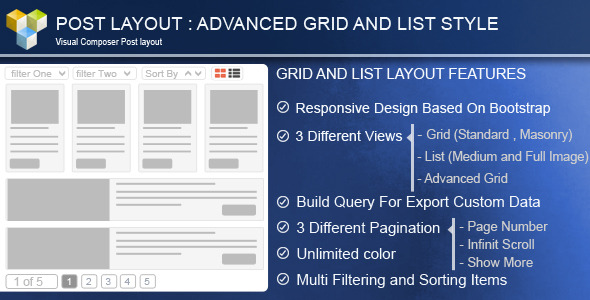
Two layout families are available. Grid mode offers three rendering approaches — a standard fixed-row grid, a MixItUp-style advanced grid, and masonry — with separate column counts for desktop, tablet and mobile. List mode comes in medium-image and large-image variants. An Ajax switch lets visitors move between grid and list without the page refreshing, which is a genuinely convenient touch for content-heavy sites.
Styling and item composition
Grid items are built with a drag-and-drop teaser layout, so the order and combination of thumbnail, title, meta and excerpt can be rearranged visually. Borders are configurable per side, with control over width, style and colour. Titles, meta lines and excerpts each accept Google Fonts and individual font sizes. Hover behaviour includes icon effects, overlay toggles, background colour, and zoom or link icons that can be shown or hidden. A second grid skin adds a set of preset item styles and animation effects for sites that want something more decorative than the default.
Pagination options
Four navigation modes are supported: no pagination, a “Show More” button, infinite scroll, and numbered pages. Infinite scroll and the load-more button both suit long archives where numbered pagination would feel heavy.
Compatibility and language support
The listing declares WPML compatibility, which matters for multilingual sites where filtered results need to respect the active language. WooCommerce 3.3.x and 3.4.x are listed as supported, so product grids are a viable use case, and the markup is built on Bootstrap 3.x. The vendor also ships the JavaScript, HTML, CSS and PHP source files, so a developer can extend or restyle beyond what the panel exposes.
Where this fits, and where it does not
The clearest fit is a WordPress site already using Visual Composer that needs a browsable content index. Examples include a magazine-style blog with a filterable article archive, a portfolio or case-study section where visitors narrow work by service or sector, a real estate or directory site with custom taxonomies driving the filters, and a WooCommerce store that wants a product grid with category filtering outside the default shop template.
It also suits freelancers and agencies building client sites on Visual Composer who want to avoid maintaining bespoke query code. The drag-and-drop item builder and per-side border controls reduce the amount of custom CSS a project needs, and the included source files mean a developer can take the styling further when a client’s brand demands it.
It is the wrong choice in two situations. First, if the site does not use Visual Composer, the plugin has no way to render anything — the listing states Visual Composer as a system requirement, and there is no Gutenberg or shortcode-based fallback declared. Second, if the project is built on a block theme or a modern page builder, the add-on adds an extra dependency for functionality that native query loop blocks and current filtering plugins now cover. The last vendor update was in July 2021, so anyone running a very recent WordPress or Visual Composer release should test the element on a staging site before committing.
Strengths and limitations
Strengths
- Filtering reads custom taxonomies, not just categories and tags, which makes it usable for directories, portfolios and other structured content.
- Query controls are broad: post type, count, order, taxonomy, author and individual post selection all live in one panel.
- Grid and list can be swapped by the visitor through Ajax, with no page reload.
- Three grid rendering modes and two list layouts cover most common archive designs.
- Per-side border styling, Google Fonts for titles, meta and excerpts, and a visual teaser builder give real design control without custom code.
- WPML support and translation files make it viable on multilingual builds.
- Source files are included, so the output can be modified rather than only configured.
- 2,475 sales indicate a reasonably established product with a track record.
Limitations
- The rating sits at 3.85 out of 5 across 66 reviews, which is below what most buyers would consider a strong score for a paid add-on. Prospective buyers should read the review comments rather than relying on the headline number.
- The most recent update was 14 July 2021. There is no declared compatibility beyond WordPress 5.1.x and Visual Composer 5.1.x, so behaviour on current releases is unverified by the vendor.
- Visual Composer is a hard requirement. The plugin cannot be used with Gutenberg, Elementor, Beaver Builder or a block theme.
- WooCommerce support is declared only up to version 3.4.x, which is well behind current WooCommerce releases. Product grids on an up-to-date store are a risk.
- Bootstrap 3.x underpins the markup. Sites running Bootstrap 4 or 5, or no framework at all, may see styling conflicts that need overriding.
- There is no Gutenberg optimisation, so the element is confined to the Visual Composer editing experience.
- Infinite scroll and “Show More” pagination can hurt crawlability and analytics accuracy compared with numbered pages, which is a trade-off inherent to the pattern rather than unique to this plugin.
How it compares with the alternatives
The realistic alternatives fall into three groups: free post grid add-ons bundled with page builders, dedicated filtering plugins, and custom development.
Free grid elements that ship with Visual Composer add-ons or theme frameworks usually handle the basics — a fixed grid of recent posts with a category filter at most. They rarely read custom taxonomies, seldom offer masonry or a visitor-facing grid/list switch, and almost never expose per-side border styling or font controls. Where this product earns its $25 is in the depth of the query panel and the front-end filter bar. For a simple blog roll, a free element is enough and this would be overkill.
Dedicated filtering plugins tend to be stronger on the filtering side — more filter types, better performance on large datasets, and active maintenance. They are usually weaker on presentation, often requiring a separate grid element or theme template to display results. This add-on’s advantage is that query, filter and layout live in one element inside the builder, which shortens build time. Its disadvantage is that the filtering feature set is narrower than a specialist tool’s.
Custom development gives complete control and no third-party dependency, but it costs developer hours and creates maintenance work on every WordPress update. For a one-off project with unusual requirements, that may still be the better route. For repeatable client work on Visual Composer, the plugin is the faster option.
The deciding factor is usually the page builder. If the site runs Visual Composer, this is a competitive choice. If it does not, the alternatives are the only options.
Frequently Asked Questions
Does this plugin work without Visual Composer?
No. Visual Composer is listed as a system requirement, and the element is registered through the builder’s own interface. There is no shortcode or Gutenberg block alternative declared in the listing, so a site without Visual Composer installed and active cannot render the grid or list output at all.
Can it filter WooCommerce products by category?
Yes, within limits. The listing declares WooCommerce 3.3.x and 3.4.x support, and the query builder accepts custom post types, so product grids with taxonomy filters are possible. However, those WooCommerce versions are old, and the vendor does not state compatibility with current releases, so testing on an up-to-date store is essential.
Is the plugin compatible with the latest WordPress version?
The vendor declares compatibility up to WordPress 5.1.x. The last update was 14 July 2021, and no newer compatibility statement has been issued. It may still function on later versions, but that is untested by the developer, so a staging environment check is advisable before deploying to a live site.
Can visitors switch between grid and list view?
Yes. An Ajax switch lets visitors move between grid and list layouts without the page reloading. The grid side offers standard, advanced and masonry rendering, while list mode comes in medium-image and large-image variants, giving two distinct browsing experiences from the same content set.
Verdict
Buy this if the site already runs Visual Composer and needs a filterable content index that reads custom taxonomies — particularly for portfolios, directories, magazine archives or structured blogs where visitors benefit from narrowing results themselves. The query panel, Ajax grid/list switch and visual teaser builder justify the $25 for that use case, and 2,475 sales suggest it has found a real audience.
Do not buy it if the site uses Gutenberg, a block theme or a different page builder, since the add-on cannot function without Visual Composer. It is also a questionable purchase for anyone running current WordPress, Visual Composer or WooCommerce releases, given the 2021 update date and the 3.85 rating. In those cases, a maintained filtering plugin or a purpose-built solution is the safer investment.