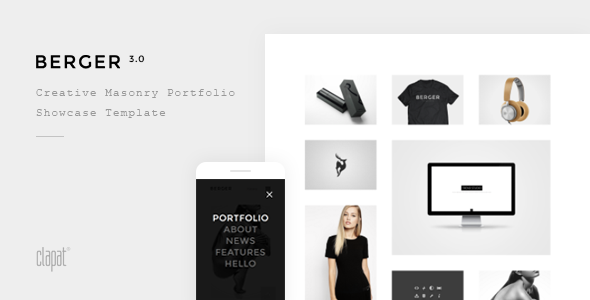
Berger is a static HTML portfolio template sold on ThemeForest for $20, built by the developer ClaPat for creative agencies, designers, freelancers and photographers who want a ready-made showcase site without a content management system. It is a set of pre-built pages and components rather than a WordPress theme, so it suits anyone comfortable editing HTML and CSS directly, or a developer who will hand the finished files to a client. With 981 sales and a 4.6 average rating, it has enough of a track record to be worth a serious look.
What the template actually gives you to work with
The core of Berger Creative is its masonry portfolio grid, which arranges project thumbnails in staggered columns of four, three or two. Masonry layouts let images of different heights sit together without awkward gaps, which matters when a photographer mixes portrait and landscape shots or an agency presents case studies of varying length. Filters can be switched off entirely if a cleaner, less busy index page is the goal.
Navigation and page transitions get more attention here than in most templates at this price. AJAX page transitions load new content without a full browser refresh, so moving between pages feels closer to an app than a website. The header can be set to stick in place, sit statically, or hide as the page scrolls down and reappear on the way up — a small behaviour that frees up vertical space on long portfolio pages. There is also a full-screen overlay menu and a full-screen slider with animated captions and three transition types (vertical slide, horizontal slide and fade), with touch support for phones and tablets.
Every page can carry a hero section sized at full window height, two-thirds or half, with options for parallax movement, opacity change on scroll, and a colour overlay behind the text. Fifteen separate project page layouts are included, which is an unusually high number and means a portfolio entry can be styled differently depending on whether it is a photo series, a branding case study or a product launch.
The supporting element library covers the usual ground: counters, team member blocks, progress bars, accordions, tabs, toggles, alert boxes, pricing tables and blockquotes. Six footer designs and six thumbnail hover effects are included as presets. Font Awesome ships with more than 600 icons that can be inserted through shortcodes and resized or recoloured individually. Everything is retina ready, meaning graphics stay sharp on high-density screens, and smooth scrolling is included for Chrome and Opera.
The contact form is styled and functional, though the vendor does not state which backend service handles submissions — that is worth confirming before purchase, since a static form needs a mail script or third-party endpoint to actually deliver messages. Documentation is described as detailed, and the author is reachable for support queries.
Where this template fits, and where it does not
Berger suits a photographer or small design studio that needs a polished portfolio online quickly and is happy to work in a code editor. A freelancer with a handful of projects and no interest in running a database would find the file-based approach simpler than maintaining WordPress, updates, and plugins. An agency building a marketing microsite for a single campaign could use the fifteen project layouts to give each case study its own character.
It is the wrong choice for anyone who needs a blog, e-commerce, membership areas, or a client who expects to log in and edit text without touching code. A static HTML template has no admin panel, so every content change means editing files and re-uploading them. Anyone whose site will change weekly should look at a CMS-based theme instead. It is also a poor fit for a business that needs search-optimised, server-rendered pages with dynamic metadata, since the vendor does not describe any SEO tooling or structured data support.
Strengths and limitations
Strengths
- Fifteen distinct project page designs give real variety without extra cost, which is rare at the $20 price point.
- AJAX transitions and the configurable header make the browsing experience feel more considered than a standard static site.
- Masonry grids in three column counts handle mixed image orientations well, which is the main practical need for photographers.
- Filters can be hidden, so the design can stay minimal rather than forcing a category bar onto every portfolio index.
- Commented, cleanly written code and detailed documentation lower the cost of customisation.
- Broad browser support, including IE9 and above, is useful for projects with conservative audience requirements.
Limitations
- Demo images are not included in the package. Buyers must source and license their own photography, which adds cost and time that the $20 price does not cover.
- There is no CMS. Content updates require editing HTML files directly, which rules out non-technical clients maintaining the site themselves.
- The contact form’s delivery mechanism is not specified in the listing, so it may need additional configuration to send mail reliably.
- Smooth scrolling is limited to Chrome and Opera, so behaviour will differ across browsers.
- No page builder, block editor or visual editing layer is mentioned, so layout changes mean working in code.
- The listing does not state performance benchmarks, accessibility compliance or SEO features, so those cannot be assumed.
How it compares with the wider category
Static HTML portfolio templates compete mostly on two axes: how much design variety is bundled in, and how much work is left to the buyer. On the first, Berger is generous — fifteen project layouts, six footers, six hover effects and three hero heights is more configuration than most templates in this bracket offer, where three or four project pages is common. On the second, it sits in the middle. It is not a barebones starter that leaves every section unstyled, but it also does not include demo imagery, a form backend or any build tooling.
Against CMS-based alternatives, the trade-off is straightforward. A WordPress portfolio theme gives non-technical editing, plugins and dynamic content at the cost of hosting complexity, updates and a heavier page weight. Berger gives speed, simplicity and full control of the markup at the cost of requiring code access for every change. Neither is better in the abstract; the deciding factor is who will maintain the site after launch. Compared with page-builder-driven templates, Berger is leaner and faster to deploy but far less flexible for someone who wants to drag sections around.
Frequently Asked Questions
Is Berger a WordPress theme or a plain HTML template?
It is a plain HTML template, not a WordPress theme. That means it runs as static files on any web host without a database or CMS installation. Content is edited directly in the HTML and CSS files. Anyone expecting a WordPress admin dashboard, plugin ecosystem or visual page builder will need to look at a different product category entirely.
Are the images shown in the Berger demo included when I buy it?
No. The vendor states plainly that demo images are not part of the package. Buyers receive the template files, code and documentation only. All photography used in the live preview must be sourced and licensed separately, whether from a stock library or from the client’s own assets. Budget for that cost alongside the $20 template price.
Can Berger be used for a photography portfolio rather than an agency site?
Yes, and it is arguably a better fit for photography than for agency work. The masonry grids handle mixed portrait and landscape images without cropping, the full-screen slider supports touch gestures, and the fifteen project layouts let each shoot or series get its own presentation. Filters can be hidden to keep the gallery minimal and image-focused.
Does the template include SEO features or schema markup?
The vendor listing does not mention SEO tooling, meta tag management or structured data. As a static template, basic on-page elements such as title tags and headings can be edited by hand in the HTML, but there is no built-in sitemap generator, schema output or optimisation panel. Anyone with strict search requirements should plan to add those manually.
Verdict
Berger is a well-stocked static template at a low price, and the 981 sales and 4.6 rating suggest buyers have generally got what they expected. It makes the most sense for photographers, designers and small studios who are comfortable editing HTML, want a distinctive portfolio online quickly, and do not need a CMS behind it. It is also a reasonable buy for a developer delivering a fixed-scope marketing site where the client will not be editing content. It is the wrong purchase for anyone who needs a blog, e-commerce, or a non-technical owner updating the site regularly, and the absence of demo imagery means the real cost sits above the sticker price. Buy it for the layout variety and the transitions; skip it if code-level maintenance is a dealbreaker.