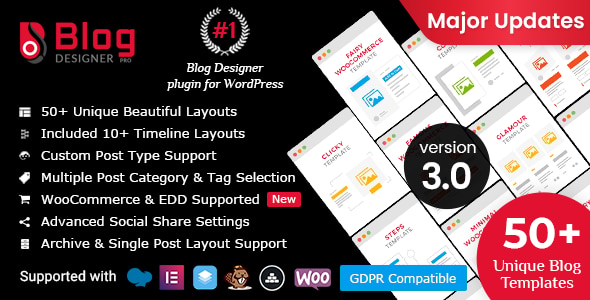
Blog Designer PRO for WordPress Utilities is a plugin that replaces the default WordPress blog listing with one of 50 pre-built layouts, covering grid, masonry, boxed, full-width, newspaper, timeline, story and slider formats. It also supplies separate designs for archive pages (category, tag, author and date) and for single post pages, so a site’s blog section can look substantially different from the rest of the theme without touching code. It suits bloggers, agencies and business sites that want control over how posts are displayed but do not want to build templates from scratch.
The plugin comes from solwin and has been sold 6,748 times on CodeCanyon, where it holds a 4.52 out of 5 rating across 279 reviews. That is a meaningful sample size for a category where many items have a few dozen buyers, and it suggests the plugin has been through enough real deployments to have had its rough edges found.
What the plugin actually changes on a WordPress site
The core proposition is layout choice without development work. WordPress themes ship with one blog template, and changing it usually means either editing PHP or accepting whatever the theme author decided. Blog Designer PRO inserts its own rendering layer, so the post loop can be presented as a grid of cards, a full-width magazine-style feed, a horizontal timeline or a slider, selected from the admin area.
The layouts are not a single template with colour options. Each of the 50 is a distinct design, and the vendor groups them by type: 14 grid layouts, 7 boxed layouts, 5 masonry, 23 full-width, 4 newspaper, 7 timeline, 4 story and 5 slider. Some names appear in more than one group because the same design supports multiple presentations. Beyond the archive layouts, there are 46 single post layouts, so the article page itself can be restyled independently of the listing.
Several capabilities matter more than the template count:
- Archive-specific designs. Category, tag, author and date pages can each be given their own layout rather than inheriting the main blog design. This is the feature that makes the plugin useful for content-heavy sites where a category page functions as a landing page.
- Custom post type support. The layouts can be applied to post types other than the default WordPress posts, which opens the plugin up to portfolios, testimonials, team members and product listings created by other plugins.
- Four pagination modes. No pagination, standard paged links, a load-more button, or automatic loading as the visitor scrolls. The infinite-scroll option changes how a blog feels to browse and is not available in most themes without custom work.
- Layout preview before publishing. A design can be inspected in the admin area before it goes live, which reduces the trial-and-error cycle of applying a template and checking the front end.
- Import and export of layouts. A configured layout, including its settings, can be exported and reused on another site. For agencies building similar blogs repeatedly, this is a genuine time saver.
- Built-in social sharing. Share buttons with counts are rendered on each post, including WhatsApp sharing, removing the need for a separate sharing plugin.
- Typography control. More than 800 Google Fonts are available, with per-template control over colours, font family and font style.
- Post meta toggles. Author, date, category and comment information can be shown or hidden per layout rather than globally.
- Category and tag filtering. Posts can be filtered on the front end by taxonomy, which turns a blog index into something closer to a browsable directory.
The plugin is Gutenberg-optimised, ships with the JavaScript, HTML, CSS and PHP source files, and declares compatibility with WordPress 5.4 through 6.8. It also lists integration with Elementor, Elementor Pro, Visual Composer, Cornerstone, WooCommerce, Easy Digital Downloads, WPML and Bootstrap 4 and 5. The most recent vendor update was 9 September 2025.
Where this fits, and where it does not
The clearest fit is a site whose blog is a primary asset rather than an afterthought. A publication-style WordPress site, a business blog used for content marketing, or an NGO news section all benefit from being able to present different content types differently. A magazine layout for the main feed, a compact grid for a tag archive and a timeline for a company history page is a realistic combination the plugin supports out of the box.
Agencies and freelancers have a second use case: building a blog layout once, exporting it, and importing it into client sites. That workflow is explicitly supported and is more efficient than rebuilding settings by hand each time.
Ecommerce stores are a third. The plugin lists WooCommerce compatibility, and the layout system can be pointed at custom post types, so product-related content such as buying guides or news updates can be styled separately from the shop pages.
Where the plugin is the wrong choice is when a site already has a theme with a blog design the owner is happy with. Installing a layout plugin on top of an existing well-built blog system creates two competing rendering paths and adds a dependency that must be maintained through WordPress updates. Sites that only need a single, simple post list are also poorly served by a plugin of this scope — the free default is adequate, and 50 options are a cost rather than a benefit.
Strengths and limitations
Strengths
- Breadth of layouts is the headline: 50 archive designs and 46 single post designs mean most visual directions are already covered.
- Archive and single post layouts are configured separately, which is more granular than most competing approaches.
- Custom post type support extends the plugin beyond blogging into portfolio and directory use.
- Import and export of layouts makes multi-site and agency workflows practical.
- Social sharing and Google Fonts are built in, reducing plugin count.
- Preview before publishing shortens the iteration loop considerably.
- Compatibility is declared across a wide WordPress range and several page builders, so it is unlikely to conflict with a modern stack.
Limitations
- Fifty templates is a lot to evaluate. There is no indication in the listing of a guided way to narrow the choice, so the selection process falls on the buyer.
- The plugin takes over blog rendering. If it is later removed, the site reverts to the theme’s default blog output, and any styling built around the plugin’s markup is lost.
- Declared browser support includes IE9 through IE11, which suggests a codebase carrying legacy compatibility. That is not harmful, but it does mean the front-end markup is likely not built on the newest CSS approaches.
- The vendor does not state performance figures for the layouts, and slider and masonry presentations typically load additional scripts. On a large blog, that is worth testing before committing.
- Demo content and documentation are hosted on the vendor’s own site, so the quality of setup guidance cannot be judged from the listing alone.
How it compares with the alternatives
The realistic alternatives fall into three groups. The first is doing nothing and using the theme’s built-in blog template — free, zero maintenance, and entirely adequate for simple sites. The second is a page builder with a posts widget, such as Elementor Pro, which offers layout flexibility but usually applies to pages rather than to native archive templates, and often requires rebuilding the same design for each archive type. The third is a bespoke theme or child theme with custom templates, which offers total control at the cost of development time and ongoing maintenance.
Blog Designer PRO sits between the second and third options. It offers more archive-level control than a page builder typically provides, particularly around category, tag, author and date pages, and it does so without code. Against a custom build it trades some flexibility for speed and a predictable update path. The trade-off is that the site becomes dependent on the plugin for its blog presentation, which is a real consideration for long-lived projects.
Frequently Asked Questions
Does Blog Designer PRO work with any WordPress theme?
It is designed to work alongside standard themes because it renders the blog output itself rather than relying on theme templates. In practice, themes that heavily customise their own blog loop or archive templates may need adjustment so the plugin’s layouts take precedence. The vendor declares compatibility with Elementor, Visual Composer, Cornerstone and Bootstrap, which covers most common build stacks.
Can the plugin style category and tag pages differently from the main blog?
Yes. Archive layouts are configured separately from the main blog layout, so category, tag, author and date pages can each use a different design. This is one of the plugin’s stronger features, because it lets a category page function as a curated landing page rather than a plain list of posts. Fifty archive layouts are included.
Is coding knowledge required to change a blog layout?
No coding is required for the standard workflow. Layouts are chosen and configured from the WordPress admin area, with options for colours, fonts and post meta visibility, then saved to apply on the front end. Source files in PHP, JavaScript, HTML and CSS are included for buyers who want to modify the templates further, but that is optional.
What happens to the blog if the plugin is deactivated?
The site reverts to the blog output defined by the active theme. Any layout configuration, imported templates and styling tied to the plugin’s markup stop applying, and the blog returns to the theme’s default appearance. That is standard behaviour for a plugin that controls front-end rendering, but it is worth planning for on projects where the blog design is central.
Verdict
Blog Designer PRO is a sensible purchase for anyone whose blog needs to look deliberately designed rather than inherited from a theme. The combination of 50 archive layouts, 46 single post layouts, separate archive configuration and custom post type support covers ground that most themes and page builders do not, and the import/export workflow makes it genuinely useful for agencies. The 4.52 rating across 279 reviews and 6,748 sales indicate the plugin has been tested widely in production.
It is not the right buy for a site with a blog design that already works, or for one that only needs a simple chronological list of posts. Buyers should also accept that the plugin becomes part of the site’s rendering stack, and removing it later means rebuilding the blog’s appearance. For projects where the blog is a core part of the site, that dependency is a reasonable price for the control on offer.