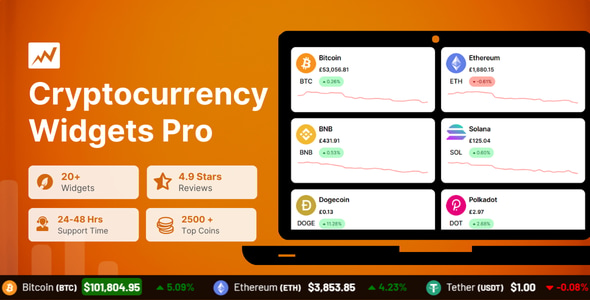
Cryptocurrency Widgets Pro is a WordPress plugin from CoolPlugins that adds live cryptocurrency price data to a site through shortcodes. It renders price tickers, coin tables, cards, sliders, charts, calculators, news feeds and donation boxes using data pulled from third-party market APIs. It suits crypto publishers, finance bloggers and agencies that need market data on a WordPress site without building a custom data pipeline.
The plugin has sold 2,454 copies on CodeCanyon and holds a 4.72 out of 5 rating across 109 reviews, which places it among the more established options in this niche. The vendor’s most recent update landed in August 2026, and the listed compatibility range runs from WordPress 4.9 through 7.0, so it is not a product that has been abandoned after launch.
What the plugin actually does with market data
At its core, the plugin is a display layer. It does not store price history or run its own market data infrastructure. Instead, it queries external sources — CoinGecko, CoinMarketCap, Binance and Open Exchange Rates are named in the vendor’s credits — and formats the response into something that fits a WordPress page.
That distinction matters when evaluating the product. What a buyer is paying for is the presentation layer and the shortcode system, not proprietary data. The vendor does not state how the API keys are handled or whether any of the sources require a paid tier for high request volumes, which is worth clarifying with support before committing to a high-traffic site.
Widget formats and where they fit
The range of output formats is the strongest part of the offer. A scrolling ticker works in a header or a sticky bar. A price card highlights one or two coins. A price block drops a compact quote into the middle of an article. A full table supports comparison across many assets, with columns for symbol, market capitalisation, trading volume and 24-hour change. Sliders, labels, charts and calculators cover the remaining common layouts.
Each of these is inserted with a shortcode, which means the widgets can go into posts, pages, sidebars, footers or page builder sections without touching theme files. For anyone maintaining a site built on a page builder, that is a meaningful convenience — the alternative is usually a custom block or a template edit that breaks on the next theme update.
Coverage, currencies and custom assets
The plugin pulls data for more than 2,500 coins, which covers the major assets and most of the long tail. Prices can be displayed in multiple fiat currencies including USD, EUR, GBP and INR, and multi-currency tabs let visitors switch between them. For sites with an international readership, that removes a common friction point where a reader in one region has to mentally convert every figure.
Custom coin support is included for tokens that the main data sources do not track well. The vendor does not specify the exact mechanism for adding a custom asset or which API it draws from, so this is a feature to test against a specific token rather than assume will work universally.
Donations, news and styling
A donation box widget accepts multiple wallet addresses, including Bitcoin and MetaMask, and can be laid out as a list or a table. That turns the plugin into a lightweight fundraising tool for creators and open-source projects, though it displays addresses rather than processing payments — there is no checkout, no confirmation and no accounting.
The news feed pulls crypto headlines into the site. Custom CSS support allows the widget styling to be adjusted to match a theme. All widgets are described as responsive, and the plugin lists compatibility with IE10 through Edge, which is a broader browser range than most current WordPress plugins bother to declare.
Where this fits, and where it does not
The clearest fit is a content site that publishes crypto commentary and wants live prices embedded in articles. A reviewer writing about Ethereum can drop a price block into the post and let it update itself, rather than pasting a screenshot that goes stale within a day. The same logic applies to news sites, market blogs and educational resources.
A second fit is a service business in the crypto space — an exchange, a custody provider, an advisory firm — that wants a market data section on its marketing site without hiring a developer. The shortcode approach means a content editor can add and rearrange widgets without engineering support.
A third is a project accepting crypto donations. The donation box is a reasonable substitute for a dedicated donation plugin if the requirement is simply to publish wallet addresses in a tidy layout.
Where the plugin is the wrong choice is any application that needs data integrity guarantees. It is a display tool that depends on third-party APIs. A trading interface, a portfolio tracker, a tax tool or anything where a stale or incorrect price carries financial consequences should not be built on a widget layer. Latency, rate limits and API outages are all outside the plugin’s control, and the vendor’s own disclaimer states plainly that price data comes from external sources.
Sites with very high traffic should also check the caching behaviour before rollout. The vendor does not document how frequently data is fetched or whether responses are cached locally, and an uncached widget on a busy page can generate a large volume of outbound API calls.
Strengths and limitations
Strengths
- Broad format coverage — ticker, table, card, block, slider, chart, calculator, label, news feed and donation box — from a single plugin rather than several.
- Shortcode insertion works across posts, pages, sidebars and page builder sections without theme edits.
- Multi-currency display with tabbed switching supports an international audience.
- Custom coin support covers tokens outside the major listings.
- Custom CSS gives a route to match an existing brand without a redesign.
- Long compatibility range and a recent update suggest active maintenance.
- Established sales history and a 4.72 rating across 109 reviews.
Limitations
- The plugin is a front-end display layer only. It holds no price history and offers no charting of its own beyond what the upstream APIs provide.
- Dependence on third-party APIs means outages, rate limits and data errors are inherited, not solved.
- The vendor does not document caching frequency or API request volume, which makes performance planning on high-traffic sites difficult without testing.
- Donation boxes publish wallet addresses but do not process or verify transactions.
- Custom coin support is described without detail on the underlying data source, so it needs testing per token.
- Styling beyond custom CSS is limited to the preset layouts the vendor ships.
How it compares with the alternatives
Buyers in this category generally choose between three approaches: a dedicated crypto widget plugin, a general-purpose data or table plugin configured with an external feed, or a custom build against a market API.
A custom build offers complete control over caching, layout and data handling, but it requires ongoing developer time and breaks when an API changes its schema. For most content sites, that cost is hard to justify against a $39 plugin.
A general-purpose table or embed plugin can display a feed, but it will not ship with crypto-specific layouts, currency switching, a ticker or a calculator. Getting those from a generic tool means assembling several plugins and accepting inconsistent styling.
Against other dedicated crypto widget plugins, the differentiators here are the breadth of widget formats and the shortcode-first approach. Some rivals lean on Gutenberg blocks or Elementor widgets exclusively, which is cleaner inside those editors but less flexible elsewhere. This plugin’s shortcode model works in any context that accepts one, including classic editor setups and older themes.
The trade-off is that a shortcode-based plugin offers less visual editing. Adjusting a widget generally means editing shortcode attributes rather than dragging controls in a live preview.
Frequently Asked Questions
Does Cryptocurrency Widgets Pro need an API key to work?
The vendor’s listing does not state that a key is required for basic operation, and the plugin is marketed as working out of the box with CoinGecko and Binance data. However, the credits also reference CoinMarketCap and Open Exchange Rates, both of which normally require registration. Confirming key requirements with support before purchase is the safest approach.
Can the widgets be placed inside blog posts rather than sidebars?
Yes. Every widget is inserted with a shortcode, so it can go into post content, pages, sidebars, headers, footers or page builder sections. That makes it straightforward to embed a live price block inside an article about a specific coin without editing any theme template files.
How often do the cryptocurrency prices update?
The plugin displays live data fetched from third-party APIs, but the vendor does not publish a specific refresh interval or describe its caching behaviour. Actual update frequency depends on the upstream source and on any caching layer on the site. Testing on the target hosting setup is the only reliable way to confirm real-world refresh rates.
Is it suitable for a website that accepts crypto donations?
It can display a donation box with multiple wallet addresses in list or table layouts, including Bitcoin and MetaMask. It does not process payments or confirm incoming transfers, so it functions as a published address display rather than a donation processing system. Sites needing receipts or accounting would need separate tooling.
Verdict
Cryptocurrency Widgets Pro is a well-established option for adding live market data to a WordPress site without development work. The breadth of widget formats, the shortcode flexibility and the multi-currency support make it a practical purchase for crypto publishers, finance blogs and service businesses that need a market section on their site. The 4.72 rating across 109 reviews and the recent update suggest the product is maintained rather than shelved.
It is not the right tool for anything that treats price data as mission-critical. Trading interfaces, portfolio trackers and financial reporting tools need direct API control, caching guarantees and error handling that a display plugin does not provide. Buyers in that category should build against a market API directly.
For everyone else — a content site, a marketing page, a donation section — the plugin does what it claims at a price that is easy to justify against the alternative of custom development.