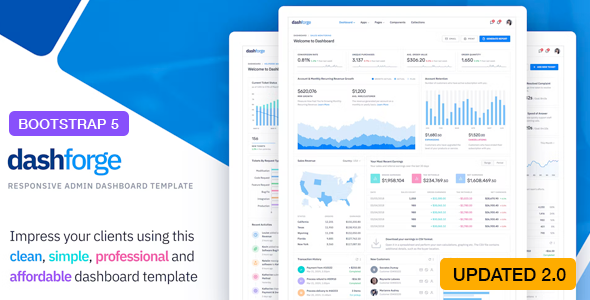
Building a robust, data-driven backend interface requires more than just a pretty face; it demands a foundation of clean code, seamless performance, and a user-centric layout. The Dashforge – Responsive Admin Dashboard Template delivers exactly that. Developed by the reputable themepixels, this premium template is engineered for developers, SaaS founders, and agencies who need a professional, scalable starting point for their web applications. Built on the latest Bootstrap 5 framework, Dashforge combines a modern aesthetic with powerful functionality, making it an ideal choice for analytics dashboards, project management tools, and complex admin panels. With over 2,400 sales on ThemeForest, its popularity is a testament to its quality and reliability.
Key Features
- Latest Bootstrap 5 Framework: Built from the ground up with the most recent version of Bootstrap, ensuring your projects are future-proofed with the latest grid system, utilities, and JavaScript components.
- Dual Navigation Layouts: Choose between a traditional vertical sidebar or a modern horizontal navigation bar. This flexibility allows you to tailor the user experience to your specific application’s information architecture.
- 500+ Reusable Components: A massive library of pre-styled UI elements, from buttons and cards to advanced form controls and modals. This drastically reduces development time and ensures visual consistency across your entire application.
- 4 Pre-Built Dashboard Templates: Jumpstart your project with four distinct, fully designed dashboards. Each template offers a unique layout and data visualization approach, giving you a variety of starting points for different use cases.
- Comprehensive App Pages: Includes fully functional page layouts for essential applications like a Mailbox, Chat interface, Contacts manager, File Manager, and Calendar. These are not just static mockups but usable frameworks you can integrate with your backend.
- Powerful Charting & Visualization: Integrates support for multiple charting libraries including Flot, Morris, Chart.js, Sparkline, and Peity. This gives you the freedom to choose the best tool for presenting complex data sets.
- SASS Powered: The source code is written in SASS, allowing for easy customization of colors, spacing, and typography. You can quickly rebrand the template to match your company’s identity without touching the core CSS.
- Skin Customizer & Navigation Skins: Provides a built-in skin customizer tool and three distinct navigation color schemes. This allows end-users or developers to switch the look and feel of the admin panel on the fly.
- Free Lifetime Updates: The developer, themepixels, provides continuous updates, ensuring compatibility with future browser versions and adding new features. The changelog shows a major update to Bootstrap 5 (v2.0.0), demonstrating active maintenance.
Who Is This For? Use Cases
The Dashforge – Responsive Admin Dashboard Template is a versatile tool designed to serve a wide range of technical and creative professionals. Its modular architecture makes it suitable for projects of any scale, from simple internal tools to complex multi-tenant SaaS platforms.
Web Developers & Freelancers
For developers building custom web applications, Dashforge eliminates the need to code an admin interface from scratch. The 500+ components and pre-built apps allow you to focus on backend logic and API integration, delivering a polished product to your clients in a fraction of the time. The clean, well-commented code is easy to navigate and customize.
SaaS Startups & Product Teams
Startups need to move fast. Dashforge provides a professional, enterprise-grade interface that can be used to build the user dashboard for your SaaS product. The pre-built analytics dashboards, charts, and data tables are perfect for presenting user metrics and KPIs. The responsive design ensures a seamless experience for users on any device.
Agencies & Design Studios
Agencies managing multiple client projects can leverage Dashforge as a standard foundation. Its flexibility in layout (horizontal vs. vertical) and skin customization allows you to create unique branded experiences for each client without starting over. The included app modules (Mailbox, Chat, File Manager) are ideal for building comprehensive internal communication and project management tools.
Technical Details & Compatibility
Understanding the technical stack is crucial for any development project. Dashforge is built with modern, stable technologies that ensure high performance and broad compatibility. The template is powered by jQuery and utilizes the latest Bootstrap 5 grid and component system. The core styling is managed via SASS, providing developers with a powerful and efficient way to customize the design.
The template is fully responsive, guaranteeing an optimal viewing experience across all screen sizes, from mobile phones to large desktop monitors. It supports a wide range of third-party plugins for enhanced functionality, including form validation, WYSIWYG editors, DataTables, Google Maps, Leaflet Maps, and jQVMap. The extensive use of 1000+ font icons (including Remixicon) ensures you have the right visual cues for every action. The changelog confirms active development, with a significant update to Bootstrap 5 in version 2.0.0 and the addition of a dark mode in version 1.1.0, signaling a commitment to long-term support and modern web standards.
Pros and Cons
Pros
- Exceptional Value for Money: Priced at only $14.00, the sheer volume of components, pre-built pages, and app modules offers an incredible return on investment compared to custom development.
- Proven Track Record: With over 2,400 sales, the template has a large user base, indicating reliability and community support. The developer, themepixels, has a strong reputation on the Envato marketplace.
- Massive Component Library: The 500+ reusable components and 4 dashboard templates provide an unparalleled head start for any project, drastically reducing development time.
- Flexible Layout Options: The ability to switch between vertical and horizontal navigation, along with the skin customizer, provides significant design flexibility without needing to modify core files.
- Active Development & Updates: The detailed changelog and free lifetime updates ensure the template remains compatible with the latest web technologies and security standards.
Cons
- jQuery Dependency: While jQuery is still widely used, some modern developers prefer frameworks like React, Vue, or Angular. This template is not a native framework component and requires manual integration if you are using a JavaScript framework.
- Demo Images Not Included: As noted by the developer, the high-quality images used in the live demo are not part of the purchase. You will need to source or create your own imagery for the final product.
- Learning Curve for Customization: While the code is clean, the sheer number of files and options can be overwhelming for a beginner. Setting up the SASS build process and understanding the component hierarchy requires some initial effort.
Frequently Asked Questions
Is Dashforge compatible with the latest version of WordPress or other CMS platforms?
Dashforge is a pure HTML/CSS/JavaScript admin template, not a WordPress theme. It is built on Bootstrap 5 and can be integrated into any backend system, including custom PHP frameworks, Laravel, Ruby on Rails, or a static site. For WordPress, it would not function as a front-end theme but could be used to build a custom admin panel or plugin interface. It is primarily designed for web applications and SaaS platforms, not for styling a standard WordPress blog.
Does the purchase include support and documentation?
Yes, purchasing Dashforge from ThemeForest includes access to the developer’s support system. The developer, themepixels, provides support for issues related to the template’s core functionality and setup. The package also includes comprehensive documentation that covers installation, file structure, component usage, and customization via SASS. The “Free Lifetime Updates” guarantee ensures you receive future improvements and bug fixes.
Can I use this template for a client project, and what is the licensing model?
Yes, you can use Dashforge for client projects. The standard ThemeForest license allows you to use the template in a single end product for yourself or a client. If you need to use the template for multiple distinct projects, you would need to purchase a separate license for each. The $14.00 price point makes this a highly cost-effective solution for client work, as you are essentially buying a professional-grade foundation for a fraction of the cost of custom design.
Final Verdict
The Dashforge – Responsive Admin Dashboard Template stands out as a top-tier solution in the crowded admin template market. Its combination of a modern Bootstrap 5 foundation, a massive library of 500+ components, and four distinct dashboard designs provides an unmatched starting point for any web application. The developer, themepixels, has clearly invested significant effort into code quality and user experience, as evidenced by the detailed changelog and the product’s strong sales record of over 2,400 units. While it relies on jQuery and requires some initial setup, the incredible value, flexibility, and active support make these minor drawbacks easy to overlook. For anyone building a SaaS platform, analytics dashboard, or complex admin panel, Dashforge offers the perfect balance of power, performance, and price. Whether you are a solo freelancer or a large agency, this template is a smart investment that will save you hundreds of hours of development time. Click the button below to get started and elevate your next project with a professional, responsive admin dashboard.