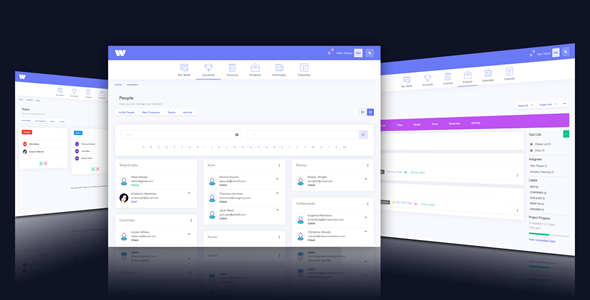
Freelance Manager is a self-hosted PHP application for running a small service business from one dashboard. It combines client records, project tracking, task lists, billable time, invoicing, payment collection, support tickets and internal messaging into a single script that is installed on the buyer’s own server. It suits freelance designers and developers, consultants and small agencies that want to own their data and stop paying a monthly subscription for Freelance Manager Project Management Tools.
The script is sold on CodeCanyon by the developer gewa13 for a one-time fee of $50, and it has been downloaded 2,541 times with a 4.5 out of 5 rating across 485 reviews. That is a meaningful sample size for this category, and it tells a buyer more about long-term reliability than the feature list does.
What the script actually does once it is installed
The core of the product is a client and project database. Each client profile holds contact details and links to every project, invoice and approval queue attached to that person, so the admin view functions as a relationship record rather than a list of jobs. Projects carry their own parameters: progress state, cost, timeline, assigned project manager and associated tasks. Multiple staff members can be assigned to the same project, which is the difference between a tool for one freelancer and a tool for a small team.
The workflow approval system is the feature that separates this from a generic to-do app. When a staff member finishes a task or a revision, the work is submitted to the client for review rather than simply marked complete. Submissions are the drafts, concepts and revision rounds that freelancers normally trade over email, and the script lets files be attached to each submission. That means version history and client sign-off live in the same place as the invoice that follows.
Time and money are handled together. A time-billing tool records hours against a client, a project or a single task, and those entries can be pulled into an invoice instead of typed from scratch. Invoices can be rendered as A4 or Letter format PDFs, and the PDF engine supports right-to-left scripts plus Cyrillic and Asian character sets, which matters for anyone invoicing clients outside English-speaking markets. PayPal and Stripe are the built-in payment gateways, with 2Checkout and PayFast added in earlier releases, so card and wallet payments can be collected without leaving the system.
Around those core modules sit the supporting tools a service business tends to need: a support ticket system with priority levels and assignment, a messaging system so client conversations stay logged against the account, staff accounts with configurable permissions, an event calendar showing outstanding invoices, projects and tasks by month or year, and a database backup and restore utility. The interface is responsive in both the admin and client areas, and since the 2020 rewrite it includes a dark mode on both sides. Language phrases can be edited from the admin panel, and mailer templates are editable there too, which removes the need to touch files for routine text changes.
Where this fits and where it does not
The natural buyer is a solo designer, developer or consultant who bills hourly or per project and currently juggles a spreadsheet, an invoicing service and an email inbox. A two-to-ten person studio is the other good fit, because the permission system and multi-staff project assignment only become useful once more than one person touches the work. Agencies that need clients to log in, review a deliverable and approve it before an invoice is raised will find the approval queue does more work than the equivalent in a subscription tool at this price point.
It is the wrong choice for a business that sells physical products, needs inventory or shipping logic, or runs complex multi-stage workflows with dependencies between tasks. There is no Gantt chart, no dependency mapping and no resource-levelling here. It is also a poor fit for anyone unwilling to manage hosting, PHP upgrades and database backups themselves, because a self-hosted script transfers that responsibility to the owner. Teams already standardised on a hosted platform with native mobile apps will find the switch hard to justify.
Strengths and limitations
Strengths
- One-time purchase instead of a recurring subscription, with full source files included for JavaScript, HTML, CSS and PHP.
- Client approval workflow with file attachments covers the revision cycle that most invoicing tools ignore.
- Time tracking flows directly into invoices, cutting the manual step between hours worked and money owed.
- PayPal and Stripe are supported out of the box, so payments can be collected without a separate integration.
- Staff permissions and multi-staff project assignment support small teams, not just individuals.
- Dark mode, editable language phrases and editable mailer templates reduce the need for code changes.
- Built-in database backup and restore is a genuine convenience for a self-hosted product.
- A 4.5 rating across 485 reviews is a strong signal of stability for a CodeCanyon script.
Limitations
- The declared software requirement is PHP 7.x. The vendor does not state support for PHP 8, and running an older PHP branch on a live server is a security consideration buyers should weigh before installing.
- Source files are included but the vendor marks the item as not high-resolution, and no child-theme or extension framework is described, so deep customisation means editing core files and reapplying changes after updates.
- There is no native mobile app. The responsive layout works in a browser, but there is no offline access or push notification.
- No Gantt chart, task dependencies or resource planning, which rules it out for complex multi-phase engagements.
- Payment gateway coverage is limited to PayPal, Stripe, 2Checkout and PayFast. Businesses relying on regional or bank-transfer gateways would need custom development.
- Some features are disabled in the public demo, so the demo does not show the complete product.
How it compares with the alternatives
The realistic alternatives fall into three groups. Hosted subscription platforms charge per user per month and handle hosting, updates and mobile apps, but the data lives on someone else’s server and costs scale with team size. Generic open-source project tools are free and extensible, but they treat invoicing and payment collection as an afterthought, so a freelancer ends up bolting on a separate billing service. Purpose-built invoicing apps handle billing well and project tracking poorly.
Freelance Manager’s position is the middle of that triangle. It is not as polished as a funded hosted platform and not as extensible as a large open-source ecosystem, but it is the only one of the three that ships client approval, time tracking, invoicing and payment collection as one installed package for a single $50 payment. The trade-off is that the buyer becomes the system administrator. For a freelancer comfortable with a cPanel install and a PHP version setting, that trade is straightforward. For anyone who wants a vendor to handle maintenance, it is not.
Frequently Asked Questions
What is Freelance Manager used for?
It is used to run a freelance or small agency business from one dashboard. Client records, projects, tasks, billable hours, invoices, payment collection, support tickets and client messaging all sit in the same self-hosted application, so work and billing stay connected instead of being split across a spreadsheet, an inbox and a separate invoicing service.
Does Freelance Manager work with PHP 8?
The vendor’s declared specification lists PHP 7.x only. Support for PHP 8 is not stated in the product data, so buyers should confirm compatibility with the developer before installing on a server running a newer PHP branch. Running an unsupported PHP version on a production server carries security and maintenance implications.
Can clients log in and approve work in Freelance Manager?
Yes. The script includes a separate client area with its own login. When a staff member or project manager completes a task or revision, the submission is sent to the client for review, and files can be attached to that submission. Clients can also send messages to staff, raising support tickets and tracking the status of their projects.
Is Freelance Manager a one-time purchase or a subscription?
It is a one-time purchase. The script sells for $50 on CodeCanyon with the JavaScript, HTML, CSS and PHP source files included, and there is no recurring licence fee. The ongoing costs are hosting, a domain and any developer time spent on customisation, rather than a monthly per-user charge.
Verdict
Freelance Manager is worth buying for a freelancer or small studio that bills clients for project work and wants client approvals, time tracking and invoicing in one place without a monthly fee. The approval workflow and the path from tracked hours to a sent invoice are the parts that justify the $50, and the 4.5 rating across 485 reviews suggests the code holds up over time. It is not the right purchase for anyone needing Gantt charts, task dependencies, a native mobile app or a vendor-managed hosting arrangement. Buyers should also verify PHP version compatibility before installing, since the vendor only declares PHP 7.x. Treat it as a tool for a technically comfortable owner, not a turnkey service.