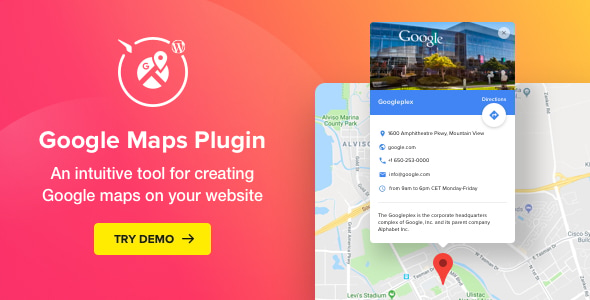
Google Maps – WordPress Map Plugin is a commercial plugin from Elfsight that embeds interactive Google Maps into a WordPress site without writing code. It supports multiple locations, custom markers, info cards with contact details, and the standard Google Maps layers and map types. It suits small businesses, agencies and multi-branch organisations that need to show physical locations on a site, and it is sold on CodeCanyon for $29 with 2,434 sales and a 4.73 out of 5 rating from 77 reviews.
The category here is Google Maps Utilities: tools that sit between the Google Maps API and a content management system, handling the API connection, the marker data and the front-end presentation so a site owner does not have to build any of it. This plugin is a mature example of that category, though its last vendor update was in March 2021, which matters for anyone running a current WordPress release.
What the plugin actually does
The core job is turning a list of addresses into a working map. A location can be added by entering a street address, a place name, or raw latitude and longitude coordinates, and the plugin geocodes it automatically. The vendor states the marker count is unlimited, and the listing references 50+ prebuilt location markers alongside 20+ icon types and an option to upload a custom icon. That combination is what separates a usable map from a pin dropped on a default blue teardrop.
Each marker can carry its own info card. The card holds a description, physical address, opening hours, phone number, email address and website link, which means the map doubles as a contact block for a branch or department. A location panel can be shown or hidden to list multiple departments, and its title and contents are editable. Markers can also be set to redirect to a URL on click, which is useful when each location has its own landing page.
Presentation controls are broader than most map embeds. There are four map types (roadmap, satellite, hybrid and terrain), six navigation control styles, and five overlays covering points of interest, traffic, transit, cycling and Street View. Dragging and scroll-to-zoom can each be switched on or off independently, which matters on mobile where an always-active map traps the page scroll. Five predefined colour schemes and 20+ colourable elements let the map match a site’s palette, and width and height are adjustable rather than fixed.
Two smaller features are worth noting. The plugin can build a route automatically from the visitor’s current location to the selected marker, and marker animations can be set to drop or bounce. Interface text is available in more than 60 languages. The editor is visual, so no PHP or JavaScript editing is required, and the source files included with the purchase are JavaScript, HTML, CSS and PHP.
Where it fits and where it does not
Multi-location businesses are the clearest fit: restaurant chains, clinics, retail branches, gyms, dealerships and franchise networks. A single map with a filterable or listed set of branches answers a question visitors ask constantly, and the info card removes the need for a separate contact page per location.
Agencies building client sites will find the page builder compatibility useful. The vendor lists Elementor, WPBakery Page Builder, Cornerstone and Layers WP, plus Gutenberg optimisation, and also names WooCommerce, Jigoshop and WP e-Commerce. In practice the commerce integrations matter less than the page builder ones, since a store locator on a WooCommerce site is the realistic use case rather than anything tied to checkout.
Single-location service businesses with one address get less value. A static embedded map or a simple address block does the same job for free, and the plugin’s multi-marker, multi-card architecture is overhead that never gets used.
It is also the wrong choice for anyone who needs a store locator with search-by-postcode, radius filtering, or a database of hundreds of locations with import and export. This plugin is a curated map builder, not a directory engine, and the vendor does not present it as one.
Strengths and limitations
Strengths
- Genuinely broad styling control for the price: map types, layers, controls, colour schemes and per-element colours in one $29 purchase.
- Info cards carry a full contact record per marker, so one map can replace several contact sections.
- Address, place name or coordinate entry means locations can be added without hunting for latitude and longitude values.
- Visual editor with no coding required, which keeps maintenance with content editors rather than developers.
- Strong reception on CodeCanyon: 2,434 sales and a 4.73 rating across 77 reviews is a meaningful sample, not a handful of early buyers.
- Compatibility list is wide, covering WordPress 4.9 through 5.7 and the major page builders of that era.
Limitations
- The most recent update listed by the vendor is version 2.4.2, dated 26 March 2021. That is a long gap, and WordPress core, PHP versions and the Google Maps platform have all moved since. Buyers should confirm current compatibility rather than assume it.
- The declared WordPress compatibility stops at 5.7.x, so running it on a much newer release is untested territory.
- Google Maps requires an API key with billing enabled on the Google Cloud side. The plugin handles the key, but the ongoing cost and setup sit with the site owner, and the vendor’s listing does not spell that out.
- No search or filtering by distance is described, which rules out true store-locator behaviour for large networks.
- Support and updates are tied to the CodeCanyon licence terms rather than a standalone subscription, so the update window depends on the purchase date.
How it compares with the alternatives
There are three realistic routes to putting a map on a WordPress site. The first is a free plugin from the WordPress.org repository, which typically covers a single marker, a basic embed and little styling. The second is a dedicated store locator plugin, which handles bulk location imports, search and radius filtering but often costs considerably more per year. The third is this kind of paid CodeCanyon utility: a middle tier that gives visual control and multi-marker support without the price or complexity of a locator platform.
Against the free tier, the gap is styling and structure. Free embeds rarely offer per-marker info cards, colour control, route building or a location panel, and they usually push the site owner into shortcode attributes or a settings page to change anything. Against a full store locator, the gap runs the other way: this plugin does not do proximity search, bulk data management or analytics on which locations visitors view. Anyone whose requirement list includes those should look at locator-specific products.
The other differentiator is the developer. Elfsight publishes a range of embeddable widgets across several platforms, so the plugin comes from a team with a product line rather than a single one-off script. That is a reasonable signal for future maintenance, though it does not override the 2021 update date.
Frequently Asked Questions
Can I add more than one location to a single Google map?
Yes, the vendor states the marker count is unlimited, and the plugin is built around multi-location maps. Each marker gets its own icon, its own info card and optionally its own click-through URL. A show/hide location panel lets the map list departments or branches alongside the pins, which is the setup most multi-branch businesses need.
Does this plugin need a Google Maps API key?
Yes. Google Maps embeds require an API key tied to a Google Cloud project, and that project needs billing enabled. The plugin provides a field for the key in its preferences, and an earlier release fixed a bug that prevented the key from saving. The API usage cost itself is billed by Google, not by the plugin vendor.
Will it work with Elementor and other page builders?
The vendor lists Elementor, WPBakery Page Builder, Cornerstone and Layers WP as compatible, and states the plugin is Gutenberg optimised. WooCommerce, Jigoshop and WP e-Commerce are also named. Compatibility is declared against specific older versions of each builder, so it is worth checking the versions in use before purchasing.
Is the plugin still updated?
The last update the vendor lists is version 2.4.2, released on 26 March 2021, which fixed a marker icon colour issue. No later release is shown in the supplied changelog. Buyers should treat long-term compatibility with current WordPress and PHP versions as something to verify directly with the vendor before relying on it.
Verdict
This plugin is worth buying for multi-location businesses and agencies that want a styled, marker-rich Google map on a WordPress site without building it from the API up. The combination of unlimited markers, per-location info cards, route building and deep visual controls is solid value at $29, and the review history backs that up. It is not the right purchase for a single-address site, and it is not a store locator: no postcode search, no radius filtering, no bulk location management. The 2021 update date is the main caveat, and anyone running a current WordPress version should confirm compatibility before committing. Buyers who need proximity search should look at locator-specific products instead.