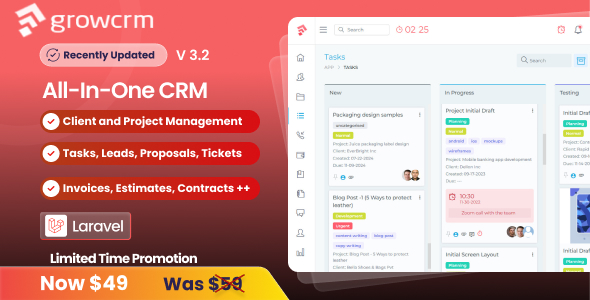
Grow CRM is a self-hosted business management application built on the Laravel PHP framework, sold as a one-time purchase through CodeCanyon. It combines client relationship management with project management, so a single installation handles tasks, time tracking, invoicing, estimates, proposals, leads and a client-facing portal. Teams, agencies and small service businesses that want to own their data rather than rent a SaaS subscription are the natural audience for Grow CRM Project Management Tools.
The script is developed by NextLoop and priced at $49.00. It has been purchased 2,625 times and holds a 4.88 out of 5 rating across 176 reviews, which is a meaningful signal of stability for a code product at this price point. The vendor last pushed an update on 11 March 2026, adding a direct invoice payment link.
What Grow CRM Actually Does
The core of the product is a project workspace. Projects can be created from scratch, cloned, or generated from templates, which matters for agencies running repeatable engagements such as a standard website build or a monthly retainer. Tasks sit inside projects, can be assigned to staff or to the client, and can be cloned when a similar piece of work comes up again.
Task dependencies are handled properly rather than superficially. A task can be locked from starting or from being completed until the task it depends on is finished. On multi-stage work where one deliverable blocks the next, this prevents the common failure mode of a team marking work complete out of order.
Time tracking is built in rather than bolted on. Users can run a live timer or enter time manually against a task, and that recorded time can then be pulled into an invoice. For anyone billing by the hour, this removes the need for a separate time-tracking tool and the reconciliation work that comes with it.
Billing is where the application goes further than most project management scripts. Invoices can be generated from time, from products, or from tasks. Recurring invoices can be scheduled daily, weekly, monthly or yearly and are emailed automatically. Subscriptions go a step further: the system generates a new invoice on the billing cycle and charges the client’s stored card automatically. Clients receive invoices by email and can pay by credit card or PayPal.
The sales side is covered by a lead capture system with a form builder. Forms can be embedded on any external website, so enquiries land directly in the CRM instead of an inbox. Estimates and proposals are produced inside the application and emailed to the client, who can review and accept them without leaving the portal. Workflow automation ties these stages together: the vendor states that actions can be triggered when an estimate is accepted or a project is marked complete, which reduces the manual handoffs between sales and delivery.
A knowledgebase module lets clients self-serve support content, including a YouTube video gallery for visual guides. Rounding this out are three distinct user roles — admin, staff member and client — each with its own view of the system. The vendor publishes working demo credentials for all three, which is unusually transparent and lets a buyer evaluate the interface before spending anything.
Who This Fits, and Where It Does Not
The strongest fit is a small agency or consultancy that currently pays for three or four separate subscriptions. Grow CRM consolidates project tracking, time recording, invoicing, recurring billing and lead capture into one codebase on one server. The client portal is the deciding factor for many buyers: clients log in, see progress, approve estimates and pay invoices, which cuts a large amount of status-update email traffic.
Freelancers billing a handful of clients will find the feature set deeper than needed, but the recurring invoice and subscription features make it viable for anyone running retainers. Businesses with an existing billing stack may still find value in the project and task layer alone.
It is the wrong choice for a team that wants zero server maintenance. This is a PHP application that must be installed on hosting with a specific set of extensions, and someone has to own updates, backups and security patching. Organisations without any technical resource, or those already standardised on a large SaaS platform with deep integrations, will find the self-hosted trade-off harder to justify. It is also not a fit for enterprise environments requiring SSO, granular audit trails or compliance certifications — the vendor does not state that any of these are supported.
Strengths and Limitations
Strengths
- Full source code is included, so the application can be modified rather than merely configured. For agencies that need to match a client’s branding or add a bespoke field, this is the difference between adapting the tool and abandoning it.
- Billing depth is genuinely unusual at this price: time-based, product-based and task-based invoicing, plus recurring invoices and automatic card charging on subscriptions.
- Three separate demo accounts are published, covering admin, staff and client views. Buyers can inspect the actual interface rather than rely on screenshots.
- Free installation is included with purchase, which removes the most common point of failure for non-technical buyers.
- Lifetime updates are included at no extra cost, and the March 2026 release shows the codebase is still being maintained.
- Written in Laravel, a widely known PHP framework, which widens the pool of developers who can work on it later.
Limitations
- Server requirements are specific and non-trivial. The vendor lists PHP 8.2 or 8.3, Apache, MySQL or MariaDB, the GD library and eight separate PHP extensions including BCMath, Fileinfo and Tokenizer. Budget hosting that lacks these will need reconfiguration or a host change.
- Although the listing mentions PHP 7.x and MySQL 5.x compatibility in its specification fields, the server requirements section names only PHP 8.2 and 8.3. Buyers on older stacks should confirm the supported versions with the vendor before purchasing, because the listing is inconsistent on this point.
- The specification lists Internet Explorer 9 through 11 as compatible browsers. That claim is dated and should not be treated as a meaningful endorsement of the front-end code.
- Support is delivered through an online helpdesk with documentation. The vendor does not state a response-time guarantee or a support window, so buyers needing contractual SLAs should ask directly.
- There is no mention of a REST API, webhooks, or native integrations with accounting and communication platforms. Teams that need Grow CRM to talk to other systems should verify what is available, since the listing does not address it.
- Because it is a one-time purchase, ongoing development depends on the vendor’s continued commercial interest. The update history is a positive sign, but it is not a subscription with a contractual roadmap.
How It Compares With the Wider Category
Project management tools generally fall into two groups: hosted subscriptions and self-hosted scripts. Hosted platforms win on convenience — nothing to install, automatic updates, mobile apps and a broad integration marketplace. Their trade-offs are per-user pricing that scales with headcount, data residing on someone else’s infrastructure, and limited ability to change how the software behaves.
Self-hosted scripts invert those trade-offs. Grow CRM’s advantage within that group is breadth. Many scripts in this category do project management well but leave billing to a third party, or handle invoicing but treat project tracking as an afterthought. Grow CRM covers the full path from lead capture through estimate, project delivery, time recording and recurring payment in one application, with a client portal tying it together. The cost of that breadth is configuration surface: there are more modules to set up and more places for a misconfigured setting to cause confusion during rollout.
Against a hosted subscription, the honest comparison is not features but ownership. A buyer at $49 with free installation and lifetime updates is trading a predictable monthly fee for responsibility over hosting, updates and backups. For a technically comfortable team, that trade is favourable within the first year. For a team without that capacity, the subscription remains the safer choice.
Frequently Asked Questions
Do I need coding skills to use Grow CRM?
No, day-to-day use requires no coding. The vendor includes free installation with every purchase, and administration happens through the interface. Coding knowledge only becomes relevant if the buyer wants to modify the source code, which is included, or to troubleshoot server-level issues on their own hosting.
Can clients log in and see their own projects?
Yes. Grow CRM ships with three user roles — admin, staff member and client — and the client role has its own restricted view. Clients can be assigned tasks, review and accept estimates, receive invoices by email, and pay by credit card or PayPal through the portal. A live demo client account is published by the vendor.
Does Grow CRM handle recurring billing automatically?
Yes. Recurring invoices can be scheduled on daily, weekly, monthly or yearly cycles and are generated and emailed automatically. The subscription feature goes further, charging the client’s stored credit card on each cycle without manual intervention. This suits retainers and ongoing service agreements rather than one-off project work.
What happens if the vendor stops updating the script?
The full source code is included, so the application keeps running and can be maintained independently. A capable Laravel developer could take over development. The vendor does not publish a long-term roadmap commitment, so buyers treating this as a decade-long platform should weigh that risk honestly.
Verdict
Grow CRM is worth buying for agencies, consultancies and service businesses that want project management and client billing in one owned installation, and that have at least some technical capacity to run a PHP application. The combination of time tracking, multi-mode invoicing, recurring subscriptions and a client portal is unusually complete for a $49 script, and a 4.88 rating across 176 reviews supports the claim that it works as described.
It is not the right purchase for teams without hosting capability, for businesses needing enterprise identity features or a documented API, or for anyone who wants a vendor to handle updates invisibly. Those buyers are better served by a hosted subscription. For everyone else, the published demo accounts make the decision easy to test before committing.