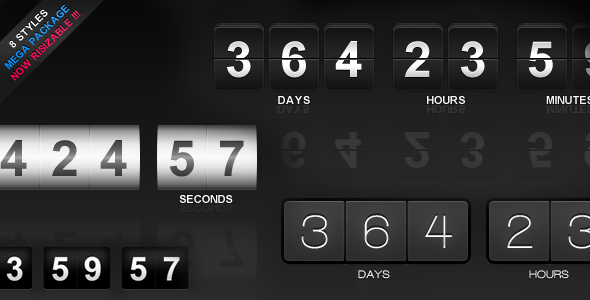
jCountdown Mega Package is a jQuery-based countdown timer script sold on CodeCanyon for $7.00. It renders a configurable clock that counts down to a date and time specified by the site owner, with four visual skins, reflection effects, and a set of methods for starting, stopping and destroying the timer at runtime. It suits developers building launch pages, sale end dates, event pages or webinar timers who want a lightweight JavaScript widget rather than a hosted service. The plugin has sold 4,280 copies and holds a 4.7 out of 5 rating across 202 reviews, which is a strong signal for a script at this price point.
What the countdown actually does
The core of jCountdown Mega Package Countdowns is a single target date. The timeText property takes a string in Year/Month/Date Hour:Minute:Second format, and a companion timeZone property accepts a GMT offset number. That combination matters more than it first appears: a countdown aimed at a global audience needs a fixed reference point, and setting the timezone explicitly means the timer resolves to the same moment regardless of where the visitor’s browser thinks it is. Anyone who has watched a “sale ends in” banner drift by several hours for overseas visitors will recognise the problem this solves.
Four visual styles ship with the package: Flip, Slide, Metal and Crystal, each available in black or white. The reflection settings are the most distinctive part of the presentation layer. Reflection, reflection opacity and reflection blur are separate properties, so the mirrored effect beneath the digits can be subtle or pronounced, and the blur value softens the reflection edge. The vendor states that reflection works in Firefox, Chrome, Safari, Opera and most mobile browsers, but not in Internet Explorer. That is an honest disclosure and worth noting, because the script otherwise claims compatibility back to IE7.
Layout control is handled through three numeric properties. width scales the whole widget and defaults to 0, which means no resizing. textGroupSpace sets the gap between the day, hour, minute and second blocks, while textSpace controls spacing within a block. A dayTextNumber property sets a minimum digit count for the day field, which prevents the layout from shifting when a long countdown drops from three digits to two.
Each unit can be switched off independently. Display toggles exist for days, hours, minutes and seconds, plus a separate displayLabel flag for the text captions underneath the numbers. A countdown that only needs to show hours and minutes is a two-line change, not a rewrite. There is also an onFinish callback, a function that runs when the timer reaches zero, which is the hook most developers will use to reveal a purchase button, redirect to a checkout page or swap in a “sale ended” message.
The API exposes four methods: create, destroy, stop and start. The stop and start pair is more useful than it sounds, because it allows a timer to be paused while a modal or video is open and resumed afterwards. Destroy removes the instance entirely, which matters on single-page sites where views are swapped in and out without a full page reload and stale timers would otherwise keep running in the background.
Where this fits and where it does not
The clearest fit is a marketing or product launch page built by a freelancer or small agency. A fixed deadline with a visible clock is a common conversion pattern, and this script provides it without pulling in a framework or paying a monthly fee to a countdown service. Event sites are another natural home: conference pages, webinar registrations and ticket-sale windows all need a deadline display, and the timezone property makes cross-border events less error-prone.
It also suits developers maintaining older sites. The declared browser support reaches back to IE7, which almost no modern library bothers with, and the plugin depends only on jQuery. For a site already running jQuery, adding this is a script tag and a short initialisation block. The included source files cover JavaScript, HTML, CSS and a layered PSD, so a designer can restyle the skins rather than being locked to the four supplied looks.
Where it is the wrong choice: a WordPress site. The vendor explicitly points WordPress users to a separate WordPress version of the package, so buying this listing for a WordPress build means either writing a custom wrapper or purchasing the other product. The same applies to anyone working in React, Vue or another component framework, where a jQuery plugin sits awkwardly against the surrounding code and a native component would be a better fit. Projects that need multiple simultaneous countdowns with independent logic, or a server-synchronised clock that cannot be tampered with by changing the local system time, should look elsewhere; this is a client-side script and the target time lives in the page source.
Strengths and limitations
Strengths
- Low price relative to the configuration depth on offer, with the full property and method set available at the entry tier.
- Independent display toggles for each time unit and for the labels, so the widget can be trimmed to exactly the units a page needs.
- Timezone offset handling built in, which reduces the risk of a deadline displaying differently for international visitors.
- Reflection opacity and blur are separately adjustable, giving more control over the visual finish than a simple on/off flag would.
- Source files include a layered PSD, so the visual style is not capped at the four bundled skins.
- An onFinish callback provides a clean hook for post-deadline behaviour instead of forcing a workaround.
- Strong marketplace track record: 4,280 sales and a 4.7 rating from 202 reviews, reviewed by the developer ufoufoufo.
Limitations
- The last vendor update is dated 9 March 2022. The changelog shows a jQuery compatibility fix in version 1.1.3, and no release has followed since, so buyers should assume no active maintenance.
- Reflection effects do not work in Internet Explorer, despite the script otherwise advertising support as far back as IE7.
- No high-resolution asset flag is declared, which suggests the bundled graphics are not retina-optimised out of the box.
- The countdown is calculated in the browser. A visitor can change their system clock to alter what they see, and a determined user can edit the target date in the page source.
- WordPress requires a separate product, so the $7.00 price does not cover the most common CMS deployment.
- No documentation format is stated in the listing beyond the property and method reference, so buyers should check the preview page before purchase to confirm the setup process meets their expectations.
How it compares with the wider countdown category
Countdown tools broadly fall into three groups: hosted services that generate an embed code, full page-builder plugins, and standalone scripts like this one. Hosted services typically charge a recurring fee and keep the timer logic on their servers, which solves the clock-tampering problem but adds a dependency and a subscription. Page-builder plugins bundle a countdown module into a larger ecosystem, which is convenient if the site already uses that builder and unnecessary overhead if it does not.
A standalone jQuery script sits between the two. It carries no recurring cost and no platform lock-in, and it can be dropped into any HTML page that already loads jQuery. The trade-off is that the buyer handles integration, styling and updates. For a one-off campaign page, that is usually a fair exchange. For a site with dozens of timers across a CMS, a plugin or a server-side solution will scale better and keep the deadline authoritative.
Within the standalone script segment, the differentiators are the range of visual styles, the depth of layout control and the browser reach. This package competes well on all three, and the reflection controls in particular are more granular than what most scripts at this price expose. The gap is maintenance: a script last touched in 2022 will eventually meet a jQuery version it was not tested against.
Frequently Asked Questions
Does jCountdown Mega Package work with WordPress?
Not directly. The vendor states that WordPress users should use the separate WordPress version of jCountdown Mega Package instead of this listing. The script is a jQuery plugin intended for plain HTML pages, so a WordPress deployment would require a custom wrapper, a shortcode or a plugin that enqueues the files manually.
Can the countdown show different timezones for different visitors?
Yes. The timeZone property accepts a GMT offset number, and the target moment is defined by the timeText value combined with that offset. Setting a fixed offset means every visitor counts down to the same absolute moment, regardless of the local time configured on their device.
What happens when the countdown reaches zero?
The onFinish property accepts a function that runs the moment the timer expires. Common uses include redirecting to a checkout page, revealing a hidden purchase button, or replacing the clock with a “sale ended” message. Without a callback, the timer simply stops at zero and the final frame remains on screen.
Is the countdown accurate if a visitor changes their computer clock?
No. The timer is calculated client-side in JavaScript, so it reads the visitor’s system time. Someone who adjusts their clock can change what the countdown displays. For deadlines where accuracy is commercially critical, a server-validated timer is the safer approach, since the authoritative time never leaves the server.
Verdict
Buy this if a plain HTML or jQuery-based site needs a styled, configurable countdown for a launch, sale or event, and the budget is small. The property set is genuinely deep for $7.00, the timezone handling is a real advantage over simpler scripts, and the sales and rating figures suggest a large number of buyers have found it fit for purpose. Skip it if the project runs on WordPress, uses a modern JavaScript framework, or needs a deadline that cannot be manipulated in the browser. The 2022 update date is the main caveat: this is a stable, finished script rather than an actively developed one, and buyers should plan accordingly.