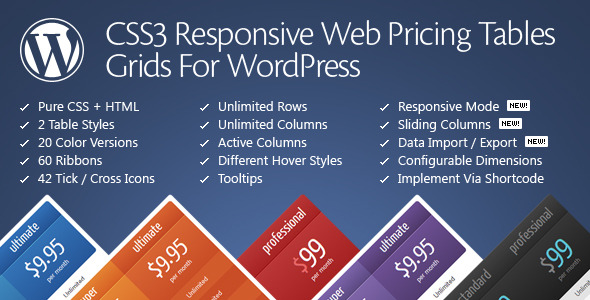
Pricing Tables for WordPress is a commercial plugin from QuanticaLabs that builds comparison and pricing grids using pure CSS3 and HTML, then embeds them anywhere on a site through a shortcode or a page-builder widget. It is aimed at freelancers, agencies and site owners who need presentable plan-comparison tables without hand-coding markup or fighting a general-purpose table block. The plugin has sold 11,227 copies on CodeCanyon and holds a 4.5 out of 5 rating across 1,055 reviews.
The product sits in CodeCanyon’s WordPress Miscellaneous category, which is a fair description: it is a single-purpose tool rather than a suite. Everything it does revolves around one job, and the feature list reflects that focus rather than breadth.
What the plugin actually does well
The core workflow is the plugin’s strongest argument. Tables are assembled in a WordPress admin panel with live configuration, and the vendor claims a finished table is achievable in two to five minutes. That claim holds up structurally: the admin screen exposes column counts, row counts, widths, alignment, fonts and colours as controls, so building a table is a matter of adjusting settings and watching the result rather than writing CSS. Once a table is finished, it is placed with the [css3_grid] shortcode.
Layout control goes further than most pricing-table tools. Column widths can be set in pixels or percentages, row heights and padding are configurable, and text alignment is adjustable per column. The plugin ships with two table styles and twenty predefined colour versions, plus a font configurator with multiple font-face options. There is no stated limit on the number of tables, columns or rows a site can run, which matters for directories or multi-service agencies that need several comparison grids.
The interactive features are where the plugin separates itself from a static table block. Columns can be set as active, meaning they render popped up above the others to draw attention to a recommended plan. Sliding columns and expandable rows let a table reveal additional detail on interaction instead of presenting everything at once. Hover states can be enabled or disabled per column, and CSS3 tooltips attach explanatory hints to individual cells. Ribbons — sixty variants are included — can be attached to one or several columns, and forty-two tick and cross icons are available for feature checklists. Rows and columns can also be sorted.
Responsive behaviour is handled through a dedicated configurator rather than a single on/off switch. Breakpoints are user-defined, and column widths and font sizes can be set differently at each step. That is a meaningful distinction: a four-column table can collapse to a stacked layout on phones while keeping a custom intermediate arrangement on tablets, which is closer to how real pricing pages need to behave.
Two operational details are worth noting. First, the plugin loads its files only when the shortcode is actually used, so pages without a table do not carry the overhead. Second, configuration settings and table data can be imported and exported, which makes moving a carefully built table between staging and production, or between client sites, straightforward. The plugin is also compatible with WordPress multisite.
Editor integration is broader than the category average. There are dedicated widgets for Elementor and WPBakery Page Builder, plus declared compatibility with Beaver Builder, Cornerstone and WPML for multilingual sites. The vendor lists Gutenberg optimisation as “No”, so the block editor experience relies on the shortcode rather than a native block. The plugin’s own compatibility list runs from WordPress 4.9 up to 7.0.x, and browser support covers Chrome, Firefox, Safari, Opera and Edge, with IE9 and above fully supported. Source files in HTML, CSS and PHP are included.
Where this fits, and where it does not
The clearest fit is a SaaS or subscription business that needs a three- or four-tier pricing page with a highlighted recommended plan, feature ticks and crosses, and tooltips explaining ambiguous line items. The active-column feature and ribbon library exist precisely for that pattern.
Agencies building client sites on Elementor or WPBakery are a second strong fit. The dedicated widgets mean a table can be dropped into a page-builder layout without leaving the visual editor, and the import/export function makes it practical to reuse a house table design across multiple client projects. Freelancers who repeatedly build comparison pages — hosting packages, service bundles, membership levels — get similar leverage.
Multilingual and multisite operators are also served, given the WPML compatibility and multisite support, though the vendor does not state whether table content itself is translatable through WPML string translation or only the surrounding interface.
Where the plugin is the wrong choice is when the requirement is a data table rather than a marketing table. If a site needs sortable, filterable, paginated tabular data pulled from a database, spreadsheet or custom post type — product catalogues, sports statistics, financial records — this is not that tool. Its sorting applies to the table’s own rows and columns, not to a dynamic dataset. A plugin built around data sources would be the correct purchase.
It is also a poor fit for anyone who wants to edit tables inside the block editor natively. The Gutenberg-optimised flag is explicitly set to “No”, so block-first workflows will be working through a shortcode.
Strengths and limitations
Strengths
- Live admin configuration removes the need to write CSS for routine layout changes, which is the main reason a table like this takes minutes rather than hours.
- Per-breakpoint control over column widths and font sizes gives genuinely responsive tables rather than a single collapsed fallback.
- Interactive elements — active columns, sliding columns, expandable rows, tooltips, ribbons and tick/cross icons — cover the conventions buyers expect on a pricing page.
- Conditional asset loading keeps the plugin’s CSS and JavaScript off pages that do not use a table.
- Import and export of configuration and table data makes staging-to-production transfers and multi-site reuse practical.
- Dedicated Elementor and WPBakery widgets, plus declared Beaver Builder, Cornerstone and WPML compatibility, cover most common build stacks.
- Source files are included, so developers can extend or restyle beyond the admin options.
Limitations
- No native block editor integration. The vendor’s own specification marks Gutenberg optimisation as “No”, so the shortcode is the placement method inside the block editor.
- Internet Explorer 6 through 8 receive no support for rounded corners or shadows. That is a legacy concern, but the vendor states it plainly and it is worth knowing if an old browser matrix is still in scope.
- The vendor does not state whether table content is translatable through WPML, only that the plugin is compatible with it. Buyers with strict multilingual requirements should confirm this before purchase.
- The design vocabulary is fixed to two table styles. Colour versions and fonts vary the look, but a project needing a structurally different table layout will require custom CSS work on the included source files.
- Support runs through the vendor’s forum in GMT+1, with stated response targets of 24 hours on weekdays and up to 48 hours in some cases. Weekend and public holiday requests wait until the next business day, which is a consideration for launch-critical work.
- Table style #1 is based on a third-party design, Pricing Tables #1 by GraphiteValley, which QuanticaLabs states it holds written rights to use. That is disclosed rather than hidden, but it means one of the two styles is not an original design.
How it compares with the alternatives
The realistic alternatives fall into three groups. The first is a page builder’s built-in table or pricing widget. Those are free with the builder and require no extra licence, but they typically offer fewer per-breakpoint controls, fewer interactive states and a narrower set of visual options. A site that needs one simple three-column table is usually better served by what it already owns.
The second group is general-purpose table plugins — the kind built for displaying data from a database, CSV file or custom post type. Those are more powerful for dynamic content but far heavier for a static marketing table, and they rarely ship the pricing-specific elements such as ribbons, active columns and tick/cross icon sets.
The third group is dedicated pricing-table plugins, which is where this product competes directly. The differentiators here are the depth of the responsive configurator, the range of interactive features, the builder integrations and the import/export capability. The 11,227 sales and 4.5 rating across more than a thousand reviews indicate the approach has held up with a large buyer base over time, and the vendor has kept the plugin updated into the WordPress 7.0.x line.
Frequently Asked Questions
Does Pricing Tables for WordPress work with Elementor and WPBakery?
Yes. The plugin ships with a dedicated Elementor widget and a dedicated WPBakery Page Builder component, so tables can be inserted from within those builders rather than through a shortcode. It also declares compatibility with Beaver Builder, Cornerstone and the WPML multilingual plugin.
Is the plugin responsive on mobile devices?
Responsive mode is optional and configurable. Breakpoints are user-defined, and column widths and font sizes can be set separately for each step, so a wide table can stack on phones while retaining a custom layout on tablets. This is more granular than a single collapse behaviour.
Can tables be edited in the Gutenberg block editor?
Not natively. The vendor lists Gutenberg optimisation as “No”, so tables are placed in the block editor using the [css3_grid] shortcode. Building and configuring the table itself happens in the plugin’s own admin panel, not inside the block editor.
Can a table design be reused across several websites?
Yes. Configuration settings and table data can be imported and exported, which allows a finished table to be moved between staging and production or copied to another site. The plugin is also compatible with WordPress multisite installations.
Verdict
Pricing Tables for WordPress is a sensible purchase for anyone who regularly builds pricing or plan-comparison pages and wants control over responsive behaviour, interactive column states and visual details without writing CSS. The live admin panel, per-breakpoint configuration, builder widgets and import/export tools justify the $47 licence for agencies, freelancers and SaaS teams producing this kind of page more than once.
It is the wrong purchase for sites that need dynamic, database-driven data tables, and for developers who want to build tables natively inside the block editor. Those buyers should look at data-table plugins or a page builder’s own pricing widget instead. For everyone else in the marketing-table niche, the combination of a large install base, a 4.5 rating and continued updates from QuanticaLabs makes this a low-risk choice.