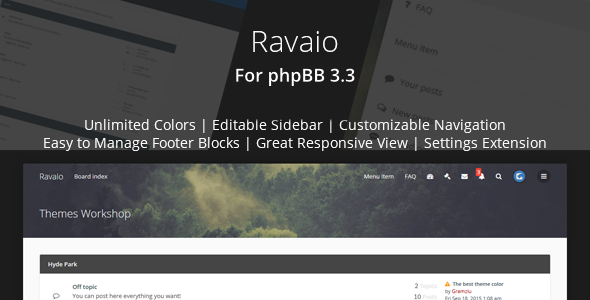
Running a phpBB forum in 2025 means balancing functionality with a modern, engaging user experience. The stock phpBB interface often feels dated, which can drive members away and make your community look neglected. Ravaio – Modern Responsive phpBB Forum Theme solves this by delivering a premium, Material Design-inspired interface that transforms your bulletin board into a polished, contemporary platform. Built specifically for phpBB 3.3 by developer Gramziu, this theme focuses on ease of use, offering deep customization options that require absolutely no coding knowledge. Whether you are launching a new community or revamping an established one, Ravaio provides the visual upgrade and user-friendly tools needed to retain members and attract new ones.
With over 1,500 sales on ThemeForest, this theme has proven its reliability and popularity within the phpBB community. It is not just a cosmetic layer; it is a comprehensive design system that includes a powerful settings extension, multiple layout variants, and extensive support for popular phpBB extensions. This article explores the features, use cases, and technical specifications of Ravaio to help you determine if it is the right foundation for your forum.
Key Features
Ravaio is packed with features designed to give you complete control over your forum’s appearance and functionality without touching a single line of code. Here are the standout capabilities:
- Ravaio Settings Extension: A dedicated control panel that centralizes all customization options. You can manage colors, menus, sidebars, and layouts through an intuitive interface, making theme management straightforward for any administrator.
- Unlimited Color Options: Use the built-in color picker to create a unique brand palette. Unlike themes with fixed color schemes, Ravaio allows you to adjust every element to match your community’s identity perfectly.
- Multiple Theme Variants per User: Empower your members to choose their preferred visual style (including a dark preset). This feature enhances user experience by letting individuals customize their viewing environment.
- Sticky Header & Footer: Keep navigation accessible with a sticky header option. The sticky footer ensures important information is always visible, improving overall site usability.
- Advanced Layout Control: Choose between boxed and wide layouts, and configure separate header options for the front page versus other pages. This granular control allows you to craft a unique landing experience.
- Versatile Sidebar Management: Edit sidebar blocks directly through the extension, eliminating the need to modify template files. You can display the sidebar on the front page, forum page, topic page, or any combination.
- Mega Menu & Dropdowns: Create a comprehensive mega menu in the header and manage dropdown menus via the extension. This is essential for forums with many categories or sections.
- Redesigned UCP and MCP: The User Control Panel and Moderator Control Panel are fully restyled to match the modern aesthetic, providing a cohesive experience for members and staff.
- Mobile-First Responsiveness: The theme is fully responsive and retina-ready, ensuring sharp images and optimal layouts on any device, from desktop monitors to smartphones.
- Extensive Icon Integration: Includes Font Awesome icons and custom icons for topics and forums, adding visual clarity and polish to content lists.
- Language & RTL Support: Works with any language and includes support for RTL (Right-to-Left) languages, making it a viable option for international communities.
- Social Media Integration: Add social icons to both the header and footer menus, helping you connect your forum with your broader online presence.
- Customizable Post Blocks: Choose between two variants of post blocks and decide how poster information is displayed—either in a dropdown box or directly under the avatar.
Who Is This For? Use Cases
The Ravaio theme is versatile enough to serve a wide range of online communities. Its combination of aesthetic appeal and functional depth makes it a strong candidate for various use cases.
Community Managers & Forum Administrators
If you manage a niche community, support forum, or general discussion board, Ravaio provides the tools to create a branded environment that stands out. The ability to customize colors, menus, and layouts without coding knowledge is a huge time-saver. The redesigned UCP and MCP also streamline moderation tasks, making it easier for your team to manage user reports and content.
Developers & Agencies
For developers building forums for clients, Ravaio offers a professional, out-of-the-box solution. The extensive documentation and support for popular extensions like mChat and Recent Topics reduce development time. The availability of LESS source files on request allows for advanced customization, enabling you to create truly unique theme variants for your clients.
Gaming & Hobbyist Communities
Gaming clans, modding communities, and hobbyist groups often rely on forums to organize and communicate. Ravaio’s modern, clean design is far more appealing to younger audiences than the default phpBB look. Features like the mega menu and custom topic icons help structure large volumes of content, making navigation intuitive for members.
Business Support Portals
Companies using phpBB for customer support can benefit from Ravaio’s professional appearance. The sticky header, quick login box, and mobile-friendly breadcrumbs improve the user experience for customers seeking help. The ability to integrate Google Analytics and other official extensions ensures you can track performance and integrate with your existing business tools.
Technical Details & Compatibility
Understanding the technical underpinnings of a theme is crucial before making a purchase. Ravaio is built with a focus on compatibility and performance.
- phpBB Version: The theme is explicitly designed for phpBB 3.3. The changelog shows a consistent history of updates to maintain compatibility with the latest phpBB releases, including 3.3.13.
- Extension Support: It supports all official phpBB extensions, including Auto Groups, Board Rules, Board Announcements, Google Analytics, and Pages. It also includes support packages for popular unofficial extensions like Recent Topics, mChat, and Last Post Avatar.
- Browser Compatibility: The theme is built using valid HTML and CSS, ensuring it functions correctly across all modern browsers, including Chrome, Firefox, Safari, and Edge.
- Responsive & Retina Ready: The theme is fully responsive, adapting to any screen size. Retina support ensures high-resolution images and icons remain sharp on modern displays.
- Performance: Ravaio uses compressed CSS files by default and includes performance improvements like lazy loading for recent post avatars and preconnect to the Google Fonts domain. This helps maintain fast page load times.
- Customization Assets: LESS source files are available on request, allowing developers to create custom variants efficiently. The theme also supports custom CSS input directly from the ACP for quick tweaks.
Pros and Cons
No theme is perfect for every situation. Here is a balanced look at the strengths and potential drawbacks of Ravaio.
Pros
- Zero-Code Customization: The Ravaio Settings Extension is incredibly powerful, allowing you to change nearly every visual aspect of the forum without editing a single file.
- Modern Material Design: The interface feels fresh and contemporary, significantly improving the user experience compared to the default phpBB theme.
- Active Development: With a changelog showing regular updates for compatibility and improvements, you can trust that the theme will remain functional as phpBB evolves.
- Excellent Value: At $29.00, it is a cost-effective solution for a premium-looking forum, especially when compared to the cost of custom development.
- User Choice: The option for users to select their own theme variant is a rare and valuable feature that boosts member satisfaction.
- Strong Social Proof: Over 1,500 sales indicate a proven track record and a community of users who have tested the theme in various environments.
Cons
- Specific Platform: This theme is exclusively for phpBB 3.3. If you are using an older version or considering migrating to a different forum platform, this is not the right choice.
- Potential Learning Curve: While the settings extension is user-friendly, the sheer number of options might feel overwhelming at first for new administrators.
- Extension Compatibility: While many popular extensions are supported, you should verify that any niche or custom extensions you use are compatible with the theme’s layout.
Frequently Asked Questions
Is Ravaio compatible with the latest version of phpBB?
Yes. The developer, Gramziu, maintains a strict update schedule. The theme’s changelog shows compatibility updates for phpBB 3.3.13, ensuring it works with the most recent security and feature releases. It is always recommended to check the theme’s support page for the latest compatibility notes before updating your forum.
Can I use this theme on a live forum without losing my existing content?
Absolutely. Ravaio is a theme, not a content migration tool. Installing it will change the visual presentation of your forum but will not alter your posts, users, or topics. The installation process is standard for phpBB themes, and the included documentation provides clear, step-by-step instructions to guide you through the process safely.
What kind of support can I expect after purchasing the theme?
Purchasing the theme grants you access to the dedicated support system on ThemeForest. You can contact the developer directly through the support tab on the theme’s page. The theme also includes detailed documentation that covers installation, configuration, and troubleshooting, providing a solid foundation for self-service support.
Final Verdict
Ravaio – Modern Responsive phpBB Forum Theme stands out as a top-tier solution for anyone serious about running a modern, engaging phpBB community. Its strength lies in its remarkable balance of power and simplicity. The extensive customization options, typically reserved for developers, are made accessible to everyone through the intuitive settings extension. This, combined with the modern Material Design aesthetic and robust feature set, makes it a compelling upgrade over the default phpBB interface.
Developer Gramziu has demonstrated a clear commitment to quality and longevity. The theme’s consistent update history, which includes compatibility patches for every minor phpBB release, is a strong indicator of its reliability. With over 1,500 sales and a solid reputation on ThemeForest, you are not just buying a theme; you are investing in a product with a proven track record. The fact that it supports a wide range of official and unofficial extensions ensures that your forum can grow and adapt without being constrained by its design.
For a one-time investment of $29.00, the value is exceptional. You are getting a premium, responsive, and highly customizable theme that would cost significantly more to develop from scratch. If you are ready to elevate your phpBB forum’s appearance, improve user engagement, and provide your members with a modern, enjoyable experience, Ravaio is an excellent choice. Don’t settle for a generic forum look—give your community the visual identity it deserves and purchase Ravaio today.