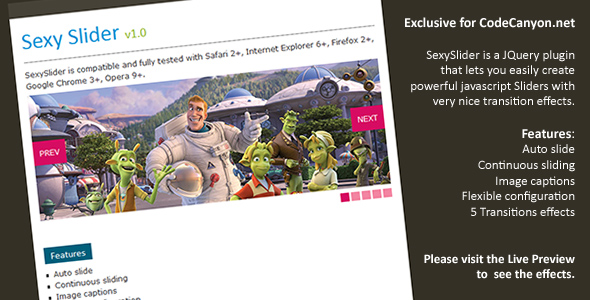
Sexy Slider is a jQuery plugin that turns a set of images into an animated slideshow with captions, automatic playback and six different transition effects. It is a small, self-contained script sold on CodeCanyon for $8, aimed at developers and site owners who want a lightweight image rotator they can drop into an existing page and configure through parameters rather than a full content management system. With 2,072 sales and a 4.48 out of 5 rating across 348 reviews, it has a long track record — though the vendor’s most recent update dates to December 2011, which matters for anyone building today.
What the plugin actually does and where its configuration goes
The core mechanic is straightforward: the script takes a collection of images, stacks them, and cycles through them on a timer. Everything else is built around controlling that cycle.
Transition effects. Six effects ship with the plugin, including a fade option added in version 1.3. Transitions are the part most visitors notice, and having several to choose from lets a site match the motion to its tone — a slow crossfade for a photography portfolio, something snappier for a product banner. The effect is selected through a configuration parameter, so switching does not require editing the JavaScript itself.
Captions with positional control. Each slide can carry a text caption, and version 1.2 introduced a parameter for placing that caption. Version 1.4 added a style parameter and four callback events — TitleShow, TitleHide, onComplete and onSlideshowEnd — which fire at defined points during playback. In practice these hooks let a developer synchronise other page elements with the slider: dimming a background, triggering an animation, or logging when a full pass through the images finishes.
Automatic and continuous playback. The slider advances on its own, and a continuous mode loops indefinitely rather than stopping after one pass. An AutoPause parameter, added in version 1.1, suspends the timer — typically on hover — so a visitor can read a caption without the slide changing underneath them. An alternate direction option reverses the sequence on each cycle, which produces a back-and-forth motion instead of a constant forward march.
Per-image links. Version 1.1 introduced the ability to attach a hyperlink to individual images, marked as beta in the changelog. This turns the slider from decoration into navigation — a rotating set of campaign banners or featured articles where each panel leads somewhere.
Editable source. The package includes the JavaScript, HTML and CSS source files, so the markup and styling can be rewritten rather than overridden. For a developer who wants the slider to inherit a site’s existing design language, that is more useful than a locked-down widget.
Projects where this slider fits, and where it does not
The strongest fit is a static or hand-built website — a small business site, a portfolio, a landing page — where a developer already controls the HTML and simply needs a rotating image panel without pulling in a framework. Because the plugin depends only on jQuery, it slots into older codebases that already load that library. The included source files also make it reasonable for a freelancer delivering a bespoke template who wants to restyle the controls and captions to match a client’s brand.
It is also a sensible choice for a legacy site that must keep working in old browsers. The vendor lists compatibility with Internet Explorer 6 through 9 alongside Firefox, Safari, Opera and Chrome — a range that modern slider libraries have long abandoned. A project maintaining an intranet or an institutional site with an ageing audience may value that explicitly.
Where it is the wrong choice: any new build that needs responsive behaviour. The vendor does not claim high-resolution or retina support, and nothing in the specification suggests the slider adapts its layout to mobile screens. A site designed mobile-first, or one where images must scale fluidly across viewports, should look at a CSS-driven or modern JavaScript carousel instead. The same applies to anyone who needs touch-swipe gestures, accessibility features such as keyboard controls and ARIA labelling, or lazy loading — none of these appear in the product data, and a script last updated in 2011 predates most of them as standard expectations.
Strengths and limitations in plain terms
Strengths
- Very low cost. At $8 it is an easy line item on any project budget, with no subscription or per-site licensing complexity described.
- Proven by volume. More than two thousand sales and a 4.48 rating from 348 buyers is meaningful evidence that the script does what it advertises for most people who try it.
- Genuinely editable. JavaScript, HTML and CSS source files are included, so the appearance and behaviour can be changed rather than merely configured.
- Event hooks. The four callbacks added in version 1.4 give developers real integration points, which is unusual at this price.
- Broad legacy browser support. Explicit compatibility with IE6 through IE9 makes it viable for projects that cannot modernise.
- Documented iteration. The changelog shows a clear progression from first release through six effects, captions, links and events — evidence the author, aeroalquimia, refined the product in response to use.
Limitations
- Stale codebase. The last vendor update was 16 December 2011. Any bug or browser change since then is unaddressed, and buyers should assume no further maintenance.
- No stated responsive or high-resolution support. The specification explicitly answers “No” to high-resolution, and mobile layout behaviour is not described at all.
- Image links are beta. The per-image linking feature was flagged as beta in 2010 and never marked stable in the changelog, so it deserves testing before relying on it.
- jQuery dependency. The plugin requires jQuery to be loaded, which adds a request and a library to pages that might otherwise avoid it.
- No accessibility provisions documented. Nothing in the listing mentions keyboard navigation, screen-reader labelling or reduced-motion handling — gaps that carry legal and usability risk on public sector or compliance-sensitive sites.
How it compares with the wider slider category
Sliders now fall into roughly three groups: CSS-only carousels, modern JavaScript libraries with responsive and touch support, and small jQuery plugins like this one. CSS-only options are the lightest and need no script at all, but they offer limited caption logic and fewer transition choices. Modern libraries handle touch gestures, responsive breakpoints, accessibility and lazy loading out of the box, at the cost of a larger footprint and often a build step.
Sexy Slider sits in the third group, and its appeal is narrow but real. Against modern libraries it loses on responsiveness, accessibility and maintenance. Against CSS-only approaches it wins on configurability: captions, per-image links, event callbacks and six transitions are more than pure CSS comfortably delivers. The deciding factor is the surrounding project. On an established jQuery-based site with fixed-width layouts and a need for legacy browser support, this plugin is competitive and cheap. On a new responsive build, a modern library is the better default and the $8 saving is irrelevant next to the rework required.
Frequently Asked Questions
Is Sexy Slider still maintained and safe to use in 2024?
No, it is not actively maintained. The vendor’s last recorded update is 16 December 2011, so no bug fixes, security patches or browser compatibility work have shipped since then. It remains functional for its original purpose on stable, older stacks, but buyers should treat it as a frozen product and test it thoroughly before deploying on any site handling sensitive data.
Does Sexy Slider work on mobile phones and tablets?
The vendor does not state mobile support, and the specification answers “No” to high-resolution output. The listed browser compatibility covers desktop versions of Internet Explorer, Firefox, Safari, Opera and Chrome only. There is no mention of touch gestures or responsive resizing, so a mobile-first project should assume it will not behave well without custom work.
What do you get in the download for $8?
The package includes the JavaScript, HTML and CSS source files, plus a minified version of the script added in version 1.1. Buyers receive the full plugin with all six transition effects, caption and auto-pause parameters, and the event callbacks introduced in version 1.4. A standard CodeCanyon licence applies, so the terms of use depend on the licence tier chosen at checkout.
Can each slide link to a different page?
Yes, per-image linking was added in version 1.1, though the changelog labels it as beta. The feature lets individual slides point to separate URLs, which suits rotating banners or featured-content panels. Because it was never marked stable in later releases, it is worth testing each link across the browsers a project needs to support before going live.
Verdict
Sexy Slider earns its place for a specific buyer: a developer or site owner working on an established jQuery-based site with fixed-width layouts, possibly with legacy browser requirements, who needs an inexpensive image rotator with captions and configurable transitions. The sales volume and 4.48 rating suggest it has served that audience well. It is not the right purchase for anyone building a responsive, mobile-first site, for projects with accessibility obligations, or for teams that expect ongoing vendor support. The $8 price makes the decision low-risk, but the 2011 update date means the real cost is the testing and customisation required to make it fit a modern page.