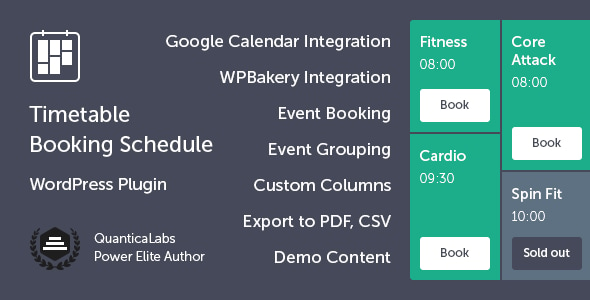
Timetable Booking Schedule for WordPress Calendars is a commercial plugin from QuanticaLabs that builds class, event and appointment schedules inside WordPress and lets visitors reserve a place on them without leaving the page. It suits gyms, studios, clinics, schools, conference organisers and similar businesses that publish a recurring weekly or monthly timetable and need bookings attached to it. The plugin has sold 10,876 copies on CodeCanyon and holds a 4.54 out of 5 rating across 330 reviews.
That combination of volume and score is unusual for a niche scheduling tool, and it is the main reason the plugin keeps appearing on shortlists. The review below covers what it actually does, where it fits, and where a different approach may serve a project better.
What the plugin actually does: scheduling, booking and distribution
The core of the product is a shortcode generator. Rather than hand-building a grid of HTML, an administrator selects which events and categories to show, chooses the columns (days, rooms, trainers, locations), sets the time interval and picks a layout. The generator outputs a shortcode that can be dropped into any page or post. That matters because it means the same timetable data can be rendered several ways — a full weekly grid on one page, a filtered list on another — without duplicating content.
Booking is built in rather than bolted on. Each event can carry a maximum number of places, a per-user booking limit, and optional terms and conditions acceptance. Guest booking is supported, so a visitor does not need an account to reserve a slot. A dedicated bookings panel handles the administrative side: reviewing reservations, exporting them as CSV, and tracking who booked what.
Notifications run through configurable email templates for both administrators and bookers, with SMTP settings available for sites whose host restricts the default mail function. Confirmation and cancellation messages are sent automatically. This is the part that separates a genuine booking tool from a display-only calendar, because a reservation that nobody is told about is not much use.
Google Calendar integration works in both directions. Events can be imported from a Google Calendar and exported back to it, which is useful when staff already maintain their schedule in Google and do not want to enter everything twice. Separately, any timetable view can be exported to PDF for printing or sharing with people who will never visit the website.
Events are stored as a custom post type, which is a WordPress term for a content type that behaves like posts but is separate from them. Each event can have multiple occurrences — recurring instances with their own dates — and a dedicated shortcode displays all occurrences of a chosen event on one page. An upcoming events widget provides a scrollable list of today’s or future sessions, which is the format most sites end up putting in a sidebar.
Presentation controls are broad. There are multiple event block layouts, dropdown and tab-based filtering, grouping by time interval, customisable tooltips, individual event colours via a colour picker, Google Fonts, custom CSS, and flexible time formats. Right-to-left language support is included, and WPML compatibility means the timetable can be translated on multilingual sites.
Where this fits, and where it does not
The clearest fit is a business that runs a repeating weekly schedule with a fixed capacity per session. A yoga studio publishing a Monday-to-Sunday grid, a swimming pool with lane bookings, a dance school with term-time classes, a clinic with appointment slots, or a conference with parallel tracks across rooms — all of these map directly onto the columns-and-intervals model the plugin uses.
It also suits agencies building sites for those clients. The one-click demo importer, the WPBakery integration and the Elementor compatibility mean a working timetable can be stood up quickly and then restyled per project. Source files are included, so a developer who needs to adjust the JavaScript or CSS can do so rather than fighting the plugin’s defaults.
Where it is the wrong choice is any project needing true time-slot inventory with variable duration, buffer time between appointments or staff-specific availability rules. This is a timetable with seat limits, not a diary system. A salon that needs to offer a 45-minute colour treatment with 15 minutes of clean-down between clients, or a clinic that needs each practitioner’s day managed independently, will hit the edges of what event-level capacity limits can express. Those projects are better served by a dedicated appointment-booking platform, even though it will cost more and require more setup.
Very large or highly dynamic schedules are also a poor fit. The plugin is built around a structured grid, and sites with hundreds of events changing daily will find a database-driven events calendar with search and filtering more practical.
Strengths and limitations
Strengths
- Booking, notifications and timetable display live in one plugin, so there is no need to pair a calendar with a separate reservation tool and reconcile two sets of data.
- The shortcode generator makes layout changes quick, and the same events can be presented as a grid, a list or a filtered view.
- Capacity limits, per-user booking caps and guest booking cover the common commercial cases without custom development.
- Google Calendar sync in both directions reduces double entry for organisations that already live in Google’s ecosystem.
- PDF and CSV export cover the two audiences that most often sit outside the website: attendees who want a printable copy, and administrators who need reservation data in a spreadsheet.
- WPML compatibility and RTL support make it viable for multilingual and non-Latin-script sites.
- The plugin works without WPBakery installed, so it is not locked to a single page builder.
Limitations
- Compatibility is declared up to WordPress 7.0.x and back to 4.9.x, but the vendor lists Internet Explorer 8 through 11 as supported browsers. That is a legacy footprint, and it says nothing about how the plugin behaves under current block-based themes beyond the stated Block Editor and Elementor support.
- The listing does not state a maximum number of events or bookings the plugin handles comfortably, nor does it describe database behaviour at scale. Anyone planning thousands of recurring occurrences should test before committing.
- Booking is capacity-based rather than availability-based. There is no documented support for variable session lengths, buffers between bookings, or per-staff calendars.
- Payment collection is not mentioned anywhere in the product data. Bookings appear to be reservations only, so a site that needs to take a deposit or full payment at the point of booking will need an additional payment layer.
- Support runs through a forum rather than a ticket system, with a stated aim of 24 hours on weekdays and possible extension to 48. That is reasonable for the price but not instant.
- The plugin is marked as not Gutenberg-optimised, so block-based editing of timetables is not the primary workflow.
How it compares with the wider scheduling category
Three broad alternatives exist. The first is a hosted booking service — a subscription platform that handles scheduling, payments, reminders and client records. Those generally win on appointment logic and lose on cost, data ownership and design control, since the schedule usually lives in the vendor’s interface rather than inside the WordPress theme.
The second is a general-purpose events calendar plugin. Those are stronger at one-off events, archives, search and structured data for search engines, but they typically stop at displaying events. Adding booking means adding another plugin, and the two rarely share a data model cleanly.
The third is custom development. That gives complete control over availability rules and pricing, at a cost that only makes sense for organisations with unusual requirements or very high booking volumes.
Timetable sits deliberately in the middle. It is a self-hosted WordPress plugin that covers display and reservation in one package, priced once rather than monthly, and it leans toward repeating scheduled sessions rather than one-off events or personal appointments. Buyers whose needs match that shape get a lot for the money. Buyers whose needs do not match it will find the gaps frustrating regardless of the price.
Frequently Asked Questions
Does Timetable Booking Schedule for WordPress require WPBakery Page Builder?
No. The plugin works fully without WPBakery installed, and it also declares compatibility with Elementor, Elementor Pro, Beaver Builder, Cornerstone and the Block Editor. WPBakery integration is offered as a convenience for sites already using that builder, letting timetable layouts be managed inside the builder interface rather than through shortcodes alone.
Can visitors book a class without creating an account?
Yes. Guest booking is supported, alongside bookings from logged-in users. Administrators can set a maximum number of places per event and limit how many bookings an individual user may make, and an optional terms and conditions checkbox can be required before a reservation is submitted.
Does the plugin take payments for bookings?
The product data does not mention payment processing at all. Bookings appear to be reservations with email confirmation rather than paid transactions, so a site that needs to collect a deposit or full fee at the point of booking would need to add a separate payment solution and connect it to the booking flow.
Can the timetable be exported or synced with Google Calendar?
Both are supported. Any timetable view can be exported to PDF for printing or sharing, and reservations can be exported as CSV for spreadsheet use. Google Calendar integration works in both directions, so events can be imported into the timetable and exported back out to keep external calendars in step.
Verdict
This plugin is a sensible purchase for gyms, studios, schools, clinics, conference organisers and agencies that publish a repeating schedule and want visitors to reserve a place on it directly from the page. The combination of a shortcode-driven timetable builder, capacity-based booking, email notifications, Google Calendar sync and PDF export covers most of what those sites need in a single install, and the 10,876 sales with a 4.54 rating suggest the approach holds up in practice.
It is the wrong buy for anyone needing true appointment scheduling with variable durations, buffer times, per-staff availability or payment at the point of booking. Those projects should look at a dedicated booking platform instead, and accept the higher cost and reduced design control that comes with it. For everyone else, the deciding question is simply whether a fixed-capacity recurring timetable matches how the business actually operates.