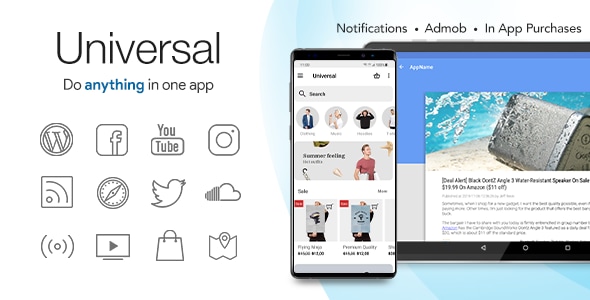
Universal – Full Multi-Purpose Android App is a $29 CodeCanyon template that lets a website owner assemble an Android app from existing online content without writing Java. It ships as an Android Studio project with .java and .xml source files, and it pulls posts, videos, audio, products and feeds from services such as WordPress, YouTube, WooCommerce, RSS and SoundCloud into a single native shell. It suits freelancers, agencies and publishers who want a branded Android presence for content they already host elsewhere, and who are comfortable working through configuration rather than building an app from zero.
What the template actually does well
The core idea is content aggregation. Instead of locking an app to one source, Universal treats each provider as a module that can be switched on and arranged. A publisher can mix a WordPress blog with a YouTube channel, a podcast RSS feed and a WooCommerce catalogue inside one navigation structure, then decide which items get icons, which sit in their own section and which are highlighted. That flexibility is the product’s main selling point, and it is the reason the template has accumulated 7,291 sales and a 4.67 rating across 569 reviews.
Presentation follows current Material Design conventions. Layouts are animated, the colour scheme is adjustable throughout, and navigation can be built as tabs, a drawer, or a combination of both. On tablets the template switches to a two-pane layout, and detail screens for articles and media drop into an immersive reading view. For a template at this price, that level of responsive polish is unusual.
Several features remove work that would otherwise require custom development:
- Dynamic remote configuration. The app reads its settings from a configuration file hosted online. Content sources, colours and menu structure can be changed after release without pushing a new build to Google Play, which matters because store review cycles are slow.
- Push notifications through OneSignal. Messages and links can be sent to installed users, which is the standard way to bring people back into a content app.
- Offline saving and favourites. WordPress posts and RSS articles can be stored for offline reading, and web pages, YouTube videos, Tumblr and Flickr images, SoundCloud tracks and WordPress audio can be saved locally. Users can also submit items as favourites.
- Advertising and in-app purchase. AdMob banners and interstitials are built in, and in-app purchases can be used to remove ads or unlock extra content.
- Comments and sharing. Comments from YouTube, Facebook, WordPress and Instagram can appear inside the app, with Disqus support for WordPress, and users can share content outward.
- Compliance and localisation. A privacy consent screen can gate access until users accept a policy, and the interface is translatable from a single file with right-to-left layout support.
Two delivery routes are offered. Buyers can download the source and work in Android Studio, or use the vendor’s online builder to configure the app through a browser and compile it in the cloud into an installable APK. The builder also exports customised source code, so a project can be started visually and finished in code. Documentation covers installation, import and customisation step by step, which is aimed squarely at people who have never built an app before.
Where this template fits, and where it does not
The strongest fit is an organisation that already publishes content and wants a lightweight Android companion. A WordPress-run news site, a church or club with a podcast feed, a radio station streaming Shoutcast or Icecast with now-playing metadata, a small retailer with a WooCommerce store, or a creator with a YouTube back catalogue can all be represented without commissioning bespoke development. Agencies building several small client apps benefit too, because the remote configuration and builder reduce per-project setup time.
It is a poor choice for anything that depends on custom backend logic. If the app must talk to a proprietary API, handle user accounts stored on your own servers, run complex offline sync, or support real-time features beyond media streaming, the template’s provider-based model becomes a constraint rather than a shortcut. Buyers should also note the vendor’s own warning: Pinterest, Instagram, Facebook and Twitter have restricted or withdrawn API access, so those content sources may not work as described. Twitter and SoundCloud APIs are additionally limited to paid or exclusive access. Anyone whose app concept centres on those networks should verify current availability before purchasing.
Strengths and limitations
Strengths
- Broad provider coverage in one codebase, with the ability to combine sources freely rather than committing to a single content type.
- Remote configuration removes the need to resubmit the app for every content or branding change.
- Genuine source code access, so the template is a starting point rather than a locked platform.
- Cloud build option lowers the barrier for buyers without an Android development environment.
- Offline saving, favourites, push notifications and AdMob support are all included rather than sold as extras.
- Strong review history at a low one-off price, with no subscription attached.
Limitations
- Several advertised social providers are unreliable because of third-party API restrictions, and the vendor acknowledges this rather than fixing it.
- Twitter and SoundCloud integrations require paid or exclusive API access that is not included in the purchase price.
- The template is a native Android project, so an iOS version is not part of the package and would need to be built separately.
- Customisation beyond colours, icons and configuration means editing Java and XML, which is real development work despite the no-code builder.
- Dependence on the vendor’s online builder and configuration service introduces a third party into the build and update chain.
- The listing does not state how many providers can run simultaneously before performance suffers, so heavy configurations should be tested before launch.
How it compares with the wider category
Android app templates generally fall into three groups: single-purpose templates tied to one platform, webview wrappers that simply display a mobile site, and multi-provider frameworks like this one. Webview wrappers are cheaper to run but feel like a browser, offer little offline behaviour and cannot mix native content types. Single-purpose templates are simpler to configure but cannot grow when a publisher adds a podcast or a shop.
Universal sits in the third group, competing on breadth of content sources and on the remote configuration model. Its trade-off is complexity: more providers mean more settings, more API keys and more places for a configuration to break. A buyer who only needs a WordPress blog in an app is paying for capability they will not use, and a simpler template would be easier to maintain. A buyer who needs to combine several content types in one branded app gets considerably more value than the price suggests.
Frequently Asked Questions
Do I need to know how to code to use this template?
No for basic setup, yes for deeper changes. The vendor’s online builder handles configuration, branding and cloud compilation without touching code, and the documentation walks through each step. Anything beyond the builder’s options, such as new content providers or altered layouts, requires editing the included Java and XML source files in Android Studio.
Which content sources can the app pull from?
Supported providers include WordPress, YouTube, Vimeo, WooCommerce, RSS and podcasts, SoundCloud, radio and Shoutcast or Icecast streams, live TV, Facebook pages, Instagram, Tumblr, Flickr, Pinterest, Maps and generic web pages. Availability varies: the vendor warns that Pinterest, Instagram, Facebook and Twitter have restricted API access, and Twitter and SoundCloud require paid or exclusive API credentials.
Can I publish the finished app to Google Play?
Yes. The cloud build service produces an executable APK that can be installed on a device or submitted to Google Play. Buyers who prefer to build locally can export the customised source code and compile it themselves in Android Studio. The vendor does not state whether it handles store submission on the buyer’s behalf, so that step is normally the buyer’s responsibility.
Can I change the app after it has been published?
Yes, within limits. The dynamic remote configuration means content sources, colours and menu structure can be updated without releasing a new version, so most day-to-day changes avoid store review. Changes to the app’s code, such as new features or layout modifications, still require a fresh build and an updated release.
Verdict
Universal is a sensible purchase for publishers, small businesses and agencies that already have content somewhere online and want a native Android app without funding a custom build. The combination of broad provider support, remote configuration, source code access and a cloud builder delivers a lot for $29, and the sales and rating history suggests the approach works for most buyers. It is the wrong choice for projects needing bespoke backend logic, iOS coverage, or heavy reliance on social networks whose APIs have been withdrawn. Buyers should confirm that their intended content sources still function before committing, and should budget time for testing rather than assuming a click-to-build app will be production-ready. Anyone unwilling to touch Java should treat the no-code builder as the ceiling of what they can achieve.