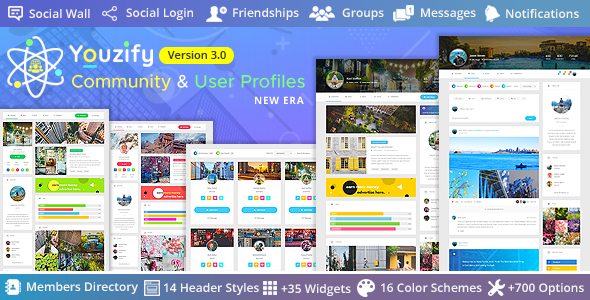
Youzify is a BuddyPress add-on that rebuilds the default WordPress user profile and community experience into a social network–style interface. It adds extended profile fields, activity streams, custom tabs and widgets, social login, and a membership layer with registration controls and privacy settings, all managed from a single admin panel. It suits site owners who want a self-hosted community rather than a rented one on a platform they do not control, and who are already committed to WordPress and BuddyPress.
The case for hosting a community on infrastructure the site owner controls is straightforward. Groups on third-party platforms can be removed, restricted, or repriced without notice, and the audience built there is never truly owned. Youzify Membership approaches the problem from the opposite direction: the profiles, the activity, the friendships and the registration data all live in the site’s own database, and the plugin supplies the interface layer that makes those profiles worth visiting.
What Youzify actually adds to a BuddyPress site
BuddyPress on its own is functional but plain. It provides the social graph — members, activity, groups, private messages — but the presentation is largely inherited from whatever theme is active. Youzify supplies the missing design and configuration layer, and the scope of that layer is the main reason the plugin has the following it does.
Profile building without code
Profiles are assembled from widgets rather than templates. A site owner can decide which blocks appear on a profile page, in what order, and which member roles see them. That means a community for photographers can lead with a media gallery while a support forum leads with recent activity and unanswered questions, using the same plugin. Custom tabs and links extend this further — a profile can carry a shop tab, a downloads tab, or a link out to an external portfolio, all without touching theme files.
Membership and registration control
The membership side covers the practical mechanics that open communities usually need: social login so members do not have to invent another password, CAPTCHA on registration forms, a limit on failed login attempts, a secure password reset flow, and per-field privacy so members choose what is publicly visible. Registration fields are configurable, which matters when a site needs to collect information at signup rather than nagging members for it later. This is the part of the plugin that most directly justifies the “Membership” framing — it governs who gets in, how they get in, and what they expose once inside.
Administration at scale
The admin panel exposes over 700 settings across nine colour schemes, and it is built to work without full page reloads. That matters less on a site with fifty members and much more on one with five thousand, where every settings page load is time spent waiting. Unlimited colour schemes, custom widgets, profile structures and social network icons mean the visual layer can be matched to an existing brand rather than the other way around.
Integrations and monetisation
Youzify connects to MyCRED for points and rewards, bbPress for forums, WooCommerce for commerce, Giphy for media in posts and messages, and Mailchimp or Mailster for email lists. The monetisation options are deliberately broad: advertising slots on profiles, sponsorships, donations, and one-time or recurring charges gating forums, categories, discussions or file downloads. The vendor does not publish performance figures for any of these paths, so revenue expectations should be set by the site owner’s own audience rather than by the listing.
Where Youzify fits, and where it does not
The clearest fit is an organisation that already has an audience and wants to give it somewhere to gather. Course providers adding peer discussion to their curriculum, membership sites that want profiles to feel like part of the product rather than an afterthought, publishers building a commenter community into something more durable, and agencies delivering a community build for a client who will administer it afterwards — all of these are natural uses. The Gutenberg optimisation and the breadth of the settings panel both point at the same buyer: someone who wants to configure rather than develop.
It is also a reasonable choice for a business replacing a Facebook Group or a Discord server with something it owns, provided the existing community will follow. Migration is a human problem, not a technical one, and no plugin solves it.
The wrong choice is a site that does not need a social layer. A brochure site, a small blog with comments switched on, or a store where customers buy once and never return will not generate the activity that justifies profiles, activity streams and friend connections. Installing a community plugin on a site with no community produces empty profile pages, which look worse than no profiles at all. Similarly, anyone unwilling to run BuddyPress itself should look elsewhere — Youzify extends BuddyPress rather than replacing it, and that dependency is not optional.
Strengths and limitations
Strengths
- The profile and activity layer is genuinely configurable, with widgets, tabs and role-based visibility rather than a fixed layout.
- Membership mechanics that usually require several separate plugins — social login, CAPTCHA, login throttling, field-level privacy — are included in one package.
- Integrations with bbPress, WooCommerce, MyCRED, Mailchimp and Mailster reduce the amount of custom glue code a build needs.
- Source files are included (JavaScript, HTML, XML, CSS, PHP), so a developer can extend or restyle beyond the admin panel.
- Broad WordPress compatibility, covering versions 5.0 through 6.2, which helps on sites that cannot update core immediately.
- The plugin has been maintained over a long period, with the most recent vendor update recorded in January 2026.
Limitations
- BuddyPress is a hard requirement. Youzify does not function as a standalone community or membership plugin, and sites already using a different membership stack will face overlap rather than integration.
- The admin panel’s 700-plus options are a double-edged feature. Finding a specific setting can take longer than expected, and there is no indication that the vendor publishes a reduced or simplified mode.
- Compatibility is declared up to WordPress 6.2.x. Sites running later core versions are outside the stated support range, even if the plugin works in practice.
- Browser support lists IE10 and IE11, which is legacy coverage rather than a modern accessibility statement. The vendor does not claim WCAG conformance, and none should be assumed.
- Pricing is a one-time $89 for the standard licence, but theme authors who want to bundle it pay $199 — a different product tier with different terms, which buyers should check before assuming the lower figure applies.
- Email marketing depends on Mailchimp or Mailster being present. There is no built-in newsletter system.
How it compares with the alternatives
The realistic alternatives fall into three groups, and the comparison is about fit rather than quality.
The first is bare BuddyPress with a community-oriented theme. This costs less and carries fewer moving parts, but it pushes profile design, membership controls and registration hardening back onto the site owner, usually through additional plugins that each need their own maintenance. Youzify consolidates that work into one dependency.
The second is a hosted community platform. These remove hosting and maintenance from the equation and often ship with better native mobile apps, but they reintroduce the control problem the plugin exists to solve. Data portability, export formats and long-term pricing are all outside the site owner’s hands.
The third is a general-purpose membership plugin paired with a separate profile solution. That combination is stronger on payment gateways, subscription logic and content restriction, and weaker on the social side — activity streams, friendships and profile widgets are usually absent or rudimentary. Youzify is the reverse: social depth first, with monetisation handled largely through integrations.
Where Youzify sits in that landscape is fairly clear. It is the option for sites where the community is the product, or close to it, and where BuddyPress has already been chosen or is acceptable.
Frequently Asked Questions
Does Youzify require BuddyPress to work?
Yes. Youzify is an extension of BuddyPress and will not function without it installed and active. The plugin supplies the profile design, membership controls and admin options, while BuddyPress provides the underlying social data — members, activity, groups and messages. Sites that cannot or will not run BuddyPress need a different solution entirely.
Can Youzify charge members for access?
It supports monetisation through integrations rather than a built-in payment engine. The vendor lists advertising on profiles, sponsorships, donations, and one-time or recurring charges to view forums, categories, discussions or downloads. In practice this means WooCommerce or a similar commerce layer handles the transaction, and Youzify handles what members see once access is granted.
Is Youzify compatible with the latest WordPress version?
The vendor declares compatibility with WordPress 5.0 through 6.2.x. Sites on later releases are outside that stated range, which does not guarantee failure but does mean support may be limited if something breaks. Anyone running a current core version should confirm compatibility with the developer before buying, especially on a production site.
Can Youzify be customised beyond the admin settings?
Yes. The package includes source files in JavaScript, HTML, XML, CSS and PHP, so a developer can modify templates, styles and behaviour directly. That said, edits to plugin files are typically lost on update, so the usual practice of using a child theme or a custom plugin for overrides applies here as well.
Verdict
Youzify is worth buying for site owners who have already decided on BuddyPress and want the community layer to look and behave like a modern social product without commissioning custom development. The combination of configurable profiles, membership controls and existing integrations covers ground that would otherwise take several plugins to reach. The 10,051 sales and a 4.98 rating across 832 reviews from developer KaineLabs indicate a mature, well-supported product rather than an experiment. It is the wrong purchase for sites with no genuine community to host, for anyone unwilling to run BuddyPress, and for projects that need deep subscription billing rather than social features. Buyers in that last group should look at a dedicated membership plugin and accept a weaker profile experience.