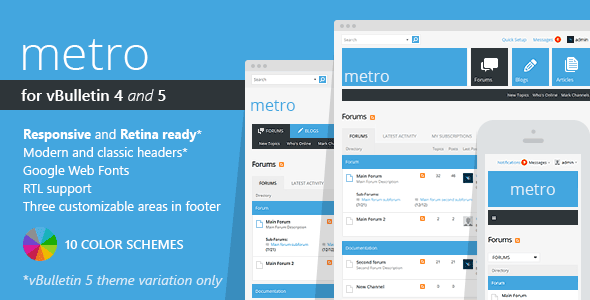
Running a thriving online community requires more than just active members; it requires a platform that is both functional and visually engaging. For administrators who prefer the robust, feature-rich environment of vBulletin, finding a modern, clean, and reliable theme can be a challenge. Metro – A Theme for vBulletin 4 and 5, developed by PixelGoose, offers a comprehensive visual overhaul that bridges the gap between traditional forum software and contemporary web design standards. This theme is designed to refresh your community’s interface with a clean, contrast-driven aesthetic while maintaining the core functionality your users expect. Whether you are managing a niche hobby forum or a large-scale support community, this skin aims to provide an intuitive and modern user experience across all devices.
Key Features
PixelGoose has packed the Metro theme with a suite of features designed to enhance both the administrator experience and the end-user interaction. The feature set is carefully curated to provide maximum customization without overwhelming the site owner. Below are the standout capabilities of this vBulletin theme:
- 10 Pre-Built Color Schemes: Choose from a diverse palette including Blue, Teal, Green, Lime, Golden, Orange, Red, Violet Red, Purple, and Black & White. This allows you to match the theme to your brand identity instantly without touching a line of CSS.
- Dual Version Compatibility (vB4): The package includes versions for both vBulletin 4.2.0 and 4.2.5, ensuring that you have the flexibility to use the theme on your specific iteration of the software.
- Fixed and Fluid Layouts (vB4): Unlike the responsive vB5 version, the vBulletin 4 iteration offers both fixed-width and fluid-width options, giving you control over how the forum scales on different monitor sizes.
- Fully Responsive & Retina Ready (vB5): The vBulletin 5 Connect version is built to be fully responsive, adapting seamlessly to tablets and smartphones. It is also retina-ready, ensuring crisp, sharp graphics on high-resolution displays.
- Editable Footer Blocks: The theme includes four custom footer blocks that can be easily managed through a dedicated page in the Admin Control Panel, allowing you to display custom content without complex template edits.
- Social Network Integration: Add links to your forum profiles on social networks directly from the “Metro Management” page, eliminating the need to manually edit templates for social icons.
- Custom Forum Icons: All forum icons have been remade from scratch to match the clean and modern aesthetic of the theme, providing a cohesive visual identity throughout the community.
- RTL Support (vB4): The theme includes built-in support for Right-to-Left languages, making it a viable option for Arabic, Hebrew, and Persian communities.
- Google Web Fonts: Typography is enhanced using Google Web Fonts, ensuring that your forum text is readable and stylish across all browsers.
- Layered PSD Files Included: For advanced users and developers, the package includes layered PSD files, allowing for deep customization of graphics if you have Adobe Photoshop skills.
Who Is This For? Use Cases
The Metro theme is versatile enough to serve a wide range of community types. Its clean design and focus on usability make it a strong contender for any vBulletin installation looking for a modern upgrade. Here are the primary user profiles that will benefit most from this theme:
Forum Administrators & Community Managers
If you are managing a vBulletin forum and your current theme feels dated or cluttered, Metro provides an immediate visual refresh. The administrative tools, such as the custom footer blocks and social link management, save significant time. Instead of hiring a developer to make minor adjustments, you can control these elements directly from the admin panel, giving you more time to focus on community growth and engagement.
Niche Communities and Support Forums
For communities centered around specific topics—such as technology, gaming, or lifestyle—the contrast and clean layout of the Metro theme help prioritize content. The 10 color schemes allow you to align the forum’s look with your niche’s branding. For instance, a tech forum might prefer the Blue or Black & White schemes, while a creative community might lean towards Purple or Lime. The focus on readability reduces visual noise, helping users find answers faster.
Developers and Design Agencies
Agencies that build and manage community platforms for clients will find the Metro theme an efficient starting point. The inclusion of layered PSD files and a clear documentation set allows developers to extend the theme further if required. The “out-of-the-box” nature of the package means you can deploy a professional-looking forum quickly, reducing project turnaround times for clients who require a stable and secure vBulletin environment.
Bloggers Using vBulletin CMS (vB4)
For users of vBulletin 4 who utilize the vB CMS and Blog features, Metro ensures that these modules are not left looking like an afterthought. The theme fully supports forums, blogs, and the CMS, providing a unified design language across all content types. This is crucial for sites that rely on both article publishing and discussion forums to drive traffic.
Technical Details & Compatibility
Understanding the technical requirements is essential before purchasing any theme. Metro – A Theme for vBulletin 4 and 5 is specifically engineered for the vBulletin platform, and its compatibility varies slightly between the two major versions.
For vBulletin 4: The theme is compatible with vBulletin 4.2.0 and 4.2.5. This version offers fixed and fluid layouts rather than responsive design, which is a standard approach for vB4 themes. It supports RTL forums and respects all default banner regions, ensuring that your advertising placements remain functional. The package includes both the 4.2.0 and 4.2.5 versions to cover different installation bases.
For vBulletin 5 Connect: The theme has been refactored for modern versions of vBulletin 5, with confirmed compatibility for versions 5.4.5, 5.5.6, 5.6.0, and 5.7.5. This version is fully responsive and retina-ready, ensuring a high-quality mobile experience. It is also described as “lighter and more stable” in recent updates, indicating performance optimizations.
Cross-Browser Support: The theme is built to work reliably across all modern browsers, including Chrome, Firefox, Safari, and Edge. This ensures that your users have a consistent experience regardless of their preferred browser.
Performance Considerations: The vBulletin 5 version of Metro has been completely refactored to be lighter and more stable. This focus on code efficiency is crucial for page load times, which directly impacts both user experience and search engine rankings.
Credits: The theme utilizes Font Awesome for its icon set, ensuring a scalable and professional vector icon experience without the need for custom image sprites.
Pros and Cons
To provide a balanced review, it is important to weigh the advantages against potential limitations. While Metro is a high-quality theme, it is designed for a specific platform and comes with considerations that buyers should be aware of.
Pros
- Extensive Customization: With 10 color schemes and easily editable footer blocks, you can achieve a unique look without coding.
- Modern Aesthetic: The clean, contrast-driven design brings vBulletin into the modern era, moving away from the dated default styles.
- Dual Platform Support: The ability to use the theme on both vBulletin 4 and vBulletin 5 makes it a versatile asset if you plan to migrate your community in the future.
- Active Development: The update history shows a commitment to compatibility with the latest vBulletin releases, including the refactored version for vBulletin 5.6.0 and 5.7.5.
- Strong Social Proof: With over 1,574 sales on ThemeForest, the theme has a proven track record of satisfying forum administrators worldwide.
- Excellent Value: At just $28.00, the theme offers a significant return on investment compared to the cost of custom design work or hiring a developer for a bespoke skin.
Cons
- vB4 Version is Not Responsive: Users on vBulletin 4 will not get a mobile-responsive layout, which could be a dealbreaker for communities with high mobile traffic. The vB5 version is responsive, but the vB4 version relies on fixed/fluid widths.
- No Support for Older vB5 Versions: While the theme supports recent vB5 versions, it does not explicitly list support for older iterations like 5.1.x or 5.2.x. You must ensure your vBulletin installation is up to date.
- Specific to vBulletin: This theme is not transferable to other forum software like XenForo or phpBB. It is strictly for vBulletin users.
Frequently Asked Questions
Is the Metro theme compatible with the latest version of vBulletin 5?
Yes, PixelGoose actively maintains the theme to support the latest releases. The product description confirms compatibility with vBulletin 5.4.5, 5.5.6, 5.6.0, and 5.7.5. The developer released a completely refactored version (2.0.0) for vBulletin 5.6.0 to ensure the theme remains lighter and more stable. If you are running an older version of vBulletin 5, you may need to update your forum software to use this theme effectively.
Can I install this theme myself, or do I need a developer?
The theme is designed for easy installation and includes full documentation to guide you through the process. If you are familiar with the vBulletin Admin Control Panel and have experience uploading files via FTP, you should be able to install the theme without issue. However, if you are new to vBulletin administration, you may want to consult a developer or rely on the support provided by PixelGoose, who are known to assist buyers with questions or installation concerns.
Does the vBulletin 4 version of Metro work with mobile devices?
The vBulletin 4 version of Metro offers fixed and fluid layouts, but it is not responsive. This means the layout will not automatically rearrange itself to fit the screen size of a smartphone or tablet. For a fully responsive mobile experience, you would need to use the vBulletin 5 Connect version of the theme, which is built with responsive design and retina-ready graphics. If mobile traffic is a priority, we recommend using vBulletin 5 with this theme.
Final Verdict
In a marketplace saturated with generic templates, Metro – A Theme for vBulletin 4 and 5 stands out as a specialized, high-quality solution for a specific platform. PixelGoose has demonstrated a clear understanding of what forum administrators need: a clean, modern interface that does not sacrifice functionality for aesthetics. The theme’s success, evidenced by over 1,574 sales, is a testament to its reliability and visual appeal. The inclusion of 10 color schemes and easy-to-edit footer blocks empowers even non-technical admins to create a unique community space.
The primary strategic advantage of this theme is its dual compatibility. Whether you are currently on vBulletin 4 or have upgraded to vBulletin 5 Connect, this package has you covered. The refactored code for the vB5 version ensures that you are not bogged down by legacy bloat, promoting faster load times and a smoother user experience. While the vB4 version’s lack of responsiveness is a minor drawback, it is a limitation of the vBulletin 4 platform itself, and the fixed/fluid options provide some flexibility.
For forum owners looking to modernize their community without breaking the bank, this theme represents a smart investment. At $28.00, it is a cost-effective alternative to hiring a designer to create a custom skin from scratch. With the backing of a responsive developer and a track record of regular updates, you are not just buying a theme; you are investing in a long-term asset for your community. If you are ready to elevate your vBulletin forum with a clean, contrast-rich, and professional design, Metro – A Theme for vBulletin 4 and 5 is a choice that delivers on its promises.