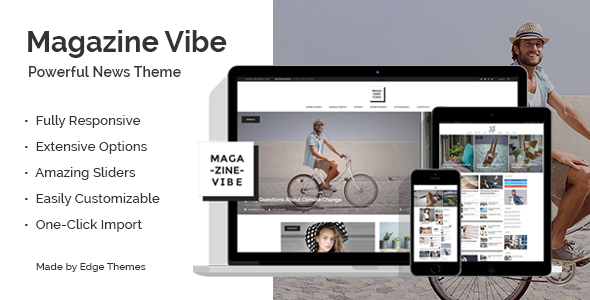
Magazine Vibe Blog Magazine is a WordPress theme built by Edge-Themes for online publications, news portals and digital magazines. It ships with twelve prebuilt homepage designs, eleven single-post layouts and a library of drag-and-drop content blocks, so an editorial site can be assembled without writing code. It suits publishers, magazine owners and agencies that want a newsroom-style front end on WordPress, and it is a poor fit for anyone who needs a lightweight blog or a strictly minimal personal site.
The theme has been on ThemeForest since the early 2010s and has accumulated 979 sales, which makes it a reasonably established option rather than a new release. The most recent update landed on 22 July 2025, and that recency matters more than the sales figure for anyone worried about abandoned software.
What the theme actually gives an editorial team
The centrepiece is the layout system. Magazine Vibe does not ask a publisher to pick one homepage and live with it. Twelve demo homepages are bundled, and each one is assembled from shortcodes — reusable blocks of content that can be dropped into any page. Seven post-layout shortcodes and ten content-block shortcodes cover the common magazine furniture: hero stories, split sliders, classic carousels, expanding video posts and section titles. A homepage can be rebuilt from those parts without touching a template file.
Category pages are handled with unusual care. Each category archive can be given its own layout, which means a fashion section can look different from a politics section on the same site. That is the kind of detail that separates a magazine theme from a general-purpose blog theme, and it is the feature most likely to justify the purchase for a multi-section publication.
Pagination deserves a mention because it is often an afterthought. The theme offers standard pagination in horizontal and vertical arrangements, a Load More button, and infinite scroll. Publishers can choose per their audience: infinite scroll suits image-heavy lifestyle content, while numbered pagination tends to perform better for news archives where readers want to jump to a specific day.
The single-post template is heavily configurable. Sticky sidebars, multiple sidebars on one page, social sharing, and a set of custom widget areas give editors control over what surrounds an article. A Breaking News widget is included for the ticker-style headline strip familiar from broadcast news sites, alongside post-list widgets, a social icons widget, and feeds for Instagram and Twitter.
On the technical side, the theme bundles WPBakery Page Builder and Slider Revolution. The vendor values these at $46 and $26 respectively, which is a meaningful part of the $79 asking price if both tools would otherwise be purchased separately. A child theme is included, which matters for anyone planning customisations that must survive future updates. The theme is translation-ready with po/mo files, integrates with WPML for multilingual publishing, and works with WooCommerce and Contact Form 7. Typography settings expose more than 600 Google Fonts, and a recent update added an option to disable Google Fonts entirely — useful for sites with European traffic and data-transfer concerns.
Header behaviour is more flexible than most. Sticky, fixed and sticky-on-scroll-up modes are all available, and the mobile header can carry its own logo and its own styling. That last point is easy to overlook until a site is checked on a phone and the desktop logo turns out to be illegible at small sizes.
Where this theme fits, and where it does not
The clearest fit is an established or aspiring online publication with distinct editorial sections. A city news portal, a fashion title, a niche trade magazine, or a digital edition built alongside a print product — these are the projects the demo set is obviously aimed at. Agencies building publication sites for clients will find the one-click demo import and the child theme useful for spinning up a starting point quickly, then handing over something the client can edit through a visual builder.
It also suits publishers who expect to grow. The combination of per-category layouts, custom sidebars, multiple header types and WooCommerce support means the site does not have to be rebuilt when a magazine adds a shop or a sponsored-content section.
Where it is the wrong choice: a personal blog with a handful of posts. The theme’s value sits in its layout machinery, and a solo writer publishing twice a month will spend more time configuring sliders and content blocks than writing. The same applies to documentation sites, portfolios and small business brochure sites, which have better-suited options at lower prices. Anyone who wants a block-based, full-site-editing WordPress experience should also look elsewhere — Magazine Vibe is built around WPBakery, a classic shortcode-based page builder, not the block editor.
Strengths and limitations
Strengths
- Twelve homepages and eleven single-post layouts provide genuine starting variety rather than cosmetic variations on one design.
- Per-category layout control, which is rare and directly useful for multi-section publications.
- Three pagination modes, including infinite scroll and Load More.
- WPBakery Page Builder and Slider Revolution are bundled, offsetting a large share of the price.
- Child theme included, so customisations survive updates.
- Active maintenance: the July 2025 release added PHP 8.3 compatibility, WooCommerce 9.x support and security improvements.
- WPML integration and translation-ready files for multilingual publishing.
Limitations
- The bundled plugins are the theme’s structural dependency. WPBakery is a shortcode-based builder, so switching themes later leaves shortcode markup embedded in page content that will not render elsewhere.
- Instagram feed functionality has been removed because of Instagram API changes, and Twitter feed support was dropped in an earlier release. Publishers who want live social feeds on the homepage will need third-party plugins.
- Demo images are not licensed for use. The vendor states plainly that they are presentational only and must be replaced with stock or original photography.
- 979 sales over roughly a decade is a modest figure for a ThemeForest theme, which means a smaller pool of community-written tutorials and forum answers than the category leaders enjoy.
- The theme carries a large feature surface, so page weight and performance depend heavily on how many sliders and content blocks a publisher stacks onto a homepage.
- No block-editor or full-site-editing workflow is offered.
How it compares with the wider magazine theme category
Magazine themes broadly split into three groups. The first is lightweight blog themes with a magazine-style homepage — cheap, fast, and limited in layout control. The second is multipurpose themes with a magazine demo, which offer breadth but rarely handle per-category layouts or breaking-news furniture properly. The third is dedicated editorial themes like this one, where the layout system is the product.
Magazine Vibe sits firmly in the third group. Its advantage over multipurpose themes is depth of editorial tooling: category-specific layouts, breaking news, split sliders and multiple pagination models are native rather than bolted on. Its disadvantage is the same as every dedicated builder-based theme — it commits a site to WPBakery, and that commitment is difficult to reverse.
Against lightweight blog themes, the trade-off is weight and complexity. A simpler theme will load faster out of the box and require less configuration. Magazine Vibe earns its overhead only when a publisher actually uses the layout options. For a site publishing several posts a day across distinct sections, that trade is straightforward. For a site publishing weekly, it usually is not.
Frequently Asked Questions
Does Magazine Vibe require any paid plugins to work?
No. WPBakery Page Builder and Slider Revolution are bundled with the theme at no extra cost, and the vendor values them at $46 and $26. WordPress itself is free. Some optional integrations, such as WPML for multilingual sites or premium form plugins, are separate purchases, but the theme functions fully without them.
Can each category page have a different layout?
Yes. The theme allows a distinct layout to be assigned to each category archive, so a news section and a fashion section can present stories differently on the same site. This is configured through the theme’s admin panel rather than through code, and it is one of the stronger editorial features on offer.
Is Magazine Vibe compatible with the latest WordPress and PHP versions?
The July 2025 update added PHP 8.3 compatibility, WooCommerce 9.x support and security improvements, alongside an updated WPML configuration file. That indicates current maintenance. As with any theme, exact compatibility should be confirmed against the specific WordPress version in use before a production deployment.
Can the demo images be used on a live site?
No. The vendor states that copyright in the demo images is not owned by them and that the images are presentational only. They must be replaced with licensed stock photography or original images before launch. Budgeting for image licensing is therefore a real cost on top of the $79 theme price.
Verdict
Magazine Vibe is worth buying for publishers running a genuine editorial operation — a news portal, a sectioned online magazine, a trade title, or a digital companion to a print product. The per-category layouts, the range of homepage and post templates, and the bundled builder and slider plugins make the $79 price reasonable for that audience, and the 2025 update shows the developer is still maintaining it. It is not the right purchase for a personal blog, a portfolio, or a small business site, where the layout machinery would go unused and WPBakery would add unnecessary weight. Anyone unwilling to commit to a shortcode-based page builder should also look at block-native alternatives before deciding.