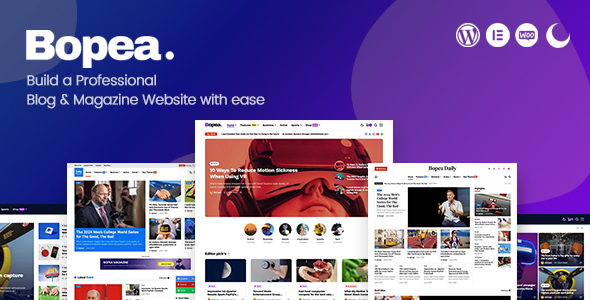
Bopea Blog Magazine is a WordPress theme built for news sites, online magazines and high-volume blogs, developed by jellywp and sold on ThemeForest for $49. It combines the Elementor page builder with Gutenberg, a dark and light colour mode, WooCommerce support and a large set of pre-built post layouts. It suits publishers who want editorial-style layouts without writing code, and it has been purchased 975 times with a strong average rating from buyers.
What the theme actually gives a publisher
The core proposition is layout variety. Bopea ships with fourteen distinct single post designs and multiple grid and list styles for archives, which means a site can run a long-form feature, a photo gallery and a short news brief without any of them looking like the same template. Column structures can be rearranged from the post editor, so an editor can change how a story displays without touching a stylesheet.
Content formatting is handled through standard WordPress post formats — video, audio, gallery, quote and standard — plus a dedicated header post style. That matters for magazines that publish mixed media: a podcast episode, a quote card and a photo essay each get an appropriate presentation rather than being forced into one article template.
Navigation and feed behaviour are where a news site lives or dies. Bopea includes Ajax loading, infinite scroll and a load-more button, all three of which change how readers move through an archive. Infinite scroll keeps people on the page but complicates analytics and footer access; load-more gives readers control. Having the choice built in rather than requiring a plugin is a practical advantage.
Design control runs through the WordPress Live Customizer, covering typography, headers, colours, backgrounds and sidebars. The theme exposes more than 800 Google Fonts, unlimited colour options and unlimited sidebars, so a publisher can match an existing brand guide. There are also category colours and category images, which let a multi-section magazine colour-code its verticals — sport in green, culture in purple — a small detail that helps readers orient themselves.
On the monetisation side, WooCommerce templates are included and updated, and the changelog shows an ads shortcode added in version 1.0.8. For a publication running both display advertising and a small shop, that reduces the number of moving parts. AMP support is present and was explicitly improved in version 1.0.7, which is relevant for publishers chasing mobile search traffic.
Under the hood, the theme is HTML5 and CSS3, cross-browser tested across Chrome, Firefox, Edge, Safari and Opera, and includes a translation file plus RTL support added in version 1.0.6. A set of custom widgets — recent posts, category image, category colour, a large-text overlay post widget, about us and social — covers most of what a magazine sidebar needs without extra plugins.
Where Bopea fits, and where it does not
This theme is aimed at editorial operations. A digital magazine with several contributors and distinct sections is the clearest fit, because the category colour and image system, the multiple archive layouts and the fourteen single post styles are all designed to differentiate content at scale. An independent blogger who publishes frequently and wants a professional-looking feed would also get value from the drag-and-drop post customisation.
News organisations matter here too. The demo set includes a daily news layout, a “Today News” demo and a sport demo, and the changelog shows eight home page demos added in version 1.1.2. A small newsroom launching a site quickly could start from one of those and adjust rather than building from zero.
It is also a reasonable choice for a publisher adding a store. WooCommerce support is maintained — template files were updated in versions 1.1.1 and 1.0.8 — so selling merchandise, subscriptions or print issues alongside editorial content is viable.
Where it is the wrong choice: a business that needs a brochure-style corporate site, a booking system or a membership portal as its primary function. Bopea is a publishing theme. Its strengths are archives, article layouts and feed presentation. A company whose main job is converting visitors into leads through landing pages would be paying for editorial machinery it will never use, and would be better served by a general-purpose multipurpose theme.
Strengths and limitations
Strengths
- Fourteen single post layouts and multiple archive grids give genuine editorial flexibility without custom development.
- Both Elementor and Gutenberg are supported, so teams are not locked into one editing workflow.
- Dark and light modes are built in, which suits long reading sessions and is increasingly expected by readers.
- Category colours and images provide a lightweight way to distinguish sections visually.
- The changelog is active and specific — releases ran from July 2024 through December 2025, with fixes to pagination, lightbox behaviour and Elementor widget styling rather than vague “improvements”.
- WooCommerce, AMP, RTL and bbPress support widen the range of projects it can serve.
Limitations
- The feature list is broad but shallow in places. Social sharing, related posts and similar functions are theme-level features; sites with complex requirements will still need dedicated plugins, and the theme does not claim to replace them.
- Infinite scroll, Ajax loading and load-more all ship together, which creates configuration decisions. Choosing poorly affects how analytics platforms record page views, and the vendor documentation does not appear to address that trade-off.
- There is no page builder beyond Elementor and Gutenberg, so teams standardised on a different builder would be starting over.
- The vendor does not publish performance benchmarks. With this many layout options, image-heavy magazine home pages can be slow, and buyers should test their own configuration rather than assume speed.
- At $49 with no stated renewal or support period in the listing, buyers should confirm support terms before purchase.
How it compares with other magazine themes
The magazine and news theme category splits roughly into three groups: lightweight themes that rely on the block editor alone, Elementor-first themes with large demo libraries, and theme-plus-plugin bundles that add their own widgets and modules.
Bopea sits in the middle. It does not force a proprietary builder the way bundled-theme products do, which keeps it portable — content remains editable in Gutenberg if Elementor is ever removed. Against lightweight block themes, it offers considerably more pre-built structure: the fourteen post layouts and category colour system would take weeks to replicate manually. Against heavier bundled products, it gives up some advanced module features in exchange for lower complexity and no dependency on a single plugin ecosystem.
The decision usually comes down to how much editorial variety the publication needs. A site publishing one type of article in one format does not need fourteen layouts. A site running news, features, galleries and reviews across several sections will use them.
Frequently Asked Questions
Does Bopea require the Elementor Pro plugin?
No. The theme supports the free version of Elementor alongside Gutenberg, and the vendor lists Elementor page builder support without naming a Pro requirement. Some advanced Elementor widgets are Pro-only by nature of that plugin, not the theme. Buyers who want to avoid paid plugin dependencies can build entirely with Gutenberg blocks.
Is Bopea suitable for a news site with multiple authors?
Yes. Multiple author support is standard in WordPress, and Bopea’s category colours, category images and varied archive layouts are designed for publications with distinct sections. The changelog also references fixes around author display. For a newsroom with several contributors, the structure is appropriate, though editorial workflow tools such as editorial calendars come from separate plugins.
Can Bopea be used to sell products alongside blog content?
Yes. WooCommerce support is included and the theme’s WooCommerce template files have been updated repeatedly, most recently in version 1.1.1. That means shop pages inherit the theme’s styling rather than looking disconnected from the editorial design. Publishers selling merchandise, subscriptions or back issues can run both from one installation.
How often is Bopea updated?
Frequently. The changelog shows releases from the initial July 2024 launch through December 2025, covering version 1.0.0 to 1.1.5. Updates addressed search ordering, gallery lightbox behaviour, Elementor widget styling, AMP rendering and pagination. That cadence suggests an actively maintained product rather than an abandoned one.
Verdict
Bopea is a well-equipped publishing theme for editors who need layout variety without development work. The combination of fourteen single post styles, Elementor and Gutenberg support, category colour coding, WooCommerce and AMP makes it a credible fit for digital magazines, news sites and prolific blogs. The 975 sales and strong rating suggest buyers have generally found it delivers what the listing promises.
It is not the right purchase for a corporate site, a service business or anyone whose main need is landing pages and lead capture. Those projects would be paying for editorial features they will never configure. Publishers who publish in several formats and sections, however, will find the breadth of layouts genuinely useful.