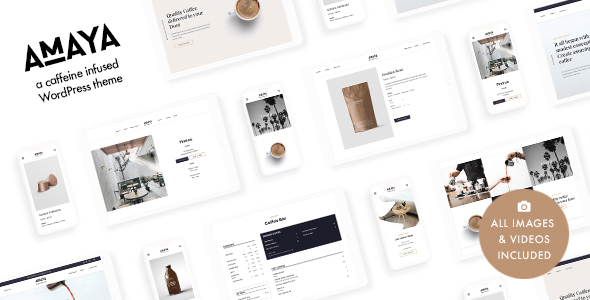
Amaya is a commercial WordPress theme built by red_sun for coffee shops, cafés, roasteries, tea rooms, bakeries and small restaurants. It pairs a template library with a block-based page builder, a dedicated menu post type and WooCommerce support, so a food or drink business can assemble a full site without writing code. It suits independent owners and freelancers building hospitality sites on a modest budget.
What the theme actually gives a café owner to work with
The feature set is organised around the practical job of publishing a hospitality site: showing a menu, telling a story, and taking orders or bookings. Several elements stand out.
A menu that exists as structured content, not a PDF
The theme registers a custom post type for menu items, which means drinks and dishes are stored as their own entries rather than typed into a page. The dedicated Menu Block then pulls those entries into a grid or list wherever it is placed. The practical benefit is maintenance: changing a price or removing a seasonal drink happens once, in one place, and every page that displays the menu updates with it. That is a meaningful improvement over the common pattern of uploading a printed menu as an image.
Eight purpose-built blocks for page composition
Amaya ships eight custom blocks. The Hero block places a background image or video behind overlay text, which is the standard way to open a café homepage. Content Boxes and Gallery both use a masonry layout, so uneven image heights stack without gaps. The Logos block handles press mentions or supplier logos and can link each one out. Blog Posts, Subtitle and Divider blocks cover the remaining layout needs. Because these are native Gutenberg blocks, they work inside the standard WordPress editor rather than a separate proprietary builder — a detail that matters if the site ever needs to be handed to another developer.
WooCommerce and the surrounding integrations
WooCommerce support means the theme can run a small online shop for beans, merchandise or gift cards alongside the informational pages. Contact Form 7 handles enquiries, MailChimp handles newsletter capture, and an Instagram Feed plugin connection pulls social photos onto the site. None of these are bundled — they are declared as compatible, which is the normal arrangement and keeps the theme lean.
Design controls and layout flexibility
More than 100 options sit in the WordPress Customizer with live preview, and the theme offers over 20 header layouts. Typography is unusually broad: 1,000+ Google Fonts are available free, and 1,900+ Adobe Fonts can be used by anyone with a Creative Cloud subscription. Two icon libraries (Font Awesome and Pe Icon 7 Stroke) combine for over 1,600 retina-ready icons. A one-click demo import installs a complete starter site, and a child theme is included for anyone modifying templates.
Practical infrastructure
The theme is translation-ready with a bundled .pot file, supports right-to-left languages, and uses a fluid responsive layout. The vendor states it is optimised for SEO and PageSpeed, though no specific scores are published, so that claim should be verified on a real install rather than taken at face value. Documentation is described as step-by-step, and support runs by email.
Where Amaya fits well, and where it does not
The clearest fit is a single-location coffee shop, café or bakery that needs a brochure site with a readable menu, a gallery, opening hours and a contact form. The demo import and block library mean a freelancer can deliver that in a short engagement rather than building templates from scratch.
A second good fit is a small roastery selling retail bags online. WooCommerce support plus the menu post type covers both the wholesale-facing story and a simple product catalogue. Agencies handling several hospitality clients will also find the child theme and header variations useful for giving each project a distinct look from one codebase.
The theme is a poor choice in a few situations. If a restaurant needs table reservations with availability logic, that is plugin territory and Amaya does not provide it. If the project requires a highly bespoke design system with custom post types beyond menus, a lighter starter theme or a full site builder will be less constraining. And a business that wants to edit its own site without learning the block editor may find a hosted website builder friendlier, even if it is less flexible.
Strengths and limitations
Strengths
- Menu items are managed as structured content, so prices and availability update everywhere at once.
- Eight custom Gutenberg blocks cover the layouts a café site actually needs, including hero video and masonry galleries.
- Broad typography control through the Customizer, with both free Google Fonts and premium Adobe Fonts supported.
- Child theme included, which protects customisations from being overwritten by updates.
- Translation-ready with RTL support, opening the theme to non-English markets.
- 974 sales on ThemeForest indicate a product with real market traction and a track record the developer has maintained since launch.
Limitations
- The SEO and PageSpeed optimisation is asserted by the vendor without published scores; performance depends heavily on which plugins and images are added, so it cannot be treated as guaranteed.
- The Adobe Fonts integration requires a paid Creative Cloud subscription, so that part of the typography offer is not actually free.
- No booking, reservation or table-management feature is included, which rules it out for full-service restaurants needing that function.
- Support is email-only; there is no phone or live chat channel listed.
- The landing page shown in the live preview is a promotional page and is explicitly not part of the theme files, so buyers should not expect that exact page to import.
How it compares with the wider hospitality theme market
Most multipurpose WordPress themes can be bent into a café site, and many restaurant themes exist. The distinction with Amaya is specialisation without overreach: it targets the coffee and bakery niche with a menu post type and blocks tuned to that use case, rather than offering a generic page builder with hundreds of unrelated demo layouts.
Against a broad multipurpose theme, Amaya trades flexibility for speed. A general-purpose theme will handle a café, a law firm and a portfolio, but the owner pays for that in configuration time and often in page weight. Against a full restaurant theme with reservation modules and online ordering built in, Amaya is narrower — it covers the shop and the story but not the booking flow. Against a bare starter theme, it saves considerable template work but offers less architectural freedom.
The right comparison is really about scope. Buyers who want one theme for many client types should look at multipurpose options. Buyers who want a coffee shop site live quickly, with a menu they can maintain, are the audience this theme was written for.
Frequently Asked Questions
Does Amaya require any coding knowledge to set up?
No coding is required for the standard setup. The one-click demo import installs a complete starter site, and the custom blocks and Customizer options handle layout and styling through the WordPress interface. Custom template changes would need PHP knowledge, which is why a child theme is included for developers who go that far.
Can Amaya sell coffee beans or merchandise online?
Yes, through WooCommerce. The theme declares WooCommerce as a supported plugin, so a shop for retail bags, merchandise or gift cards can run alongside the informational pages. WooCommerce itself is free but must be installed separately, and payment processing depends on which gateway extensions are added.
Is the Amaya theme compatible with the block editor?
Yes. Amaya is built for Gutenberg, the default WordPress block editor, and adds eight custom blocks on top of it, including hero, menu, gallery, logos and content box blocks. Pages are therefore assembled in the native editor rather than a separate page builder, which keeps content portable if the site is later moved.
Does the theme include online table reservations?
No. Amaya does not ship a reservation or table-booking feature, and the vendor does not claim one. Restaurants that need availability-based bookings would have to add a third-party reservation plugin and check that it integrates cleanly with the theme’s templates before committing to a purchase.
Verdict
Amaya is a sensible purchase for independent coffee shops, cafés, bakeries and small roasteries that need a well-structured site with a maintainable menu, and for freelancers who build those sites repeatedly. The structured menu post type and the focused block set are the real arguments in its favour, and the 974 sales suggest the approach resonates with buyers. It is not the right pick for full-service restaurants needing reservations, nor for projects demanding a fully custom design system. At $79 it sits in the normal range for a niche ThemeForest theme, and the included child theme and ongoing update history from red_sun reduce the usual risk of buying from a small studio.