Advanced iFrame Pro Utilities is a WordPress plugin that embeds external or internal web pages inside a frame on a site and then gives the site owner control over how that framed content looks and behaves. It handles resizing, cropping, zooming, lazy loading, parameter passing and link rewriting for embedded pages, and it ships as a CodeCanyon item with a free version available on the WordPress plugin directory. It suits developers, agencies and technically confident site owners who need to pull third-party content into their own pages without losing design control.
The plugin is sold by the developer mdempfle for $36 and has accumulated 11,434 sales with a 4.55 out of 5 rating across 249 reviews, which places it among the more established utilities in its category. The most recent vendor update landed on 29 March 2025, and the listing states compatibility up through WordPress 6.9.x while still claiming support back to WordPress 5.3.
What the plugin actually lets a site owner do
The core problem this plugin solves is that a standard HTML iframe is a blunt instrument. It shows a rectangle of someone else’s page at a fixed size, and anything that does not fit is either cut off or wrapped in scrollbars. Advanced iFrame Pro Utilities layers a substantial control panel on top of that basic element.
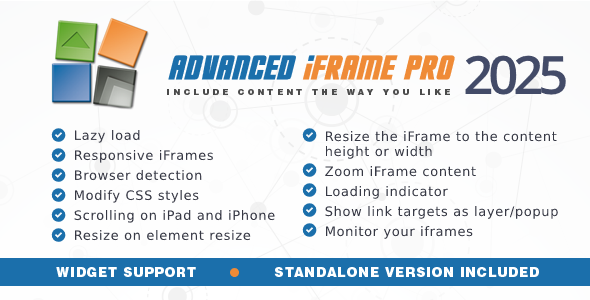
Sizing and cropping. When the embedded page sits on the same domain, or when the remote page can be modified, the frame can be resized to match the height of its content. Dynamic height changes are detected, and the plugin also handles the height of elements that are hidden at load time. When neither condition applies, the included area selector lets a mouse drag define which region of the remote page is visible, so a header, sidebar or footer can be cropped out without touching the source. Zoom works alongside this, either at a fixed ratio or as an automatic factor calculated from browser width — a practical fallback for embedding pages that were never built responsively.
Styling and layout control. CSS can be injected into the parent page, and in some configurations into the framed page as well. That makes it possible to override fixed pixel widths, hide navigation bars, or restyle embedded widgets so they blend into the host site rather than announcing themselves as foreign content.
Performance and loading behaviour. Lazy loading defers the iframe until after the main page has rendered, and the plugin can go further by loading only when the frame scrolls into view or when a visitor clicks a button. A loading indicator covers the gap while the embedded page assembles itself, which matters because iframes routinely add noticeable delay to a page load.
Links, parameters and navigation. Link targets can be rewritten in the parent and, with the right setup, inside the iframe itself. External links can open in an overlay layer on top of the current page instead of sending visitors away, and that layer can carry its own header and footer. Parameters can be parsed and forwarded from the parent, placeholders such as the current WordPress username are supported, and the iframe URL can be appended to the parent URL so a specific embedded view remains bookmarkable.
Device handling. Browser and device detection allows different iframes, or different regions of the same iframe, to be served to different visitors. An iOS-specific workaround addresses the platform’s long-standing difficulty with scrolling inside iframes, and it is scoped so it does not interfere with other operating systems.
Monitoring and maintenance. An iframe checker runs inside the plugin and can test every iframe on the site once a day, in parallel, including frames that were not created by this plugin. It reports whether each one can still be embedded, which is the difference between finding out from a monitoring report and finding out from a visitor staring at a blank space.
Editor and widget integration. A Gutenberg block adds an iframe with a live preview directly in the block editor, and a widget covers widget areas. The underlying code is not limited to WordPress — the vendor notes it can be used on any PHP page where a few lines can be inserted. Source files for JavaScript, CSS and PHP are included.
Where this fits, and where it does not
The strongest fit is a site that needs to display content it does not control. A membership site embedding a third-party booking calendar, a marketing site pulling in a supplier’s product catalogue, a dashboard aggregating several external tools, or an agency building a landing page around a client’s existing web application — all of these are cases where an iframe is the only realistic integration and the default behaviour is not good enough.
It also suits anyone migrating a legacy non-responsive page into a modern layout. Auto zoom can shrink a fixed-width page to fit a phone screen when no other option exists.
The plugin is the wrong choice when the goal is to import content rather than display it. If the requirement is to pull text, images or posts from another site into the WordPress database so they can be searched, indexed and styled natively, an iframe is the wrong tool regardless of how well it is configured. Search engines treat framed content as belonging to the source domain, and the host site gains no SEO benefit from it. Sites that need genuine content integration should look at feed importers or the REST API instead.
It is also a poor fit for anyone unwilling to work with HTML and CSS. The vendor states plainly that basic HTML and CSS knowledge is needed to identify elements on a page, and that is not a disclaimer added for legal cover — it reflects how the cropping and CSS override features actually work.
Strengths and limitations
Strengths
- Deep control over iframe presentation: cropping, zoom, CSS injection and responsive sizing in one interface.
- Lazy loading options go beyond the usual deferral, including load-on-visible and load-on-click.
- Built-in daily iframe checker monitors frames created outside the plugin as well, which is unusual and genuinely useful for maintenance.
- Parameter forwarding, placeholders and bookmarkable iframe URLs handle state in ways a plain iframe cannot.
- Long track record — 11,434 sales and a 4.55 rating from 249 reviews is a meaningful signal of stability.
- Gutenberg block with live preview, plus a widget for non-block themes.
- Source files included, and the code can run outside WordPress on any PHP page.
Limitations
- The most requested features — resizing a remote frame to its content height and modifying its CSS — require adding a line of JavaScript to the remote page. If the third party will not cooperate, those features are unavailable and the area selector becomes the fallback.
- HTTP pages cannot be embedded inside HTTPS pages. This is a browser security rule the plugin cannot work around, and it rules out older third-party sources entirely.
- Third-party cookies inside iframes remain unreliable, particularly in Safari and Internet Explorer. The plugin offers a workaround, but the vendor presents it as a possible fix rather than a guaranteed one.
- Configuration is dense. The settings surface is large enough that setup time is real, and the vendor’s own advice is to read the quickstart and feature comparison chart before purchasing.
- Updates purchased through CodeCanyon require migrating to the Freemius licensing system, which adds a step for existing buyers.
- Pricing is stated as $36 on CodeCanyon, with a subscription option described as low as $0.99 per month. The vendor does not state on the listing what happens to updates if a subscription lapses.
How it compares with the alternatives
Most WordPress iframe plugins are thin wrappers: a shortcode, a width and height field, and nothing more. They are adequate when the embedded page is cooperative — same domain, responsive, and free of anything that needs hiding.
Advanced iFrame Pro Utilities competes in a different tier, alongside general-purpose embed and content-mapping tools. Against plain iframe plugins it wins on control but costs more and demands more configuration. Against content importers and feed aggregators it loses outright on SEO and searchability, because framed content is never part of the host site’s own index. Against custom development, it is faster to deploy and easier to hand over, but a developer with specific requirements may prefer to write the resize and messaging logic directly rather than configure around someone else’s abstraction.
The honest positioning is this: it is a specialist tool for a specific integration problem, and it is priced accordingly. Sites with no iframe requirement at all will get nothing from it.
Frequently Asked Questions
Can Advanced iFrame Pro resize an iframe to fit its content automatically?
Yes, but only under certain conditions. If the embedded page is on the same domain, resizing works out of the box. If it is on a different domain, one line of JavaScript must be added to the remote page to enable the workaround. Without that cooperation, the plugin cannot measure the content height.
Why does the embedded page show up blank or refuse to load?
The most common cause is that the remote site sends an X-Frame-Options or Content-Security-Policy header blocking framing. The second is a protocol mismatch: an HTTP page cannot be embedded in an HTTPS page. The plugin’s own checker can confirm which of these applies before any configuration is attempted.
Does embedding another site’s page help with SEO?
No. Search engines attribute framed content to the source domain, not the host page. The embedding site gains no ranking benefit from the framed material, and the content will not appear in its own search results. If SEO value is the goal, the content needs to be imported rather than framed.
Does this plugin work without modifying the external page?
Partly. Cropping a region of a remote page, hiding areas, zooming and lazy loading all work without touching the source. Resizing to content height and injecting CSS into the remote page do not — those require adding a JavaScript line to the external page. The vendor publishes a comparison chart detailing exactly which features apply to each setup.
Verdict
Advanced iFrame Pro Utilities is worth buying for anyone who needs to embed external content and cannot accept the limitations of a plain iframe. The combination of area selection, zoom, lazy loading, link rewriting and a daily iframe checker covers problems that most competing plugins ignore, and a 4.55 rating across 249 reviews suggests the implementation holds up in practice.
It is not worth buying for sites that need content imported rather than displayed, nor for anyone who does not want to work with HTML and CSS. The dependency on remote-page cooperation is the real constraint, and it should be checked before purchase rather than discovered afterwards. Buyers who confirm their setup supports the features they need will find a well-maintained, unusually capable tool.