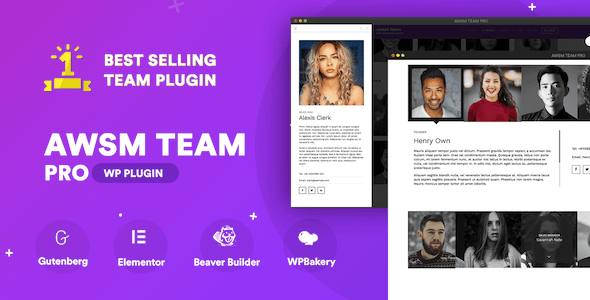
The Team Pro is a WordPress plugin that builds and manages team member listings without requiring custom theme code. It is part of the CodeCanyon Interface Elements category and is sold under the name The Team Pro Interface Elements, a label that reflects how the plugin slots into a site’s existing design rather than replacing it. Site owners, freelancers and agencies who need a staff page, a committee directory or a leadership grid should consider it; anyone building a single static page once and never touching it again probably should not.
The plugin comes from the developer awsmin, who has shipped it through 8,628 sales and holds a 4.6 out of 5 rating across 182 reviews. Those numbers matter here because team showcase plugins are usually bought once and forgotten, so a long sales history and a steady changelog are the best available signal that the product is maintained.
What the plugin actually does
At its core, The Team Pro creates a custom post type for team members. Each member is a WordPress entry with fields for name, designation, short description, photo and social links. That structure is the important part: because members are stored as content rather than hardcoded into a template, adding a new hire or removing a departing colleague is a normal editing task, not a development one.
The visual output is driven by eight presets — Drawer, Modals, Slide-In, Grid, Circle, Card, Table and List. These are not colour variations of one layout. A drawer slides member detail in from the side of the screen, modals open a popup, and the grid, circle, card, table and list presets present members in progressively more structured formats. A table layout suits a committee or board where readers scan credentials; a circle layout suits a small creative team where photos carry the page. Each preset ships with its own style options, so spacing, colours and typography can be adjusted without writing CSS.
Filtering and search are built in. Teams can be split into groups, and visitors can filter the listing by those groups. The plugin added a members search feature in version 1.10.0, which matters once a directory passes roughly thirty people — below that, filtering alone is usually enough. Deep linking was added in version 1.8.0, meaning individual members and specific filter states can be linked to directly, which is useful when a team page is referenced from an email campaign or an internal document.
Page builder support is broad. The plugin works with Gutenberg natively and integrates with Elementor, WPBakery and Beaver Builder. The vendor also lists Elementor as a compatible technology, and there is a dedicated AWSM Team block for the Gutenberg editor. Shortcodes remain available for anyone placing a team listing inside a widget or a template file, and the shortcode accepts a limit attribute for capping how many members appear in a given placement.
Translation support covers WPML and Polylang, added in version 1.9.0. For multilingual sites, that means team filters and member content can be translated rather than left in a single language. The plugin also handles automatic updates, and the changelog shows security fixes landing in 2024 and again in February and May 2026 — a maintenance rhythm that is genuinely relevant when a plugin sits on a public-facing page.
Where it fits, and where it does not
The clearest fit is a professional services firm, agency or consultancy that needs a team page with enough structure to look deliberate. A wealth advisory practice with twenty advisors, each with a photo, a title, a short biography and a LinkedIn link, is close to the ideal use case. The same applies to a nonprofit board listing, a university department directory, a conference committee page or a sports hall of fame — the vendor’s own showcase includes examples along these lines.
Freelancers building client sites benefit from a second angle. Because the plugin supports Gutenberg, Elementor, WPBakery and Beaver Builder, it does not force a particular build stack. A freelancer can drop it into whichever page builder the client’s theme already uses and hand over a site where the client edits team members through the standard WordPress admin.
It is the wrong choice when the requirement is a one-off, static team section that will never change. In that case a hand-built block of HTML or a single page builder template costs nothing and carries no update obligation. The plugin’s value comes from repeated editing, filtering and structured member data — strip those away and the $29 price buys convenience rather than capability. It is also a poor fit for sites that need member profiles with genuinely complex custom fields, such as a medical practice storing credentials, licence numbers and appointment booking links per practitioner; the plugin’s member fields are designed for name, title, description and links, and pushing far beyond that means either custom development or a different class of directory plugin.
Strengths and limitations
Strengths
- Eight distinct layout presets rather than cosmetic variants, covering grid, list, table, card, circle, drawer, modal and slide-in presentations.
- Members are stored as WordPress content, so day-to-day updates need no developer involvement.
- Works with Gutenberg, Elementor, WPBakery and Beaver Builder, which removes the usual lock-in to one page builder.
- Filtering, member search and deep linking are all present, which keeps large directories navigable.
- WPML and Polylang support makes it viable on multilingual sites.
- Active security maintenance through 2026, with a public changelog that documents fixes rather than hiding them.
- Detailed documentation is included, and the source files cover JavaScript, HTML, CSS and PHP.
Limitations
- High-resolution output is not declared as a feature. Sites that depend on retina-quality member photography should verify image handling against the demo before committing.
- Browser support lists IE10 and IE11 alongside modern browsers, which suggests legacy code paths remain in the codebase rather than having been removed.
- Compatibility is stated up to WordPress 6.9.x. Sites running newer WordPress versions are outside the vendor’s declared support range until the listing is updated.
- Member fields are deliberately simple. Complex per-person data — certifications, multiple locations, custom taxonomies — is not accommodated without extending the plugin.
- Some changelog entries note that template files must be updated if they were overridden in a theme, which means customised installs carry a manual step on certain upgrades.
- Preset styling is controlled through the plugin’s own options. Sites with a strict design system may find themselves overriding CSS to match existing components.
How it compares to the wider category
Team showcase plugins generally fall into two camps. The first is the lightweight shortcode plugin: a handful of layouts, minimal settings, often free. The second is the full directory plugin, built for listings with search, categories, maps and per-entry custom fields — frequently repurposed from a business directory or staff directory codebase.
The Team Pro sits between them. It offers more layout variety and more presentation control than the typical free shortcode plugin, and its eight presets cover ground that a lightweight alternative would require custom CSS to reach. At the same time, it stops short of the directory category: there is no map integration, no complex field builder, no front-end submission workflow. That is a reasonable boundary for a team page, but it does mean a project that starts as “show our staff” and grows into “let people search staff by location and specialism” will outgrow this plugin.
Against page builder add-ons that bundle a team widget, the trade-off is different. Those add-ons are convenient but tie the team listing to that builder. The Team Pro works across four builders plus Gutenberg, which matters for agencies maintaining sites on mixed stacks. The cost of that flexibility is a separate plugin to keep updated and a separate admin interface for members.
Frequently Asked Questions
Does The Team Pro work with Elementor and Gutenberg?
Yes. The plugin supports Gutenberg through a dedicated team block and integrates with Elementor, WPBakery and Beaver Builder. Shortcodes are also available for placements outside a page builder, such as widgets or template files. This means the same team listing can be inserted into pages built with different tools on the same site.
Can team members be filtered or searched on the front end?
Yes. Teams can be divided into groups that visitors filter, and a member search feature was added in version 1.10.0. Deep linking was introduced earlier, so specific members and filter states can be linked to directly. For directories of more than roughly thirty people, search and filtering are what keep the page usable.
Is The Team Pro compatible with multilingual sites?
WPML and Polylang support was added in version 1.9.0, so team filters and member content can be translated. The changelog also records a fix for team members failing to display when translations were applied to filters, which indicates the multilingual path has been tested and corrected rather than simply declared.
How often is the plugin updated?
The changelog shows a steady cadence, including security fixes in July 2024 and again in February and May 2026. Earlier releases addressed PHP 8 compatibility, jQuery version conflicts and page builder clashes. The vendor declares compatibility up to WordPress 6.9.x, so buyers on newer WordPress releases should confirm support before relying on it.
Verdict
The Team Pro earns its 4.6 rating and 8,628 sales through breadth rather than novelty. Eight real layout presets, four page builder integrations, working filters and search, and a changelog that shows security fixes landing through 2026 add up to a plugin that does a specific job thoroughly. At $29 it is a straightforward purchase for agencies and freelancers who build team pages repeatedly and want a consistent, client-editable result.
It is the wrong buy for a single static team section that will never change, and it will frustrate anyone who needs member profiles with complex custom data or map-based directory search. Buyers should also confirm image resolution handling and WordPress version compatibility against the demo, since the vendor does not declare high-resolution output and support is listed only up to WordPress 6.9.x. Within those boundaries, it is a well-maintained option in a category where maintenance is often the deciding factor.