Testimonials Showcase is a WordPress plugin that collects customer quotes, reviews and case study references into a single custom post type and then renders them on the front end as either a grid or a slider. It is sold on CodeCanyon for $24 and is aimed at freelancers, agencies and site owners who want social proof on a site without building a custom solution or paying a monthly subscription. The plugin has been downloaded 5,922 times and holds a 4.86 out of 5 rating across 299 reviews, which places it among the better-established options in the Testimonials Showcase Interface Elements category.
The developer, cmoreira, has kept the plugin updated through to May 2025, and the changelog shows a consistent focus on PHP 8 compatibility and security patches rather than feature bloat. That matters for anyone evaluating a plugin they intend to run for several years.
What the plugin actually does well
The core of the product is a custom post type for testimonials. Each entry can carry a quote, an author name, a subtitle, a featured image, a star rating and a link. Because entries are stored as posts rather than hard-coded into a page, they can be reused across multiple layouts and updated in one place. That is the single most practical design decision in the plugin.
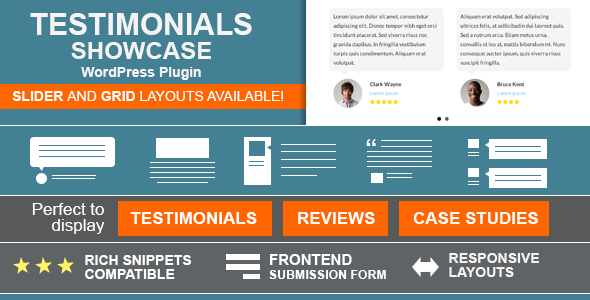
Display happens through two layout families. The grid layout arranges entries into a configurable number of columns with adjustable alignment, image shape and image effects. The slider layout puts entries into a rotating carousel where the transition effect, the number of entries per slide and the control style are all settable. Five built-in themes cover the common visual treatments: rounded speech bubbles, flat speech bubbles, flat card boxes, quote marks and a simple separator. More than fifteen styling options sit behind those themes, so the output can be pushed some distance from the defaults without touching CSS.
Structured data is handled properly. The plugin emits JSON-LD, the format Google recommends, so review markup can be attached to the entries. Used correctly this gives search engines machine-readable information about ratings and reviewers, which is the mechanism behind star ratings appearing in search results. The plugin does not guarantee rich results — Google decides that — but it produces the markup that makes them possible.
The front-end submission form is worth calling out because it changes the workflow rather than just the appearance. A shortcode places a form on any page, and visitors can submit their own testimonial. Submissions land in WordPress awaiting approval, and the administrator controls which fields appear and what confirmation messages are shown. For agencies running a client site, this removes the need to email testimonial text back and forth.
Link handling is more flexible than most plugins in this price range. A link can be attached to the subtitle, to the image, or to a read-more element that points to a dedicated single page for that testimonial. That last option is what makes the case study use case viable: a testimonial can act as the entry point to a longer project write-up. There is also support for lightbox links on the featured image, a custom lightbox class and rel attribute, and a nofollow option for outbound URLs.
Two integration details round out the picture. A widget lets any saved layout be dropped into a sidebar or widget area, and a WPBakery module is included for sites built with that page builder. The shortcode generator produces both a shortcode and a PHP function, so a layout can be placed in a post, page, widget or hard-coded into a theme template. The generator shows a live preview of the selected settings before the code is copied. Gravatar support means entries without a featured image still get a face.
Where this plugin fits, and where it does not
The clearest fit is a service business or agency site that needs a testimonials page plus a smaller slider or grid on the homepage. The single-page-per-testimonial feature makes it a reasonable choice for studios that want to publish case studies and link them from client quotes. Freelancers building client sites will find the front-end submission form and the layout generator reduce build time considerably.
It is also a sensible pick for sites already using WPBakery, since the bundled module avoids the friction of shortcode placement inside that builder.
The wrong choice is a site built entirely around the block editor. The vendor lists the plugin as not Gutenberg-optimized, meaning there is no native block for placing testimonials. Layouts go in through shortcodes or widgets, which works, but anyone expecting to drag a testimonial block into a page and edit it visually will be disappointed. Sites that need a testimonial carousel with complex animation timelines, or that want to pull reviews automatically from Google or Trustpilot, are also outside what this plugin does — it stores and displays entries that are entered manually or submitted through its own form.
Strengths and limitations
Strengths
- Testimonials are stored as a reusable post type, so one entry can appear in several layouts without duplication.
- Both shortcode and PHP function output are generated, giving developers a clean path into theme templates.
- JSON-LD structured data is built in rather than sold as an add-on.
- Front-end submission with admin approval turns testimonials into an ongoing workflow, not a one-time content entry.
- Per-testimonial single pages support case study linking, which most competitors treat as an afterthought.
- Widget and WPBakery integrations cover the two most common non-shortcode placement routes.
- Consistent maintenance record, with the most recent update in May 2025 addressing security.
Limitations
- No block editor support. Placement on modern WordPress sites relies on shortcodes and widgets, which is a real workflow gap rather than a cosmetic one.
- Drag-and-drop ordering of testimonials was removed in a 2019 update because it conflicted with browser changes. Ordering is now handled through query options in the shortcode generator instead, which is less intuitive for non-technical editors.
- Retina support for uploaded images depends on installing a separate free plugin, WP Retina 2x. The layouts themselves are retina-ready because they use CSS and font icons, but the images are not handled automatically.
- Translation readiness covers the interface through .po and .mo files, but the vendor does not ship pre-made translations. Every language beyond the default has to be created by the site owner.
- Automatic review import from third-party platforms is not part of the feature set. Entries are manual or form-submitted.
How it compares to the wider category
Testimonial plugins generally split into two groups. One group is hosted or freemium services that store testimonials on the vendor’s servers and pull them in through a widget or embed. Those offer automatic collection from review platforms and zero maintenance, but they introduce a recurring cost, an external dependency and a third party holding the content.
The other group is self-hosted plugins like this one, where the data lives in the WordPress database and the licence is a one-time purchase. Testimonials Showcase sits firmly in that second group. Its advantages over the category are the depth of layout control, the structured data implementation and the case study linking. Its disadvantage relative to hosted alternatives is that nothing is automated: no review syncing, no email requests for testimonials, no hosted dashboard.
Against other self-hosted options, the differentiator is breadth rather than any single standout feature. Most competitors offer either a grid or a slider; this plugin offers both with a shared settings layer. The trade-off is that it carries more configuration surface than a minimal plugin would, and the shortcode generator, while powerful, is the kind of interface that rewards reading the documentation first.
Frequently Asked Questions
Does Testimonials Showcase work with the WordPress block editor?
No. The vendor explicitly lists the plugin as not Gutenberg-optimized, so there is no dedicated block. Testimonials are placed using shortcodes in posts and pages, through a widget, or via the bundled WPBakery module. The shortcode generator produces the code, and it works fine inside a shortcode block, but the editing experience is not visual.
Can visitors submit their own testimonials from the front end?
Yes. A shortcode displays a submission form on any page, and the administrator chooses which fields appear and what messages are shown. Submitted testimonials are held for approval before they appear on the site. This makes it practical to run an ongoing collection process rather than entering every quote manually.
Will the plugin make star ratings appear in Google search results?
It outputs review structured data in JSON-LD format, which is the markup Google uses to understand ratings. Whether stars actually appear depends on Google’s own eligibility rules and the page meeting its guidelines. The plugin supplies the correct markup, but it cannot guarantee a rich result, and no plugin can.
Can testimonials link to a full case study page?
Yes. Each testimonial has its own single page, and a read-more link can point to it. Links can also be attached to the subtitle or the featured image, and there is a nofollow option for outbound URLs. This makes the plugin usable for portfolio-style case studies rather than just short quotes.
Verdict
Testimonials Showcase is a solid buy for agencies, freelancers and business owners who want testimonials stored inside WordPress and displayed in a range of layouts without a subscription. The one-time $24 price, the structured data support and the case study linking make it a better fit than hosted alternatives for anyone who wants to own the content outright. It is the wrong purchase for sites that depend on the block editor for content editing, or for anyone who needs reviews pulled automatically from Google or Trustpilot. The 4.86 rating across 299 reviews suggests the plugin delivers on its promises in practice, and the update history through 2025 indicates the developer is still maintaining it. Buyers should go in expecting to configure rather than click-and-go, and to handle image retina support separately.