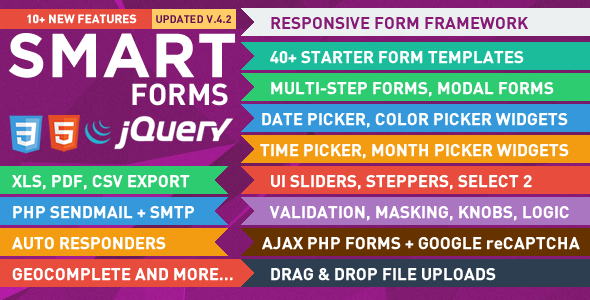
Smart Forms is a standalone HTML, CSS, JavaScript and PHP form framework sold on CodeCanyon for $11. It provides a library of styled form controls — date pickers, sliders, steppers, masked inputs, multi-step wizards and modal popups — plus working AJAX PHP handlers that process submissions, validate them and export the collected data. It suits freelancers and small agencies building custom forms on plain PHP sites, and it is not a WordPress plugin.
The product has been purchased 4,303 times and holds a 4.65 out of 5 rating across 175 reviews, which places it among the better-established form scripts in the CodeCanyon JavaScript category. It is developed by elflaire and was last updated in January 2019.
What the framework actually gives a developer
Smart Forms is best understood as two products in one: a front-end interface kit and a back-end processing layer.
On the interface side, every control is drawn with CSS3 and HTML5 rather than images, which keeps the file weight down and means colours and sizing scale cleanly. The kit covers the usual ground — text inputs, file uploaders, checkboxes, radio buttons, toggle switches, star ratings and progress bars — and adds a set of jQuery-driven widgets that are normally awkward to build from scratch: date, time and month pickers, colour pickers, numeric steppers, range sliders with labels and tooltips, autocomplete fields with multi-tag selection, and a combo box that blends a text field with a dropdown. Three visual styles ship (Elegant, Flat and Dark), each with seven colour variants, so a form can be restyled without rewriting markup.
The layout sits on a fluid twelve-column grid, and more than forty starter templates are included. Those templates matter more than the raw feature list suggests: they let a developer assemble a contact form, booking form or quotation request by editing existing markup rather than building from an empty file.
The processing layer is where the script earns its price. Five AJAX PHP forms ship ready to run, covering contact, modal contact, booking, quotation, order with file upload and a multi-step project quote. Each handles client-side and server-side validation, sends mail through either SMTP or the server’s sendmail function, and writes submissions to a CSV file. From there the data can be viewed and sorted in a data table, printed, or exported to PDF, XLS and CSV. A real-time AJAX CAPTCHA runs on the PHP side, which is a meaningful step up from client-side-only spam checks.
Version 4 added drag-and-drop file uploads via Dropzone.js, Google reCAPTCHA support, international telephone number validation, geocomplete location lookup and a show/hide password control. Earlier versions introduced conditional logic and branching — showing or hiding fields based on checkbox, radio or select values — dynamically cloned elements that users can add and remove, chained selects that populate one dropdown from another, number and currency formatting, and multi-step wizards in vertical, horizontal and progress-bar layouts.
Browser support is declared as IE9 through IE11, plus Chrome, Firefox, Safari, Opera and Edge, with testing on Android and iOS. That IE9 floor is unusually broad for a script of this type and reflects its 2019 release date.
Where Smart Forms fits, and where it does not
The clearest fit is a custom PHP website that needs several distinct forms — a booking request, a multi-step quote calculator, an order form with uploads — and a developer who wants consistent styling across all of them without pulling in a front-end framework. The conditional logic and chained selects make it viable for quote calculators where the available options change based on earlier answers, and the export functions suit any project where someone has to hand submission data to a client in a spreadsheet.
A second fit is agency work where forms recur across projects. Buying once and reusing the template library across client sites is cheaper than rebuilding date pickers and validation for every job.
The wrong choice is any WordPress site. The listing states plainly that this is not a WordPress plugin, and there is no integration path — a WordPress user would be paying for a PHP processing layer that duplicates what a form plugin already does, then hand-wiring markup into a theme. Projects that need payment processing, CRM synchronisation, user accounts or database storage beyond flat CSV files are also a poor match; the script handles mail and file export, not transactional workflows.
Anyone who needs active maintenance should weigh the update history carefully. The last vendor update was January 2019, so there is no evidence of testing against newer PHP versions or current browser releases beyond what the original specification claims.
Strengths and limitations
Strengths
- Genuinely broad widget coverage — date, time, month, colour, slider, stepper, autocomplete, combo and masked inputs — in one consistent package.
- Working PHP back end included, not just front-end markup. Contact, booking, quotation, order and multi-step forms run out of the box.
- Data handling beyond simple email: CSV storage, sortable data tables, and PDF, XLS and CSV export.
- Server-side AJAX CAPTCHA plus optional Google reCAPTCHA, which is more spam protection than most scripts at this price include.
- Conditional logic, branching, chained selects and cloned elements cover complex form behaviour without custom JavaScript.
- Three styles with seven colour variants each, and a fluid twelve-column grid, make restyling straightforward.
- Strong review record: 4.65 from 175 ratings, with reviewers repeatedly citing responsive design and author support.
Limitations
- The last update was January 2019. PHP and browser behaviour have moved on considerably since then, and the vendor does not state which current PHP versions are supported.
- Declared browser support starts at IE9, which suggests the CSS and JavaScript were written for a much older baseline. Modern build tooling, ES modules and current accessibility expectations are not part of the package.
- Storage is flat-file CSV. There is no database schema, so querying, filtering at scale or integrating with an existing application database requires custom work.
- No payment gateway integration. Order forms collect data; they do not take money.
- Conditional logic is limited to checkboxes, radios and selects. Rules based on typed text values or on combinations across multiple steps are not described in the specification.
- Support and updates are described as free, but a seven-year gap since the last release means the practical value of that promise is uncertain.
- Setup assumes comfort with PHP and jQuery. The listing claims no coding knowledge is required, but wiring forms into an existing site, configuring SMTP and handling file permissions are developer tasks.
How it compares with the alternatives
The realistic alternatives fall into three groups: WordPress form plugins, hosted form services, and hand-built forms using a general front-end framework.
WordPress plugins win on integration. They install in a dashboard, store entries in the site database, and connect to email marketing and payment tools without touching code. Smart Forms cannot compete there and does not try to — it targets sites that are not on WordPress at all.
Hosted form services win on setup speed and on handling deliverability, spam and storage for you. They lose on styling control, on data ownership and on per-submission pricing at volume. Smart Forms keeps everything on the developer’s own server, which suits projects with privacy constraints or a preference for self-hosting, at the cost of managing mail configuration and file storage directly.
Building forms by hand with a modern CSS and JavaScript framework gives the most control and the best long-term maintainability, but it means sourcing or writing date pickers, masking, validation, file upload progress and export logic. Smart Forms is essentially a shortcut past that work. The trade-off is that the shortcut is frozen at its 2019 state, whereas a hand-built stack keeps moving with the ecosystem.
Against other CodeCanyon form scripts, the differentiators are the breadth of the widget set, the inclusion of a working PHP processing layer rather than markup alone, and the export options. Scripts that only ship front-end components leave the developer to build the back end; scripts that focus on processing tend to offer fewer interface controls.
Frequently Asked Questions
Is Smart Forms a WordPress plugin?
No. The vendor states explicitly that it is not a WordPress plugin. It is a standalone framework built with HTML, CSS, JavaScript and PHP, intended for custom PHP websites. Installing it on WordPress would require manually embedding the markup and scripts into a theme, and the PHP processing layer would duplicate functionality a WordPress form plugin already provides.
What kind of forms can be built with Smart Forms?
Contact forms, booking forms, quotation requests, order forms with file uploads and multi-step project quote wizards are all included as working examples. Beyond those, the widget library supports conditional logic, chained selects, cloned repeatable fields and modal popups, so calculators and branching questionnaires are achievable without writing custom JavaScript for the interface layer.
Does Smart Forms store submissions in a database?
No. Submissions are written to CSV files on the server, then viewed and sorted through a data table interface and exported to PDF, XLS or CSV. There is no database schema included. Projects that need to query entries, relate them to other data or scale to high submission volumes would need custom development on top of the script.
Is Smart Forms still maintained?
The vendor’s last recorded update was January 2019, so there has been no recent maintenance. Support and updates are advertised as free, and reviewers have praised the author’s responsiveness historically, but buyers should assume no active development. Testing against current PHP versions and modern browsers is not documented by the vendor and would need to be verified independently.
Verdict
Smart Forms is worth buying for developers building forms on non-WordPress PHP sites who want a wide widget library, working AJAX processing, spam protection and data export in a single $11 package. The 4,303 sales and 4.65 rating from 175 reviews indicate it has delivered on that promise for a substantial number of buyers. It is not the right purchase for WordPress users, for projects needing payment processing or database-backed storage, or for anyone who requires a vendor actively maintaining the code against current PHP and browser standards. The stalled update history is the single most important factor in the decision — the feature set is genuinely broad, but it reflects the state of web development in early 2019 rather than today.