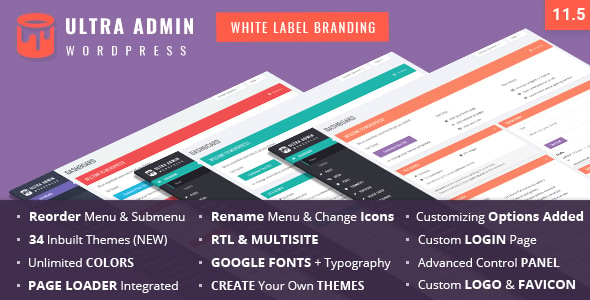
Ultra WordPress Admin Theme is a plugin from developer themepassion that replaces the default WordPress dashboard styling with a fully customised interface, and it sells on CodeCanyon for $23. The product bundles 30 built-in admin colour schemes, a visual theme builder, white label branding tools, drag-and-drop menu management and a customisable login screen. It is aimed at freelancers and agencies who hand WordPress sites to clients and want the backend to carry their own brand rather than WordPress defaults. The listing reports 2,700 sales and a 4.47 out of 5 rating across 120 reviews, which puts it among the better-established options in the CodeCanyon interface elements category.
What Ultra WordPress Admin Theme Actually Changes
The plugin’s core job is cosmetic control over the WordPress admin. Instead of accepting the standard grey dashboard, an administrator can pick from the included themes or build one from scratch, adjusting colours, backgrounds, typography, button states, content box styling and the admin top bar. The vendor states that 650+ Google Fonts are integrated, with separate font assignments possible for headings, menu items and body text, plus fallback to local system fonts. For anyone who has tried to restyle wp-admin through a child theme or raw CSS, the appeal is obvious: the work happens through settings panels rather than code.
White label branding is the second pillar, and it is where the plugin earns its price for agency work. The WordPress logo, the footer credit and the login screen can all be replaced with a client’s or agency’s identity. The login page gets its own styling controls covering logo, background, opacity, fonts and colour, and the standard “Back to Site” and “Forgot Password” links can be hidden. The footer can carry custom text, and the WordPress version number can be removed from it — a small detail, but one that reduces the information a casual visitor can gather about the installation.
Menu management goes further than appearance. Items and sub-items can be renamed, reordered by drag and drop, given custom icons, or disabled entirely. A genuinely useful wrinkle here is the ability to show the original, unedited menu to administrator accounts while everyone else sees the trimmed version. That means a site owner keeps full access while a client sees a dashboard stripped down to the handful of sections they actually use.
Multisite support is present and reasonably developed. The plugin installs across a network, each site can hold its own settings, and a single click can push one site’s theme out as the default for every site on the network. For agencies running many client sites on one WordPress installation, that is a meaningful time saver.
Smaller additions round out the package: an import/export panel for moving settings between sites, an optional page loader, smooth scrolling, control over the admin top bar links including the “Howdy” greeting text, and an email settings tab for the outgoing “from” name and address. An update also added compatibility with the Admin Menu Editor Pro plugin, which matters if a site already relies on it for menu control.
Where It Fits and Where It Does Not
This plugin is built for client-facing work. A freelancer delivering a WordPress site to a small business can use it to present a dashboard that looks like part of the product they were paid for, not a generic CMS. An agency managing multiple client sites on a multisite network gets the strongest return, because the network-wide default theme and per-site settings remove repetitive setup. It also suits developers building a WordPress-based product or membership platform where the admin experience is visible to customers.
It is the wrong choice in a few situations. If a site already has a well-built custom admin theme maintained in-house, layering this on top creates two systems fighting over the same CSS. If the requirement is functional rather than visual — restricting what roles can do, auditing changes, or building custom admin pages — this plugin does not address that; it is a styling and branding layer, not an admin framework. And on a single personal blog where nobody but the owner ever sees the dashboard, the $23 buys very little of practical value.
One further caveat: the vendor’s compatibility list names WordPress versions up to 6.8.x, and the most recent changelog entry supplied is dated July 2024. Buyers on newer WordPress releases should confirm current compatibility before relying on it in production.
Strengths and Limitations
Strengths
- Deep styling coverage across the admin — top bar, menu, buttons, forms, content boxes, footer and login screen — controlled from settings rather than code.
- Genuine white label capability, including login page branding, footer text and removal of the WordPress version string.
- Menu renaming, reordering, icon replacement and per-role visibility, with administrators able to keep the unedited menu.
- Multisite handling that includes per-site settings and a one-click network-wide default theme.
- Import and export of settings, which makes rolling a standard agency configuration across sites straightforward.
- An established track record: 2,700 sales and a 4.47 rating from 120 reviews is a reasonable signal of stability for a CodeCanyon item.
- Source files include PHP, CSS, JavaScript and layered PNG assets, so the styling can be extended beyond what the settings panels expose.
Limitations
- The compatibility list stops at WordPress 6.8.x and the changelog supplied ends in mid-2024, so buyers on later releases are taking a compatibility risk the vendor does not currently address.
- Browser support is declared from IE9 upward, which suggests a codebase carrying legacy CSS and JavaScript rather than a modern, lightweight one. That can mean more page weight than a lean custom stylesheet would add.
- Because the plugin overrides admin CSS broadly, conflicts with other plugins that also style the dashboard — page builders, form plugins or other admin customisers — are a realistic possibility and are not something the vendor claims to guard against.
- Support for WordPress 5.3 through 6.8 in one package implies a wide compatibility surface. Features that depend on newer WordPress admin markup may behave differently across those versions.
- The changelog entries supplied show mostly compatibility updates and CSS fixes rather than new capability, which suggests a mature but largely settled product.
- There is no stated limit on how many sites a single licence covers in the supplied data, so buyers should check the CodeCanyon licence terms before deploying across a client portfolio.
How It Compares to the Wider Category
Admin customisation plugins generally fall into three groups. The first is pure white label tools, which strip WordPress branding and tidy the login screen but leave the dashboard layout largely intact. The second is admin menu editors, which focus narrowly on reorganising or hiding menu items. Ultra WordPress Admin Theme sits in a third group: full visual overhaul packages that attempt to cover branding, layout, typography, menus and login in one product.
Against the first group, it offers considerably more surface area — the theme builder and typography controls go well beyond hiding a logo. Against the second, it is broader but less specialised; a dedicated menu editor may handle complex role-based menu logic more precisely. The trade-off with any all-in-one admin theme is weight and overlap. A site that only needs the login screen rebranded can achieve that with a much smaller plugin or a short functions.php snippet, and adding a full styling framework for that single purpose is disproportionate. The case for Ultra WordPress Admin Theme is strongest when most of its features will actually be used — branding, menus, typography and multisite together.
Frequently Asked Questions
Does Ultra WordPress Admin Theme work with WooCommerce and page builders?
Yes, the vendor lists compatibility with WooCommerce 6.x.x, Elementor, Gravity Forms, Easy Digital Downloads, bbPress, WPML, WP EasyCart, Layers WP and Cornerstone. That said, compatibility declarations cover the plugins’ own interfaces, not every third-party extension built on top of them, so testing on a staging site before a live deployment remains sensible.
Can the admin menu be different for different user roles?
Partly. The plugin allows the original, unedited menu to be shown to administrator accounts while all other users see the edited version. That is a two-tier split rather than full per-role control, so a site needing a different menu for editors, authors and subscribers separately would need additional tooling.
Is Ultra WordPress Admin Theme compatible with multisite?
Yes. It installs across a WordPress multisite network, supports individual settings for each site, and can set one site’s theme as the default for every site on the network with a single click. Settings can also be exported from one site and imported into another.
Can settings be moved from one WordPress site to another?
Yes. The plugin includes an import and export panel for its settings, so a configuration built on one installation can be transferred to another. This is useful for agencies that want a consistent admin appearance across multiple client sites without rebuilding the theme each time.
Verdict
Ultra WordPress Admin Theme earns its place for agencies and freelancers who deliver WordPress sites to clients and want the backend to reflect their own or their client’s brand. The combination of white label branding, drag-and-drop menu control, a theme builder and multisite support covers more ground than most single-purpose admin plugins, and a 4.47 rating across 120 reviews suggests it holds up in practice. Buyers on WordPress versions released after the last documented update should verify compatibility first, and anyone whose only need is hiding a logo or two should look at lighter options. For a single personal site with no client audience, the feature set will go largely unused and the $23 is hard to justify. For a portfolio of client builds, it is a reasonable one-time cost against the hours it saves.