Storage for Contact Form CF7 Forms is a WordPress plugin that saves every Contact Form 7 submission into the site’s own database, including uploaded files, so entries survive even when email delivery fails. It adds an Entries screen to the WordPress dashboard with filtering, search and CSV export, and it is aimed at site owners, freelancers and agencies who treat contact form messages as business records rather than disposable notifications. The plugin is sold on CodeCanyon for $29 by Preseto, the development shop of Kaspars Dambis, a WordPress core contributor.
What the Plugin Actually Does With Each Submission
Contact Form 7 sends email. It does not keep a copy. If the notification bounces, lands in a spam folder or gets deleted by an overzealous inbox rule, the message is gone. Storage closes that gap by writing each submission to the WordPress database before or alongside the email, giving the site a permanent record that does not depend on any mail server behaving correctly.
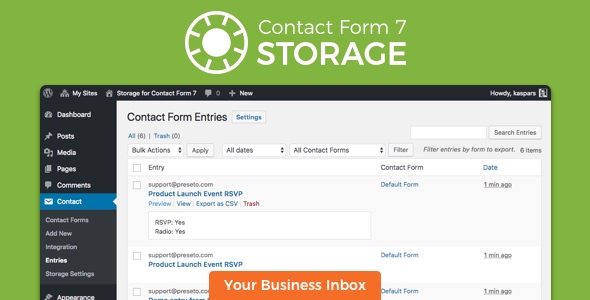
Each stored entry captures more than the field values a visitor typed. The record includes the individual input field values, the date and time of submission, the recipient email address, the subject line of the notification that was sent, the URL of the page where the form was submitted, and the IP address, browser and device information of the sender. It also links back to the configuration page of the specific form used. That last detail matters on sites running several forms, because it removes the guesswork about which form produced a given message.
Uploaded files are stored too. The plugin keeps attachments in the WordPress uploads directory and records their location, and a shortcode replaces the filename in the notification email with a direct link to the file. That means the person receiving the email can open the attachment without logging into the site.
Managing and Exporting Entries
All submissions appear under a new Entries section in the WordPress admin, listed in reverse chronological order with a quick preview so a full page load is not needed just to check one message. Dropdown filters narrow the list by form and by date, and a free text search finds specific entries across the stored data. Bulk actions let a site owner select a subset of entries rather than exporting everything.
CSV export is the feature most agencies will use weekly. The export includes the field values as separate columns, plus links to any attachments, and the delimiter can be set to comma, semicolon or tab so the file opens cleanly in Excel. Individual form settings can exclude particular fields from the export, which is useful when a form collects something that should stay in the database but never travel in a spreadsheet.
Privacy Controls and Email Integration
The plugin is not a compliance tool and the vendor says so directly, but it provides the levers that privacy work usually requires. Storing the IP address and browser information can be switched off entirely in the settings, and entries, their metadata and their attachments can be deleted individually. For sites that need to honour deletion requests, that is the practical minimum.
Two shortcodes extend the notification emails: one inserts a unique entry ID, and the other generates a link to the entry in the admin area that only logged-in users can open. Contact Form 7 does not support nested square brackets, so the documentation advises using braces or parentheses around these variables instead. It is a small quirk, but one worth knowing before wondering why a shortcode renders as plain text.
Where This Plugin Fits and Where It Does Not
The clearest fit is any site where a lost message has a cost. Lead generation sites, quote request forms, service businesses and agencies managing client sites all benefit from a submission log that exists independently of email. Sites handling file uploads benefit disproportionately, because attachments are the part of a form submission most likely to be lost and the hardest to reconstruct.
It also suits projects with a light privacy obligation. Being able to disable IP and user-agent logging, and to delete a single entry with its attachments, covers the routine requests that small businesses actually receive. Freelancers maintaining multiple client sites will appreciate that the plugin is a single file upload with no configuration wizard, and that the storage settings are per form rather than global.
Where it is the wrong choice: sites that do not use Contact Form 7 at all. This plugin has no standalone form builder and no purpose without that dependency. Projects that need conditional logic, multi-step forms, payment collection or CRM synchronisation should look at a full form platform instead, because Storage deliberately does one job. Sites expecting a hosted, off-site archive should also look elsewhere, since everything is written to the local WordPress database and inherits its backup obligations.
Strengths and Limitations
Strengths
- Every submission is retained in the database, so a failed or deleted notification does not mean a lost lead.
- Attachments are stored and linked directly in notification emails, which removes the usual friction of chasing uploaded files.
- CSV export with selectable delimiters and per-field exclusions produces spreadsheets that open cleanly in Excel without manual cleanup.
- Filtering by form and date, plus free text search, keeps large entry lists manageable on busy sites.
- IP address and user-agent logging can be turned off, and entries can be deleted with their metadata and files.
- Written and maintained by a WordPress core contributor, with support handled by the author rather than a first-line ticket desk.
- Compatibility is broad: the plugin runs on WordPress 3.2 and later, and the current release is marked as tested against WordPress 6.7 and Contact Form 7 version 6.0.
Limitations
- Contact Form 7 is a hard requirement. Nothing in the plugin works without it.
- Storage is local. Entries live in the site’s own database, so they are only as safe as the site’s backup routine, and a database loss takes the submission log with it.
- The vendor does not claim GDPR compliance, only features that assist with it. Deletion is manual and per entry, so a formal erasure workflow still needs a process around it.
- The shortcode syntax for entry ID and entry URL cannot use square brackets because of a Contact Form 7 limitation, which is an easy trap for anyone copying the documentation carelessly.
- There is no built-in spam filtering or validation layer beyond what Contact Form 7 already provides, so a form receiving junk submissions will store that junk.
- Automatic updates depend on installing the separate Envato Market plugin and supplying an API token, which adds a step the buyer may not expect.
How It Compares to the Wider Category
The alternatives fall into three groups. The first is doing nothing and relying on email, which costs nothing and fails silently at exactly the wrong moment. The second is a full form platform that replaces Contact Form 7 entirely, bundling storage, entries, exports and often payments or CRM hooks into one subscription. The third is a general-purpose database or logging plugin that can be configured to capture form submissions but was not designed for it.
Against a full form platform, Storage is narrower and cheaper: a one-time $29 against an ongoing licence, and no migration of existing forms. Against a generic logging plugin, it wins on specificity, because the entry fields, the attachment handling and the CSV columns are already shaped around Contact Form 7’s data model. The trade-off is that it inherits Contact Form 7’s limits as well as its popularity. A site that has already outgrown Contact Form 7 will not be rescued by adding storage to it.
The sales figures support the narrow-but-useful positioning. More than 2,300 sales and a 4.95 out of 5 rating across 60 reviews suggest a plugin that does a modest job reliably rather than one that promises everything. That pattern is consistent with a maintained codebase: the changelog shows a steady stream of compatibility updates, including PHP 8 notice fixes and adjustments for Contact Form 7’s file upload API changes.
Frequently Asked Questions
Does Storage for Contact Form CF7 stop emails from being sent?
No. The plugin stores submissions in addition to sending them, not instead of. Contact Form 7 continues to deliver its normal notification emails, and the database entry acts as a backup for the cases where delivery fails or the message is later deleted. Both channels run side by side, which is the point of the plugin.
Can form submissions be exported to Excel?
Yes. The Entries screen has an Export as CSV button, and the delimiter can be set to comma, semicolon or tab so the file opens correctly in Excel. Exports can cover all submissions or a filtered subset by form and date, and include links to any uploaded attachments.
Is this plugin GDPR compliant?
The vendor does not claim compliance, only features that help. Storing IP addresses and browser information can be disabled in the settings, and individual entries can be deleted along with their metadata and uploaded files. Sites still need their own retention policy and process for handling erasure requests.
Does it work with the latest versions of WordPress and Contact Form 7?
The current release, version 2.1.4 from January 2025, is marked as tested with WordPress 6.7 and Contact Form 7 version 6.0, and it includes fixes for PHP 8 notices. The vendor lists compatibility with WordPress 6.2 through 6.8 and requires Contact Form 7 to be installed and active.
Verdict
Buy this if the site runs Contact Form 7 and losing a submission would be a real problem. It is a sensible purchase for lead generation sites, service businesses, agencies managing client builds, and any project where visitors upload files through a form. The price is a one-time $29, the plugin is maintained, and the export and privacy controls cover the everyday admin tasks that come with storing form data.
Skip it if Contact Form 7 is not in use, if the project needs a full form platform with conditional logic and integrations, or if the requirement is an off-site archive that survives a database failure. Storage for Contact Form CF7 Forms is a focused tool that does one job well, and it is worth buying only when that job matches the project in front of it.