WPBakery Page Builder Add-on Image Hotspot with Tooltip and Lightbox is a small WordPress extension that lets a site owner place clickable markers on top of an image, then attach a tooltip and a lightbox popup to each marker. It is built for people already running the WPBakery Page Builder (formerly Visual Composer) and is aimed at anyone who needs an interactive product photo, floor plan, map or diagram without writing custom code.
The add-on comes from developer sike and sells on CodeCanyon for $13. It has moved 2,139 copies and holds a 4.55 out of 5 rating across 40 reviews, which suggests a settled, reasonably well-understood tool rather than an experiment. The last vendor update landed on 16 February 2022.
What the add-on actually does
The core idea is simple and the execution is narrower than the feature list first suggests. A WPBakery row accepts an image, and the add-on overlays one or more hotspot markers on it. Each marker is positioned independently, so a single photograph can carry a dozen different points of interest.
Positioning happens in the WPBakery frontend editor. That is a meaningful detail: instead of typing pixel coordinates into a settings panel and refreshing to check the result, the marker can be dragged into place on the live page. The vendor notes that the frontend editor must be enabled for this to work, which is a real dependency rather than a nicety.
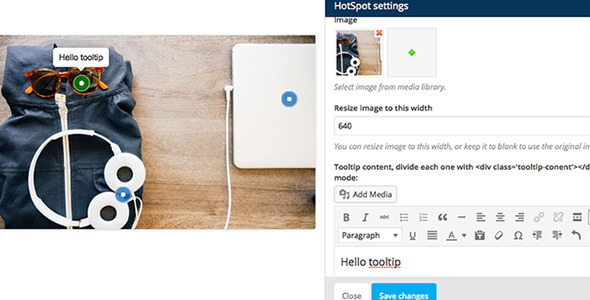
Each hotspot supports a tooltip — the small panel that appears on hover or tap — and a lightbox, the full-screen overlay that opens on click. The tooltip is not limited to plain text. It accepts images and video, which turns a hotspot into a miniature content slot rather than a label. Four tooltip skins are offered (shadow, light, noir and punk), four animation styles (grow, slide, fade and fall), and eight arrow positions covering the four sides plus all four corners.
The lightbox is the more interesting half. A hotspot link can open a YouTube or Vimeo video, a static image, or a Google Map, so a single image can act as a navigation layer for mixed media. Markers themselves can be numbered, or use a Font Awesome icon, and the icon colour is fully configurable. A pulse animation is available in six colours for drawing attention to a specific point.
Two smaller options are worth noting because they affect how a page behaves on load. A start number setting controls where numbering begins, and there are separate controls for which hotspot is open by default and whether all of them display at once. That gives some control over the first impression a visitor gets before interacting.
On the technical side, the add-on is responsive and retina ready, and it enqueues its JavaScript and CSS only on pages where the element is actually used. That last point matters more than it sounds: a plugin that loads its assets sitewide adds weight to every page, and this one avoids that. Source files are included in the package in JavaScript, HTML, CSS and PHP, and the vendor states that FAQ documentation ships alongside.
Where this fits, and where it does not
The clearest fit is a product page or landing page where a single image carries several points of explanation. An ecommerce listing for a piece of equipment, for example, can annotate each component with a tooltip and open a demo video in the lightbox. The same pattern works for real estate floor plans, hotel room diagrams, restaurant menus photographed as a spread, and instructional diagrams in a course site.
A second fit is agencies and freelancers building client sites on WPBakery. Because the add-on extends the page builder rather than replacing it, it works whether WPBakery is bundled inside a theme or installed as a standalone plugin — a distinction that trips up plenty of extensions. For a studio that already standardises on WPBakery, this is a low-cost way to add an interactive layer without commissioning custom JavaScript.
It is the wrong choice in a few situations. Sites built on Elementor, Gutenberg or any other editor will get nothing from it; the vendor points Elementor users toward a separate widget package instead. Anyone who needs the hotspot markers to be clickable links to other pages, rather than lightbox triggers, should check that requirement carefully first, because the documented behaviour centres on tooltips and lightbox popups. And a site that needs an accessible, keyboard-first interactive image — with full screen-reader semantics for every marker — should treat this as unverified, since the vendor does not state accessibility conformance either way.
Strengths and limitations
Strengths
- Drag-to-position markers in the frontend editor remove the guesswork from placing hotspots on an image.
- Tooltips accept images and video, not just text, so each marker can carry real content.
- Lightbox supports YouTube, Vimeo, images and Google Maps from a single element.
- Conditional asset loading keeps the JavaScript and CSS off pages that do not use the element.
- Source files in JavaScript, HTML, CSS and PHP are included, which gives a developer room to extend or restyle.
- Broad WordPress version support, declared from 4.9 upward, and a long track record at 2,139 sales.
- Low price relative to the cost of building the same interaction from scratch.
Limitations
- The last vendor update was February 2022. WordPress and WPBakery have both moved on since, and the vendor does not state tested compatibility with newer releases.
- It requires WPBakery Page Builder to be installed and active, plus the frontend editor enabled. Without both, the drag-to-position workflow does not function.
- There is no Gutenberg block. The listing states outright that the product is not Gutenberg optimised, so block-based sites are excluded.
- Accessibility is not addressed in the product data. Tooltips and lightbox overlays are exactly the kind of component where keyboard and screen-reader behaviour needs to be verified rather than assumed.
- The source listing repeatedly steers buyers toward a larger all-in-one bundle, which implies this single add-on may not receive the same attention as the package.
- Tooltip and lightbox styling is limited to the preset skins and animations the vendor provides; deeper customisation means editing the included CSS directly.
How it compares with the wider category
Interactive image tools generally fall into three groups. The first is standalone plugins, which install independently of any page builder and often ship their own shortcode or block. The second is dedicated image-map tools, which specialise in linking regions of an image to URLs. The third is add-ons like this one, which extend a specific builder and inherit its editing experience.
The trade-off is straightforward. Standalone plugins work with any theme and editor, but they add another settings screen and another set of assets to manage. Builder add-ons feel native — the hotspot element sits in the same element library as everything else, and positioning happens in the editor the site owner already knows. The cost is lock-in: this add-on is only useful for as long as the site runs WPBakery.
Against dedicated image-map tools, the difference is intent. Image maps exist to make regions of an image clickable links. This add-on exists to attach explanatory content — a tooltip plus a media popup — to points on an image. If the requirement is navigation, an image map is the better-shaped tool. If the requirement is explanation, the hotspot-plus-lightbox model fits more naturally.
Frequently Asked Questions
Does this plugin work without WPBakery Page Builder?
No. It is an add-on, not a standalone plugin, and the vendor states plainly that WPBakery Page Builder must be installed and activated. The frontend editor also needs to be enabled, because that is where hotspot positions are dragged into place. On a site without WPBakery, the element simply will not appear.
Can a hotspot open a YouTube or Vimeo video?
Yes. Lightbox support was added in version 1.5.2 and covers YouTube, Vimeo, images and Google Maps. A hotspot link can therefore open a video in a full-screen overlay rather than sending the visitor to another page. The vendor does not state whether self-hosted video files are supported in the lightbox.
Is the add-on compatible with the latest WordPress version?
The vendor declares compatibility from WordPress 4.9 through the 6.x and 7.0.x lines, but the last update was February 2022 and no newer testing is documented. Compatibility with the newest WordPress and WPBakery releases is therefore unconfirmed. Testing on a staging site before deploying to a live installation is the sensible approach.
Can hotspot positions be changed without touching code?
Yes, provided the frontend editor is enabled. Markers are dragged directly on the live page preview, and the position saves with the element. This was added in November 2014 and remains the primary way to place hotspots. Editing coordinates by hand is not part of the documented workflow.
Verdict
This add-on is worth buying for one specific audience: site owners and developers already committed to WPBakery Page Builder who need annotated images with tooltips and media lightboxes, and who want to place markers visually rather than by trial and error. At $13, with 2,139 sales and a 4.55 rating behind it, the risk is low and the workflow is genuinely faster than building the interaction by hand.
It is not the right purchase for anyone on Elementor or Gutenberg, for sites that need image regions to act as plain navigation links, or for projects with strict accessibility requirements that the vendor does not document. The stale update history is the main caveat — the product works, but it is not being actively refreshed, so buyers should verify it against their current WordPress and WPBakery versions before relying on it.