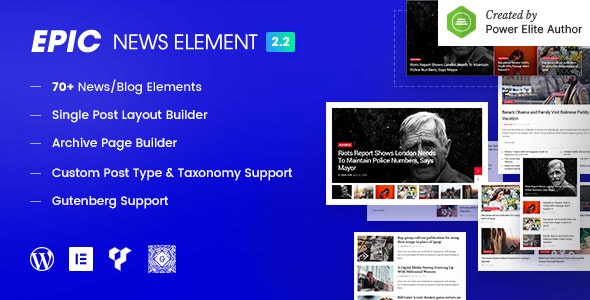
Epic News Elements Add-ons is a WordPress plugin that supplies more than 70 drag-and-drop content blocks for building news, blog and magazine layouts inside Elementor and WPBakery Page Builder. It works alongside whatever theme is already installed, so a site owner can assemble homepages, category pages and article grids without switching themes or writing template code. It is aimed at publishers, editorial sites and freelancers who need editorial-style layouts on a tight budget.
What the plugin actually gives a site builder
The core of the product is a library of design elements that plug into two of the most widely used front-end page builders for WordPress. Rather than shipping a fixed demo homepage, it hands over individual blocks — post grids, sliders, hero sections, carousels, news tickers and YouTube playlist embeds among them — that can be arranged in any order. The practical effect is that a magazine-style front page is assembled the same way a landing page would be, by dragging blocks into a column and adjusting settings in a side panel.
Content selection is more granular than a typical “recent posts” widget. Each module can pull posts by category, tag or author, and two controls stand out for editorial work. An offset setting skips a defined number of posts, which is how a site avoids repeating the same lead story in a hero block and the grid beneath it. A separate unique content group setting prevents the same article appearing twice across multiple modules on one page — a small feature that matters a great deal on a busy homepage where three or four post blocks sit side by side.
Pagination is handled per module rather than globally. Editors can choose standard numbered pagination, previous/next links, a load-more button, or infinite scrolling that fetches the next batch as the visitor reaches the bottom. Because the choice is made module by module, a homepage can use load-more on one section while a category archive uses classic pagination.
Layout behaviour is worth noting separately. Modules adapt to the width of the row they are placed in, which means the same block can look noticeably different in a narrow sidebar column than in a full-width band. Each element also ships with light and dark colour schemes that can be overridden, so a dark editorial theme and a light one can both be served without rebuilding blocks from scratch.
On the technical side, the plugin is translation ready with .po and .mo files supplied, declared compatible with WPML, and states support for WooCommerce 6.x. It is described as Gutenberg optimised and retina ready, and the source files bundled with the purchase include PHP, JavaScript, HTML and CSS. The vendor lists compatibility from WordPress 4.9 up to 6.8, which is an unusually wide range and useful for agencies maintaining older client sites.
Updates are delivered automatically once the plugin is registered, and the changelog shows the vendor is still active — version 2.3.8 addressed a news ticker animation fault and a fatal error that appeared when Elementor’s Flexbox Container experiment was switched on. That last fix is a reasonable signal that the developer tracks changes in the page builders rather than abandoning the product between major releases.
Where this fits, and where it does not
The strongest fit is an existing WordPress site that already runs Elementor or WPBakery and needs editorial layouts without a full redesign. A publication that likes its current theme but wants a richer homepage, or a business blog that has outgrown a plain post list, can add the blocks and start composing immediately. Freelancers building news or magazine sites for clients will find the module-level controls — offset, unique groups, per-module pagination — map closely to how editors actually think about a front page.
It also suits agencies running multiple sites on a shared page builder, because the same element library carries across projects and the light/dark schemes reduce the amount of per-site styling work. Designers who prefer building layouts visually in the front end, rather than in PHP templates, are the natural audience here.
It is the wrong choice for anyone who does not already use Elementor or WPBakery. The plugin is an add-on, not a standalone builder, so a site running the block editor alone or a different page builder gets nothing from it. It is equally unsuitable for a project that needs a complete, opinionated magazine theme with pre-built demo pages, custom post types and editorial workflows out of the box — this supplies the components, not the finished publication. Anyone wanting a single-click demo import and a finished design should look at full themes instead.
Strengths and limitations
Strengths
- Works with any theme that supports Elementor or WPBakery, so adopting it does not force a theme migration.
- Offset and unique content group controls solve the duplicate-post problem that plagues multi-block homepages.
- Pagination is configurable per module, covering numbered, previous/next, load more and infinite scroll.
- Light and dark colour schemes are built into each element and can be overridden per site.
- Translation ready with .po and .mo files, and declared WPML compatible.
- Broad WordPress compatibility range, from 4.9 through 6.8.
- Active maintenance, evidenced by a 2025 update fixing a Flexbox Container conflict.
- Source files included, which helps agencies that need to extend or debug styling.
Limitations
- Custom post type support is tied to the Pro tier according to the vendor’s own feature list, so the version sold here is limited to standard WordPress posts as a content source.
- Because it is an add-on rather than a theme, the visual result depends heavily on the surrounding theme’s typography and spacing — inconsistent results are likely across mismatched themes.
- Seventy-plus elements is a large surface area to learn, and the vendor does not publish a detailed element-by-element reference in the listing.
- Declared WooCommerce support stops at version 6.x, so sites on newer WooCommerce releases have no stated compatibility guarantee.
- Internet Explorer 10 and 11 are listed as supported browsers, which suggests parts of the codebase carry legacy weight even though those browsers are long retired.
How it compares with the wider category
Add-on packs for page builders sit between two alternatives: full magazine themes and general-purpose widget or block libraries. A dedicated magazine theme bundles layouts, demo content and often custom post types into one purchase, which is faster to launch but locks the site into that theme’s structure and design language. A general block library offers breadth across many content types but rarely goes deep on editorial specifics such as offset handling, duplicate prevention across modules, or news tickers.
This product positions itself in the middle. It is narrower than a general library and considerably more focused on publishing layouts, but it deliberately avoids the theme lock-in that comes with a magazine theme. The trade-off is that the buyer supplies the design direction and the surrounding theme. For teams that already have a theme they are happy with, that is an advantage; for anyone starting from nothing, a full theme will usually get to a finished site faster.
On price, at $39 it sits at the lower end for a commercial add-on of this scope. The listing shows 2,145 sales and a 4.8 out of 5 rating across 46 reviews, which is a meaningful sample for a CodeCanyon item and suggests the plugin behaves as described for most buyers. The developer, jegtheme, maintains an active changelog rather than shipping once and moving on.
Frequently Asked Questions
Does Epic News Elements work with any WordPress theme?
Yes, provided the theme supports Elementor or WPBakery Page Builder. The plugin adds elements to those builders rather than replacing the theme, so it does not depend on a specific theme’s templates. The visual outcome still varies, because typography, spacing and colour inherited from the theme will affect how the blocks look on the page.
Do I need Elementor Pro to use this plugin?
No. The vendor lists both the free Elementor and Elementor Pro as compatible, and WPBakery Page Builder is supported as an alternative. Elementor Pro is only necessary if a site needs Pro-exclusive features such as its theme builder or popup tools. The plugin’s own elements work with the free version of either builder.
Can the plugin pull in custom post types?
Only in the Pro tier, according to the vendor’s feature list. The standard version sources content from regular WordPress posts. Sites that publish listings, portfolios, directories or other custom post types as their main content would need the higher tier, or would have to convert that content into standard posts to display it with these elements.
Will the same post appear twice on a homepage with several blocks?
Not if the unique content group setting is used. Each module can be assigned to a group, and the plugin then prevents a post already shown in one module from appearing again in another within that group. Offset settings provide a second layer of control by skipping a set number of posts at the start of a query.
Verdict
Buy this if a site already runs Elementor or WPBakery, the existing theme is worth keeping, and the goal is a richer editorial front page with real control over which posts appear where. The offset and unique group features alone justify the price for anyone managing a multi-block homepage, and the 4.8 rating across 46 reviews supports the vendor’s claims. Skip it if the project needs a finished magazine theme with demo content and custom post types included, or if the site does not use either supported page builder. Anyone expecting the plugin to design the site for them will be disappointed; it supplies the building blocks, and the layout decisions remain with the buyer.