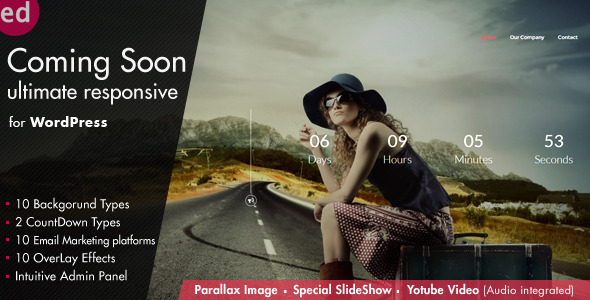
The Coming Soon CountDown Responsive WordPress Plugin Utilities is a commercial WordPress extension from developer azzaroco that swaps the public face of a site for a configurable placeholder page while the real work continues behind it. It combines a countdown timer, several background styles, an email opt-in form and role-based access control, so a site can be staged, teased or partially opened without being taken offline. It suits freelancers, agencies and site owners who need a polished holding page rather than a bare “under construction” notice, and it has sold more than 2,100 copies on CodeCanyon with a 4.49 out of 5 rating across 80 reviews.
What the plugin actually lets a site owner do
The core mechanic is a single enable/disable switch. The plugin stays installed and active while the public sees the placeholder; when the build is finished, one toggle reveals the live site. That matters because deactivating and reactivating plugins on a production site is a common source of lost settings, and this design avoids it entirely. The same switch can be thrown again later for a redesign or a major migration.
Around that switch, the vendor has built out a fairly deep set of presentation controls:
- Two countdown styles. A timer can be shown as plain digits or as circular rings that drain as the deadline approaches. Both count down dynamically rather than sitting at a static number.
- Six background families. Solid colour, a single image, a parallax image, a standard slideshow, a slideshow with Ken Burns-style slow zoom and pan, and video. The video option includes audio with play and pause controls, which is unusual at this price point.
- Transition effects. Ten jQuery-driven animations (fade, blind, clip, drop, explode, fold, puff and three slide directions) control how the page content enters. These are cosmetic, but they are the difference between a template that looks bought and one that looks built.
- Colour and pattern presets. Ten predefined colour schemes apply with one click, and ten background patterns (dots, rectangles, diagonals) can be layered on top. A darkness slider from 0 to 100 percent adjusts overlay opacity so text stays legible over busy imagery.
- Subscription handling. The opt-in form connects to ten destinations, including MailChimp, MailerLite-adjacent services such as Mailster and MailPoet, Campaign Monitor, AWeber, Constant Contact, iContact, GetResponse, MadMimi and a local list stored in WordPress itself. Submissions go through AJAX, so the page does not reload.
- Access rules by WordPress role. Rather than a blunt on/off, the plugin can let logged-in users with particular roles see the real site while everyone else sees the holding page. Individual pages can also be whitelisted so a Home, About or Contact page stays public during the build.
- Page furniture. Four title lines with automatic font scaling, a menu with per-item visibility toggles, a contact form with transparent fields, a “more info” popup and ten social icon links round out the layout.
The plugin ships with its source files (PHP, JavaScript, HTML and CSS), is declared compatible with WordPress 6.0 through 6.6, and lists integration with Elementor, Visual Composer and Easy Digital Downloads. The vendor states it is translation-ready from version 3.7 onward, and the settings screen includes bundled documentation rather than pointing to an external manual.
Where this fits, and where it does not
The clearest fit is a client build in progress. An agency can put a branded holding page in front of a half-finished site, collect early interest through the opt-in form, and give the client’s own staff access via a WordPress role so they can review pages without the placeholder getting in the way. The visible-pages feature is what makes this practical: a site can launch its About and Contact pages early while the shop or portfolio section stays hidden.
A second fit is a product or event launch. The countdown gives visitors a concrete deadline, the subscription form captures leads before the doors open, and the video background option gives a campaign page more presence than a static logo on white. Because the plugin can be switched on again later, the same setup works for seasonal promotions or a temporary maintenance notice.
It is also reasonable for a solo site owner who wants something better than a default WordPress maintenance message without paying for a page builder licence.
Where it is the wrong choice: anyone who needs a genuine maintenance mode with granular technical controls. This plugin is built around marketing presentation, not around HTTP 503 responses, IP allowlists for developers, or scheduled downtime windows. A site that needs search engines to see a proper maintenance status, or that needs staging environments kept entirely separate from production, should look at a dedicated maintenance-mode tool instead. Similarly, a project that depends on the block editor for layout will find this plugin’s Gutenberg support explicitly marked as not optimised.
Strengths and limitations in plain terms
Strengths
- The breadth of background and countdown options is well above what most placeholder plugins offer at this price. Video with audio, parallax and Ken Burns slideshows are all included rather than sold as add-ons.
- Role-based visibility and page whitelisting solve a real workflow problem: partial launches and client review without extra tooling.
- Ten email marketing integrations plus a local list means the opt-in form is useful out of the box, not a decorative field that goes nowhere.
- Source files are included, so a developer can restyle or extend the templates rather than fighting inline CSS.
- A long, documented update history — the vendor’s changelog runs back through multiple WordPress version compatibility releases — suggests the product is maintained rather than abandoned.
Limitations
- The last recorded update is October 2023, and the declared compatibility stops at WordPress 6.6. Sites running newer WordPress releases are, on the vendor’s own specification, outside the tested range.
- Gutenberg optimisation is marked as “No”. The plugin predates and largely ignores the block editor, which will feel dated to anyone building with native WordPress blocks.
- The visual layer relies on Bootstrap 3.3.1 and Font Awesome 4.1 — both long superseded. That is not a functional defect, but it does mean the front-end assets carry legacy weight.
- Ten page transition effects and ten colour schemes are fixed presets. There is no indication of a fully custom CSS-free design system, so matching an existing brand palette may require the included stylesheets.
- Search engine handling of the placeholder page is not described in the vendor specification. Anyone who needs explicit control over indexing during a build should confirm that behaviour before relying on it.
How it compares with the wider category
Coming-soon and maintenance plugins generally fall into three groups. The first is the lightweight utility: a logo, a message and a countdown, usually free, with almost no design control. The second is the marketing landing page builder, which offers strong visuals but often costs considerably more and may be tied to a page builder ecosystem. The third is the technical maintenance tool, focused on HTTP status codes and developer access rather than aesthetics.
This plugin sits firmly in the second group while keeping a first-group price. Against bare-bones utilities it wins on presentation and on the email integrations, which most free alternatives lack entirely. Against full landing-page builders it is narrower — it does one page type rather than arbitrary layouts — but it is also faster to configure, since the structure is already assembled. Against technical maintenance tools it is not a substitute at all; the two solve different problems and could reasonably be run side by side.
The honest positioning is this: it is a design-led placeholder with lead capture and access rules, priced as an impulse purchase. Buyers who need developer-grade maintenance controls or strict block-editor compatibility are shopping in the wrong aisle.
Frequently Asked Questions
Does this plugin hide the site from search engines while it is active?
The vendor’s specification does not state how the placeholder page handles search engine indexing. That is a meaningful gap, because a coming-soon page that gets indexed can compete with the real site later. Buyers who care about this should check the demo or ask the developer directly before purchasing.
Can visitors subscribe to a mailing list from the coming soon page?
Yes. The plugin includes an AJAX subscription form that connects to ten destinations, including MailChimp, Campaign Monitor, AWeber, Constant Contact, GetResponse, Mailster, MailPoet, iContact, MadMimi and a local list stored inside WordPress. Submissions are processed without reloading the page, and no third-party form plugin is required.
Will the plugin work with the latest version of WordPress?
Not confirmed. The vendor lists compatibility up to WordPress 6.6.x, and the most recent update was released in October 2023. Versions released after that fall outside the tested range, so a site on a newer WordPress install should test on a staging copy before enabling the plugin on a live site.
Can part of the site stay visible while the rest shows the countdown page?
Yes. The plugin supports page whitelisting, so selected pages such as Home, About or Contact can remain public while everything else shows the placeholder. Access can also be granted by WordPress user role, letting administrators, editors or client accounts browse the real site during the build.
Verdict
Buy this if the goal is a good-looking holding page with a working countdown, a lead capture form and enough access control to keep a client review process running smoothly — and if the site is on WordPress 6.6 or earlier. The 2,100-plus sales and 4.49 rating suggest it delivers reliably for that job, and at $18 the risk is minimal. Do not buy it if the requirement is a technical maintenance mode with status-code control, if the site runs a WordPress version newer than the vendor’s tested range, or if the design must be built with native block editor patterns. In those cases the plugin is either the wrong tool or a compatibility gamble, and the money is better spent elsewhere.