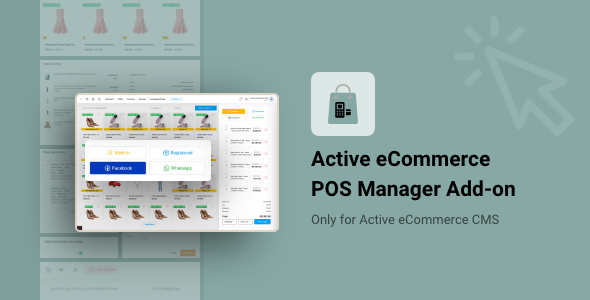
The Active eCommerce POS Manager Add-on is a paid extension that adds a point-of-sale (POS) screen to an existing Active eCommerce CMS installation, letting administrators and marketplace sellers create orders from a back-office counter instead of the storefront checkout. It is sold on CodeCanyon by ActiveITzone for $25 and is not a standalone system: it requires the parent CMS to be installed first. Store owners running a physical shop alongside an online catalogue, and multi-seller marketplaces whose vendors need an in-person sales channel, are the natural buyers.
That dependency shapes everything else about the product. Because the POS is a native module inside the same Laravel application rather than a separate till connected by an API, stock levels, customer records and order history stay in one database. For a small retailer already committed to Active eCommerce CMS, that removes the reconciliation work a third-party POS would create. For anyone who has not bought the CMS, the $25 price is only part of the entry cost.
What the POS Manager actually adds to an Active eCommerce store
The core function is order creation from the admin or seller panel. Staff pick products, set quantities, choose a customer, attach shipping details, apply a discount and confirm. The resulting order is recorded in the same order table the online store uses, which is the main practical advantage over running a separate till and exporting figures at month end.
Product selection built for a busy counter
Only products explicitly enabled for POS appear on the selling screen, so a catalogue of thousands can be trimmed to the lines a shop actually stocks. Search works by name or category, and variable products display their size, colour and other options with live stock counts attached. There are additional filters for discounted items, low-stock items, best sellers and highest-rated products, which is useful for upselling at the till. If a product is missing from the POS list, staff can pull it in from within the POS screen without leaving the checkout flow.
Customer handling that tolerates incomplete data
Walk-in customers can be served without an account, and an order can be completed with only a phone number or email address. When that partial data matches an existing registered customer, the system loads the stored profile, so a returning buyer’s history stays attached to the new purchase. Shipping addresses can be added or edited during checkout. The vendor also positions this as a way to log sales that arrive through WhatsApp, Facebook or other messaging channels, keeping those orders in the same reporting pool as web sales.
Checkout, payment and receipts
Cart building happens without page reloads, with a running order summary on the right-hand side of the screen. Flat-rate shipping can be applied at checkout, and discounts are set at order level rather than through the store’s coupon system. Payment options cover cash, cash on delivery and offline methods. The vendor states that every POS order is recorded as paid, which is a deliberate simplification worth understanding before purchase. Thermal printer configuration, invoice printing and receipt downloads are included, so no separate billing software is needed at the counter.
Access control and installation
Administrators decide which users can reach the POS and which products appear in it; sellers see a narrower interface limited to their own catalogue. Installation is handled through the CMS’s add-on manager: upload the package, activate it, and the module appears. The vendor lists PHP 7.x and the Laravel framework as requirements, and the download includes PHP, JavaScript, JSON, HTML and SQL source files.
Where this add-on fits, and where it does not
The strongest fit is a retailer who already runs Active eCommerce CMS and wants the online catalogue and the shop floor to share one stock figure. A single-location store with a counter, a phone-order operation, or a warehouse with a trade counter all match the feature set. Multi-vendor marketplaces are the second clear case: sellers who fulfil orders in person get a selling interface without being given broad admin permissions, and the platform owner keeps every transaction in one reporting system.
It is also a reasonable choice for businesses in markets where cash and cash on delivery dominate, since those payment paths are handled directly rather than bolted on.
The wrong choice is anyone without the parent CMS, or anyone unwilling to buy it. The add-on cannot run alone, and the combined cost and setup effort should be weighed against a standalone POS. It is also a poor fit for a retailer who needs true offline operation — a till that keeps selling when the internet drops. Nothing in the supplied specification describes local caching or offline mode, and a browser-based module inside a hosted Laravel application should be assumed to need a live connection. Businesses with complex payment reconciliation, partial payments, layaway or multi-currency cash handling will also find the paid-status simplification too blunt.
Strengths and limitations
Strengths
- Native integration means one stock pool, one customer record and one order history across online and counter sales — no sync job to monitor.
- Role separation is genuinely useful in marketplaces: sellers sell, admins control access and product visibility.
- Variable products show real stock at the point of sale, which reduces overselling on popular sizes and colours.
- Receipt printing and thermal printer support are included, removing a common hidden cost of POS setups.
- Orders can be created for unregistered customers with minimal data, matching how walk-in retail actually works.
- Established track record on CodeCanyon: 1,822 sales and a 4.47 average from 30 reviews, with the vendor shipping updates as recently as August 2026.
Limitations
- Hard dependency on Active eCommerce CMS. The add-on has no value without it, and the CMS is a separate purchase.
- Every POS order is forced into paid status. There is no documented support for partial payments, pending balances or split tender, which limits accuracy for credit-based or deposit-taking retailers.
- Payment handling is limited to cash, COD and offline methods; no card terminal or integrated card reader flow is described.
- The stated software requirement is PHP 7.x, an older branch. Buyers on newer PHP versions should confirm compatibility with the vendor before installing.
- No offline mode is documented, so a dropped connection stops counter sales.
- Discounts are order-level only, with no coupon logic, which is simpler than many retailers expect from a POS.
How it compares with the wider POS category
Dedicated POS platforms and SaaS tills generally win on breadth: hardware integrations, offline resilience, staff shift management, detailed cash-drawer reconciliation and multi-outlet reporting. They also come with recurring subscription costs and, critically, a second database. Keeping that second database aligned with an online store is where most small retailers lose time, and it is precisely the problem this add-on is designed to avoid.
Against other add-ons in the Active eCommerce ecosystem, the comparison is narrower. Most extensions add storefront or admin functionality; this one adds a sales channel. Its value depends entirely on whether the business has a physical or in-person sales motion at all. A pure online store has no use for it, however well built it is.
The honest positioning is this: it is a competent, tightly integrated module for a specific platform, not a general-purpose POS. Buyers who want a full retail back office with cash management and offline trading should look at standalone systems and accept the integration work. Buyers whose main pain is stock drifting between the website and the shop should find the native approach more valuable than extra features they would not use.
Frequently Asked Questions
Can the Active eCommerce POS Manager Add-on be used without Active eCommerce CMS?
No. The add-on is a module that installs into an existing Active eCommerce CMS installation through its add-on manager and has no standalone mode. Buyers who do not already own the CMS must purchase it separately before this add-on will function. Budget for both, plus the time to set up the parent platform.
Does it keep online and in-store stock levels in sync?
Yes, because both draw on the same database. A POS order reduces stock in the same records the website reads, so the online catalogue reflects counter sales immediately without an export or sync step. This is the product’s central advantage over pairing the store with an unrelated third-party POS system.
Can sellers in a multi-vendor marketplace use the POS, or only the admin?
Both can use it, with different scope. Administrators control which users have POS access and which products are listed there, and can sell in-house products. Sellers get their own POS interface restricted to their own catalogue, so vendors can record in-person sales without receiving wider administrative permissions across the marketplace.
What payment methods does the POS support?
Cash, cash on delivery and offline payment recording are supported, with receipts printable on a thermal printer or downloadable as an invoice. The vendor states that all POS orders are saved as paid, so there is no documented handling of deposits, partial payments or outstanding balances. Retailers needing split payments should confirm the workflow before buying.
Verdict
Buy this add-on if Active eCommerce CMS is already the backbone of the business and there is a physical counter, trade desk or phone-order operation that needs to feed the same inventory. The native integration, seller-level access control and included receipt printing justify the $25 for that audience, and the sales and review figures suggest the vendor supports it consistently.
Do not buy it as a first step into POS software, as a replacement for a full retail back office, or for any environment that needs offline selling, split payments or detailed cash reconciliation. Those requirements sit outside what the vendor documents, and no amount of integration convenience compensates for a till that cannot do the job at the counter.