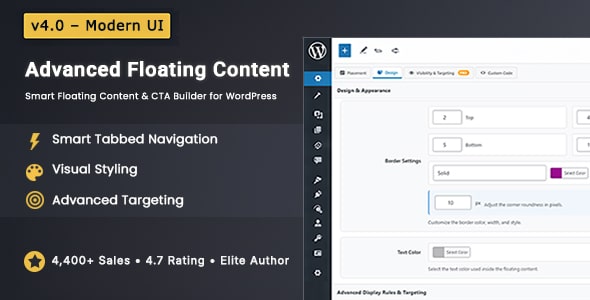
Advanced Floating Content Advertising is a WordPress plugin that places bars, calls to action, videos, forms and widgets in fixed or scroll-triggered positions around a site’s content. It is built for site owners who want promotional messages to stay visible while people browse, rather than disappearing the moment a visitor scrolls past. The plugin comes from CodeTides and sells on CodeCanyon for a one-time $25, with 4,435 sales and a 4.77 out of 5 rating from 235 reviews at the time of writing.
That combination of price, sales volume and rating makes it one of the more established options in its category, and the version 4.0 release rebuilt the admin interface around a tabbed workflow. The sections below cover what it actually does, where it fits, and where a different approach may serve better.
What the Plugin Actually Does
The core idea is simple: instead of interrupting visitors with a modal popup, the plugin keeps content permanently or conditionally visible in a fixed layer over the page. The vendor places no cap on the number of floating elements, so a site can run an announcement bar, a side call to action and a cart notice at the same time.
Placement and scroll behaviour
Each element can be set to behave in one of three ways. Fixed elements stay pinned to the viewport while the page scrolls. Absolute elements stay inside a defined region of the document. Scroll-based elements appear only after the visitor reaches a set scroll depth, which is useful for messages that would be premature at the top of a page. Position is controlled per side — top, bottom, left or right — with individual margin values for each edge, and the layout responds to screen size.
Sticky announcement bars
Announcement bars come in two modes. In sticky mode the bar locks to the top or bottom of the screen and overlays the page. In integrated mode it pushes the surrounding content down so nothing is hidden. The second option matters on sites where an overlay would cover navigation or a checkout button.
Targeting rules
This is where the plugin goes well beyond a basic notice bar. Display can be limited by page type — homepage, archive, search results — or narrowed to specific posts, pages, categories, custom post types and individual post IDs. Audience rules cover logged-in versus logged-out visitors, WordPress user roles, desktop versus mobile, operating system, and country or IP address. Scroll depth and viewport width can also act as triggers, so a message can be shown only on wide screens or only after a visitor has read a certain distance down the page.
Frequency and impression control
Global display limits, per-user impression caps and rules for what happens after a visitor closes an element are all configurable. This is the part that separates a well-behaved floating element from an irritating one, and it is often the first thing missing from cheaper alternatives.
WooCommerce integration
The plugin includes a promotion engine aimed at WooCommerce stores, letting offers be placed on specific product, category or cart contexts. Because the targeting rules already cover post types and categories, the practical effect is that a discount bar can appear on one product category and nowhere else.
Design controls and custom code
Styling is handled through the admin rather than a stylesheet. Backgrounds can be solid colour, image or transparent; borders, corner radius, padding, text size and colour are all adjustable; close buttons can be a standard button, an anchor link or removed entirely. A custom code tab accepts CSS and JavaScript for anything the interface does not cover, and the source files for JavaScript, CSS and PHP ship with the purchase.
Where This Fits and Where It Does Not
The clearest fit is a content site or store that already has traffic and wants to promote something without resorting to popups. A publisher running a newsletter signup, an affiliate notice or a seasonal sale can place one element and target it tightly, which keeps the message from following every visitor around the site.
WooCommerce stores are a strong match because category and product-level targeting lets promotions appear only where they are relevant. Membership and community sites running BuddyPress or bbPress can use role targeting to show different messages to logged-in members and anonymous visitors. Agencies building client sites will find the custom CSS and JavaScript hooks useful when a design calls for something the built-in controls cannot produce.
Multilingual projects are supported through WPML, and the plugin also lists compatibility with Elementor, Beaver Builder, WPBakery, Divi-adjacent builders such as Cornerstone and Layers WP, plus Bootstrap 4 and 5 and Foundation 6. Gutenberg and the Classic Editor are both supported.
Where it is the wrong choice: a site that needs a full popup or exit-intent system with A/B testing and conversion reporting. This plugin deliberately avoids modal overlays, and it does not present itself as an analytics or testing tool. Anyone whose goal is to measure which variation of a message converts better should look at a dedicated marketing platform instead. Similarly, a single small blog that wants one dismissible cookie notice is over-served by a $25 plugin with this many targeting rules.
Strengths and Limitations
Strengths
- The targeting depth is unusually broad for the price: page, post, category, custom post type, user role, device, operating system, country and IP address are all available without add-ons.
- Impression caps and post-close behaviour are built in, which is what keeps a floating element from becoming a nuisance.
- The sticky versus integrated bar modes solve a real layout problem rather than just offering a visual variation.
- Custom CSS and JavaScript are permitted, so the plugin does not become a ceiling on design work.
- Source files are included, which matters to agencies that need to audit or extend behaviour.
- A 4.77 rating across 235 reviews is a meaningful sample size, and the plugin has been updated recently.
Limitations
- There is no built-in A/B testing or conversion reporting. Deciding which message works better requires an external analytics setup.
- The vendor lists browser support going back to Internet Explorer 6. That claim is inherited from an older codebase and says nothing useful about how the plugin behaves in current browsers; it should be treated as marketing rather than a tested guarantee.
- No high-resolution assets are included, so anyone expecting retina-ready packaged graphics will need to supply their own.
- Because the plugin covers so many targeting dimensions, the settings screen is dense. The redesigned tabs help, but a first-time user still has to understand the difference between absolute and fixed positioning before results look right.
- Country and IP-based rules depend on how visitor location is resolved. The vendor does not document the geolocation source, so accuracy for that specific rule cannot be verified from the listing.
How It Compares to the Wider Category
Floating bar and notice plugins generally fall into three groups. The first is free, single-purpose plugins that add one announcement bar with a handful of colour options. The second is bundled marketing suites, where floating bars are one module inside a larger popup, email and automation product, usually on a subscription. This plugin sits in a third group: a focused, one-time-purchase tool with targeting depth closer to the suite end of the market.
Against the free tier, the difference is control. Free bars typically cannot restrict display by user role, scroll depth or impression count, which is exactly what determines whether a bar helps or annoys. Against subscription suites, the trade-off runs the other way: those platforms include testing, reporting and email integration that this plugin does not attempt. The sensible comparison is not feature count but whether a site needs measurement and automation, or simply precise placement.
For a store or publisher whose main requirement is getting the right message in front of the right segment without a recurring fee, the plugin’s positioning is straightforward. For a team already paying for a marketing platform, adding this would duplicate functionality.
Frequently Asked Questions
Does Advanced Floating Content slow down a WordPress site?
The vendor does not publish performance benchmarks, so no speed claim can be verified from the listing. What can be said is that the plugin loads its own CSS and JavaScript, and each floating element adds markup to the page. Sites running many elements at once should test with a caching and optimisation setup before launch.
Can it show different floating content to logged-in users and guests?
Yes. Visibility rules include logged-in status and WordPress user role, so a membership site can show a join prompt to guests and a different message to existing members. Combined with page and category targeting, this allows several distinct audiences to be served from one installation without overlap.
Is it compatible with WooCommerce product and category pages?
Yes, WooCommerce promotion targeting is a listed feature, and the general targeting rules cover custom post types and categories. That means an offer can be limited to a single product category or a specific product page. The vendor lists compatibility with WooCommerce 5.x, 6.x and 7.x.
Does the plugin work with page builders like Elementor and WPBakery?
Yes. The compatibility list includes Elementor and Elementor Pro, Beaver Builder, WPBakery Page Builder, Cornerstone, Layers WP, Visual Composer, Gravity Forms, Easy Digital Downloads, BuddyPress, bbPress and WPML. Gutenberg and the Classic Editor are both supported, so the choice of editor does not restrict where floating elements can appear.
Verdict
Advanced Floating Content Advertising suits site owners who want promotional messages to remain visible without resorting to popups, and who need the kind of targeting — user role, device, scroll depth, impression caps — that free notice bars do not offer. The one-time $25 price, the 4,435 sales and the 4.77 rating across 235 reviews make it a low-risk purchase for that use case, and CodeTides has kept the plugin current.
It is the wrong buy for anyone who needs A/B testing, conversion reporting or exit-intent behaviour, since none of those are part of the product. It is also more machinery than a small blog needs for a single notice. Buyers in the middle — stores, publishers, membership sites and agencies — are the ones this plugin is actually built for.