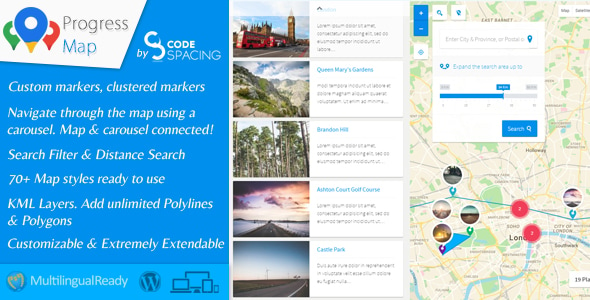
Progress Map WordPress Plugin Interface Elements is a location-mapping add-on for WordPress that turns ordinary posts, pages and custom post types into markers on a Google Map, paired with a carousel that stays in sync with the map. It is built for sites whose content has a physical address or coordinate — hotels, property listings, restaurants, stores, job sites — and it is sold on CodeCanyon by the developer codespacing (Hisham) at $114. After more than a decade on the marketplace it has accumulated 6,355 sales and a 4.44 out of 5 rating across 312 reviews, which is a meaningful signal of longevity rather than novelty.
What the plugin actually does with your location content
The core idea is straightforward: any post that carries coordinates becomes a map marker. The vendor does not limit this to WordPress’s built-in post types, so a site can attach maps to unlimited custom post types — a property listing type, a restaurant type and a job type can all coexist and each can be mapped independently. Adding a location means entering coordinates into a form on the standard “Add New Post” screen, which keeps the workflow inside the editor most WordPress users already know rather than introducing a separate management screen.
The carousel is the part that distinguishes this from a plain embedded map. It is synced to the map in both directions, so selecting an item in the carousel zooms the map to that location, and the two views act as one interface. Recent versions added hash navigation, meaning carousel position can be reflected in the URL, which makes individual listings linkable and shareable. The carousel also adapts to small screens, an important detail given how much map browsing happens on phones.
Marker behaviour and visual clustering
Markers are configurable rather than fixed. A “visited marker” feature lets a site change the appearance of markers a user has already clicked, which gives visitors a visual trail of what they have explored. For dense datasets, the plugin offers clustering — grouping nearby markers into a single symbol at low zoom levels — and version 5.8 introduced a colour-based clustering mode that uses a gradient keyed to marker density. That is a genuine usability improvement for city-scale directories, where hundreds of overlapping pins otherwise become an unreadable smear.
Admin tooling and drawing tools
Map setup happens through an admin panel that covers map settings, marker settings, carousel settings and controls. Administrators can draw polygons, polylines, rectangles and image overlays directly on the map to define service areas, delivery zones or neighbourhood boundaries. Version 6.0.2 replaced Google’s deprecated DrawingManager with Terra Draw to stay compatible with Maps JavaScript API v3.65 and later, which matters because deprecated Google APIs eventually stop working altogether.
Modern Google Maps platform support
The 6.0 release was a substantial platform migration rather than a cosmetic update. It moved Places autocomplete to the newer PlaceAutocompleteElement, migrated the Places API to improved pagination and ranking preferences, and rebuilt the heatmap layer on deck.gl after Google deprecated the visualisation library that previously powered it. The vendor also added support for Cloud Map IDs, which is what unlocks styling, datasets and feature layers configured in the Google Cloud Console. A map caching system was introduced in the same release to improve load times. Sites running older integrations that Google has since retired should treat these changes as the main reason the plugin remains viable.
Where this fits, and where it does not
This is a good match for directory-style projects where location is the primary organising principle: a real estate agency site, a hotel or restaurant guide, a store locator, a regional job board, or a franchise network showing branch coverage. It also suits agencies building repeatable location sites, because the custom post type support means the same plugin configuration can be reused across client projects with different content models. The Bootstrap 4 dependency is worth noting — the front-end markup assumes Bootstrap 4.x, so a theme built on Bootstrap 5 or a different framework will need styling work to avoid visual conflicts.
It is the wrong choice for a site that needs only a single static map showing one office. The setup overhead, the Google Maps API key requirement and the cost are disproportionate for one pin. It is also a poor fit for anyone who needs a front-end submission workflow out of the box: the vendor sells a “Submit Locations” add-on separately, and the main plugin’s changelog references that add-on rather than bundling it. Buyers should also note the vendor’s own announcement that the product has moved to progress-map.com, with all nine modules offered there for a one-time $149 including lifetime updates — a different commercial arrangement from the CodeCanyon listing.
Strengths and limitations
Strengths
- Unlimited custom post type support, so location data does not have to be forced into standard posts.
- Two-way carousel and map synchronisation, with hash navigation for linkable listings.
- A long, documented migration history — Advanced Markers, the new Places API, Terra Draw and deck.gl heatmaps — showing active maintenance against Google’s changing platform.
- Marker clustering with a density-based colour mode for large datasets.
- Administrative drawing tools for polygons, polylines, rectangles and image overlays.
- Map caching and Cloud Map ID support for performance and console-side styling.
- Source files include PHP, JavaScript, JSON, HTML, XML, CSS and layered PNG, so deeper customisation is possible.
- 312 reviews and a 4.44 rating give a reasonable picture of real-world reliability.
Limitations
- No Gutenberg block. The vendor’s own specification lists “gutenberg-optimized: No”, so the editing experience is built around classic meta boxes and shortcodes rather than the block editor.
- Bootstrap 4.x is a declared compatibility requirement. Sites on Bootstrap 5 or no framework will need custom CSS.
- Front-end location submission requires a paid add-on, not the base plugin.
- Google Maps API keys, billing and quota management are the buyer’s responsibility, and the plugin’s cost is separate from any Google usage charges.
- Documentation and support now sit on the vendor’s own site rather than the CodeCanyon listing, so the purchase channel and the support channel have diverged.
- The plugin does not geocode addresses by itself in the material reviewed; coordinates are entered into the post form, which is slower for large imports.
- No stated accessibility conformance for the map and carousel interface.
How it compares with the wider category
Location plugins generally fall into three groups. The first is simple embed tools that place a map on a page with a few pins — cheap, quick, and unsuitable for anything with more than a handful of locations. The second is full directory themes and suites, which bundle mapping with search, filtering, payment and submission but lock the site into one theme’s structure. Progress Map sits between them: a focused plugin that plugs into whatever theme and post types already exist, rather than a theme that dictates the whole site.
Against the simple embed group, the difference is carousel synchronisation, clustering, drawing tools and custom post type mapping — capabilities that only matter once a site has real listing volume. Against the directory-suite group, Progress Map gives up bundled front-end submission and search filtering in exchange for flexibility and a much smaller footprint on the theme layer. The trade-off is that buyers who need a complete directory product will likely assemble it from Progress Map plus separate add-ons or plugins, and should price that stack before committing. On pure map rendering and Google platform currency, the recent migration work puts it ahead of plugins that have not yet moved off deprecated APIs.
Frequently Asked Questions
Does Progress Map work with the WordPress block editor?
No. The vendor’s specification explicitly lists the plugin as not Gutenberg-optimized, and locations are added through a form on the classic “Add New Post” screen. Sites running a fully block-based editorial workflow will find the interface sits outside that pattern, though the shortcodes and meta boxes still function normally on current WordPress releases.
Do I need a Google Maps API key to use it?
Yes. The plugin renders through the Google Maps JavaScript API, including the newer Advanced Markers, Places autocomplete and Cloud Map ID features. That means a Google Cloud project, an enabled billing account and an API key are prerequisites. Google’s usage charges are billed separately from the plugin purchase price and are not included.
Can I map custom post types other than standard posts?
Yes, and the vendor places no limit on how many. Default and custom post types can each be mapped, so a property type, a restaurant type and a store type can run side by side. Each location’s coordinates are entered on its own post editing screen, keeping the data attached to the content rather than a separate table.
Is the plugin still being updated?
Yes. The most recent release recorded is version 6.0.4, dated 20 June 2026, containing bug fixes for add-on version checks. Earlier 2026 releases delivered substantial platform migrations to Advanced Markers, the new Places API, Terra Draw drawing tools and deck.gl heatmaps, indicating the developer is actively tracking Google’s deprecation schedule.
Verdict
Progress Map is a well-maintained, genuinely capable mapping plugin for WordPress sites where location is the point of the content — directories, property portals, store locators and regional listings with enough volume to justify clustering and carousel navigation. The 6,355 sales and 4.44 rating reflect a product that has survived twelve years of Google API changes, and the 2026 migration work shows the developer is still keeping pace with them. It is not the right purchase for a site that needs one static map, nor for a team that needs front-end submission and filtering without buying additional modules. Buyers should also weigh the CodeCanyon listing against the vendor’s own site, where the same product is sold with all nine modules and lifetime updates under a different pricing model. Anyone planning a serious location directory should budget for the plugin, any required add-ons, and Google Maps API usage separately.