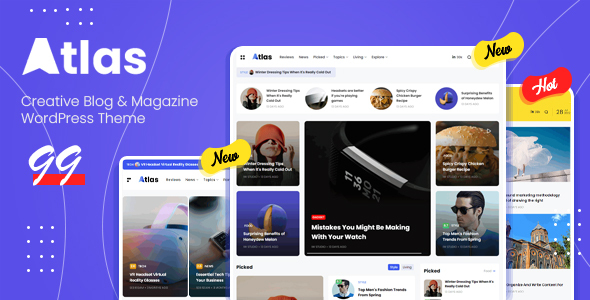
Atlas is a WordPress theme built for editorial websites: blogs, online magazines, news portals and personal publications. It pairs a deliberately compact, minimal layout with the Elementor drag-and-drop page builder, so a site owner can either import a ready-made demo in one click or assemble headers, footers and article layouts from scratch. It is aimed at publishers who want a clean reading experience and control over typography and colour without writing code. The Atlas Blog Magazine category on ThemeForest is crowded, and this entry from TMRW-studio competes on speed settings, RTL support and a wide set of built-in article formats rather than on novelty.
What the theme actually gives a publisher
The core of the product is layout flexibility through Elementor. Headers, footers and front pages are all editable in the builder, which means a site can be restructured without touching template files. The vendor ships prebuilt demo sites that install in a single click, and those demos serve as a starting point rather than a finished design — most buyers will adjust colours, fonts and block order.
Article presentation is where the feature list runs deepest. There are five article layouts, plus grid and masonry arrangements for archive and category pages. A sticky sidebar and sticky navigation keep navigation visible during long reads, and an off-canvas menu and sidebar are available for narrower viewports. For serialised content, infinite scroll loads the next batch of posts automatically, and a “now reading” indicator shows progress through a single article.
Several features target reader engagement and sharing. Social share buttons are built in, with a WhatsApp share button and WhatsApp counter elements that appear in the changelog history. Search is handled through an Ajax search with a popup presentation, and the megamenu supports Ajax category loading, which means a large category tree does not have to load all at once.
Performance and technical groundwork are addressed in a few ways. The theme includes its own speed optimisation settings, lazy loading and lazy sizing for images, and a fetchpriority option for post images — a browser hint that tells the browser which image matters most. SVG logos and icons are supported, as are retina displays. On the SEO side, the theme outputs rich snippets and Open Graph tags, and the changelog shows repeated work on heading tag structure, which suggests the developer has treated semantic markup as a maintenance concern rather than a one-off.
Other practical details: full RTL support for right-to-left languages such as Arabic and Hebrew, translation readiness, dark and light skins with unlimited custom colours, all Google Fonts, Contact Form 7 and Mailchimp compatibility, and WooCommerce compatibility for anyone selling products alongside editorial content. An advertisement post type and floating ads are included, which is unusual for a theme at this price and useful for ad-supported publications.
On credibility signals, the listing shows 984 sales on ThemeForest at $39, and the theme has been updated regularly — the version history runs from an initial release through to a 2025 update that added compatibility with the newest WordPress version. That update cadence is the strongest evidence that the product is actively maintained.
Where Atlas fits, and where it does not
Atlas suits independent bloggers who want a magazine-style front page with mixed layouts — a hero post, a grid of secondary stories, a sidebar of popular posts. It suits small editorial teams running a niche news site, particularly where content volume is high enough that infinite scroll and Ajax category menus genuinely improve browsing. It also fits multilingual publishers, because RTL support is built in rather than bolted on, and publishers running display advertising, because the ad post type and floating ad units remove the need for a separate plugin.
It is a reasonable choice for agencies building a client publication on a modest budget, since the Elementor foundation means handover is easier than with a bespoke theme. The WooCommerce compatibility also makes it viable for a creator selling a small number of products or memberships alongside a blog.
Where it is the wrong choice: a site that needs complex, custom editorial workflows — multi-author approval chains, advanced custom fields driving structured data, or a paywall with tiered subscriptions — will outgrow what a theme of this type offers. The same applies to anyone who dislikes page builders. Because Elementor drives the layout, a buyer who prefers block-based editing in the native WordPress editor, or who wants a lean hand-coded theme, will find the builder layer an obstacle rather than a convenience. Sites with very large media libraries should also check the lazy loading behaviour against their own caching setup before committing.
Strengths and limitations
Strengths
- Genuinely broad article formatting: five single-post layouts, grid and masonry archives, sticky sidebar and sticky header all included without extra plugins.
- RTL support is a first-class feature, which narrows the field considerably for Arabic, Hebrew and Persian publishers.
- Built-in advertising tools — an advertisement post type and floating ads — are rare at this price point.
- Performance work is visible in the changelog, including fetchpriority for images, lazy loading and dedicated speed settings.
- Active maintenance: the version history shows frequent fixes through 2024 and a framework upgrade in late 2025.
- SEO groundwork covers rich snippets, Open Graph and heading structure, with the developer correcting heading tags in multiple releases.
Limitations
- Elementor is a hard dependency for layout work. There is no equivalent path for someone who wants to avoid the builder.
- The feature set is wide but shallow in places. The theme handles presentation well; it does not attempt editorial workflow, membership logic or complex content modelling.
- Several early releases required the paid ACF Pro plugin before switching to the free version. Buyers on older documentation may still encounter references to the Pro requirement.
- The vendor does not state performance benchmarks, PageSpeed scores or a tested WordPress version range in the listing, so speed claims rest on the feature list rather than published measurements.
- Support is described as dedicated with a help centre, but the listing gives no response-time commitment or support hours.
- The changelog shows a high volume of small bug fixes — a sign of responsiveness, but also of a codebase that has needed steady patching.
How it compares with the wider category
The blog and magazine theme market splits roughly three ways: multipurpose themes that include a blog demo among dozens of other layouts, dedicated editorial themes, and block themes built for the native WordPress editor. Atlas sits firmly in the second group. Against multipurpose themes, it trades breadth for focus — a multipurpose theme will also give you portfolio, agency and ecommerce demos, but its blog templates are usually less considered and its archive options thinner. Against block themes, Atlas offers more ready-made article presentation out of the box, at the cost of being tied to a third-party builder.
Within the dedicated editorial segment, the differentiators are RTL support, the advertising post type and the depth of archive layout options. A theme without those would need extra plugins to match, and each plugin adds weight and another update to track. The trade-off is that Atlas does not try to be a publishing platform. Buyers comparing it with premium alternatives should weigh how much of their requirement is presentation versus workflow — Atlas is strong on the former and silent on the latter.
Frequently Asked Questions
Do I need to know how to code to use the Atlas theme?
No coding is required for typical use. Layouts are assembled in the Elementor drag-and-drop builder, and the one-click demo import gives a working site immediately. Customisation of colours, fonts and logos happens through theme options. Some comfort with WordPress administration is still expected, particularly around menus, categories and plugin management.
Is Atlas compatible with WooCommerce?
Yes, the listing states full WooCommerce compatibility, and the changelog records a fix to the add-to-cart button. That makes it viable for a publication selling a small number of physical or digital products. It is not positioned as a full ecommerce theme, so stores with complex product catalogues, variations or subscription logic should look at dedicated WooCommerce themes instead.
Does the theme support right-to-left languages?
Yes. RTL support is listed as a core feature, covering right-to-left scripts such as Arabic, Hebrew and Persian. The theme is also translation ready, so interface strings can be localised. Buyers should still verify that any third-party plugins they plan to use — forms, ad managers, membership tools — handle RTL correctly on their own, since the theme cannot control plugin output.
How often is the Atlas theme updated?
The changelog shows a steady release history from the initial version through 2024, with a framework upgrade and WordPress compatibility update recorded in late 2025. That pattern indicates an actively maintained product. The listing does not publish a fixed update schedule, so buyers should treat maintenance as ongoing rather than guaranteed at a specific interval.
Verdict
Atlas is a well-considered choice for bloggers, niche news sites and small editorial operations that want a polished magazine layout without building one from scratch. The combination of RTL support, advertising tools, multiple article formats and active maintenance justifies the $39 price for that audience, and the 984 sales suggest the approach has found a market. It is not the right pick for publishers whose needs centre on editorial workflow, membership tiers or complex content structures, nor for anyone committed to avoiding page builders. Buyers should also confirm their caching and image setup plays well with the lazy loading options before launch, since the vendor does not publish performance figures. For presentation-led publishing sites, the fit is strong; for platform-led ones, it is not.