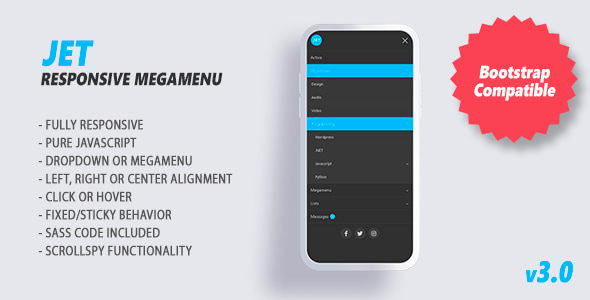
Jet is a responsive mega menu component built with CSS and plain JavaScript, distributed as a code script on CodeCanyon by developer marcoarib. It handles dropdown navigation, multi-column mega panels, sticky and fixed headers, and mobile menu behaviour without relying on jQuery. It suits front-end developers and agencies who need a lightweight navigation layer they can drop into an existing site rather than a full theme or page builder.
The script has been sold 2,204 times and holds a 4.85 out of 5 rating across 87 reviews, which places it among the better-established navigation scripts in its price bracket. At $6.00 it is an inexpensive addition to a project, and the vendor last updated it in July 2024.
What Jet Navigation Actually Delivers
The core proposition is a menu system that works across phone, tablet and desktop from a single codebase. Jet Navigation is written in pure JavaScript, meaning the browser runs the menu logic directly without loading jQuery or another helper library first. On a content-heavy site where every kilobyte counts, that matters: there is no second framework to download, parse and maintain alongside the rest of the stack.
Responsiveness is handled by the component itself rather than left to the developer. The menu adapts its layout for small screens, so the same markup serves a desktop mega panel and a collapsed mobile menu. For teams building one template that has to survive on a phone, that removes a common source of layout bugs.
Bootstrap compatibility is stated explicitly. Sites already running Bootstrap can integrate the menu without fighting conflicting grid or utility classes. The script also ships with its own CSS grid system for arranging content inside mega panels, which means a multi-column panel can be laid out without pulling in an external grid framework.
Two header behaviours are available through a single CSS class each: fixed navigation, where the menu stays pinned to the top of the viewport, and sticky navigation, where it scrolls normally and then locks into place. Both are common requirements on long marketing pages, and exposing them as classes rather than JavaScript configuration keeps the setup short.
Beyond basic dropdowns, Jet supports full mega menus in several sizes, dropdowns with different alignments (including left and right), and menu items with icons. Version 3.0 added a set of interactive elements that can sit inside the menu: buttons, plain text blocks, search fields and badges. A search field inside a mega panel is useful on sites with large catalogues, where navigation alone cannot surface everything. Social links and scrollspy functionality were added in the same release, the latter letting the menu highlight the section a visitor is currently reading.
Customisation is covered on two fronts. SASS source files are included, so colours, spacing and typography can be changed at the variable level and recompiled rather than overridden with extra CSS. Separately, a set of JavaScript options and callbacks lets developers hook into the menu’s behaviour and extend it programmatically. The vendor describes the documentation as detailed, and the source files for JavaScript, HTML and CSS are all included in the download.
Where Jet Fits and Where It Does Not
Jet is a good match for a custom-built site where the developer controls the markup. A freelancer building a brochure site, a portfolio or a small business site in plain HTML, CSS and JavaScript can add a professional navigation layer in an afternoon without adopting a framework. Agencies maintaining several client sites benefit from the same reason: one dependency-free component that behaves consistently across projects is easier to support than a different menu implementation on every build.
It also fits projects already committed to Bootstrap. Because the vendor states full compatibility, the menu can be introduced into an existing Bootstrap theme as a replacement for the default navbar without a rewrite.
There are situations where Jet is the wrong choice. If a site is built on WordPress, Shopify or another CMS, the navigation is usually generated by the platform, and replacing it with a standalone script means writing custom integration code that the CMS will not maintain for you. Similarly, anyone who needs a drag-and-drop visual builder to assemble menus will find a code-based component the wrong tool: Jet expects the developer to write markup and configure options, not to point and click.
Projects that depend heavily on a JavaScript framework such as React or Vue are also a poor fit. Jet is a plain script, not a framework component, so it would need to be wrapped and managed manually inside the framework’s lifecycle.
Strengths and Limitations
Strengths
- No jQuery or third-party library dependency, which keeps the page weight down and removes a common source of version conflicts.
- One component covers dropdowns, mega panels, icons, search fields, badges, buttons and social links, so fewer separate plugins are needed.
- Fixed and sticky header modes are enabled with a CSS class rather than custom scripting.
- SASS source is included, allowing changes at the variable level instead of CSS overrides.
- JavaScript options and callbacks provide an extension path for behaviour the defaults do not cover.
- Bootstrap compatibility and a built-in grid system reduce integration work on existing themes.
- Free updates, with the most recent release in July 2024 focused on performance.
Limitations
- Browser support is declared from IE10 upward. That legacy coverage is a reasonable signal of conservative code, but it also suggests the component was not written around the newest CSS and JavaScript features, which may matter on projects targeting modern-only browsers.
- There is no visual menu builder. Every menu structure is defined in HTML and configured through options, so non-developers cannot maintain it.
- The vendor does not state accessibility conformance, keyboard navigation behaviour or ARIA support in the listing. Buyers with accessibility requirements should verify this on the demo before committing.
- Integration with CMS platforms such as WordPress is not provided. The script is framework-agnostic, which is a strength for custom builds and a gap for platform-based sites.
- Because it is a code script rather than a plugin, updates are manual. There is no automatic update mechanism to pull in future fixes.
How It Compares With Other Navigation Scripts
Navigation components in this category generally fall into two groups: those that depend on jQuery and those that do not. The jQuery-based options remain common because they integrate easily with older themes and carry a large body of tutorials, but they add a library the site may not otherwise need. Jet sits in the dependency-free group, which is the more modern position and the one most new projects should prefer.
The second axis is scope. Some scripts do one thing well, such as a simple dropdown or an off-canvas mobile menu. Jet is broader: it covers mobile and desktop in one component, adds mega panel layouts, and includes interactive elements inside the menu. That breadth means fewer plugins to coordinate, but it also means more configuration surface than a single-purpose script.
The third axis is workflow. Visual builders let non-technical users assemble menus but lock the result into a specific platform. Code-based components like Jet give full control over markup and styling, at the cost of requiring a developer. The choice comes down to who will maintain the navigation after launch.
Frequently Asked Questions
Does Jet require jQuery?
No. Jet is written in pure JavaScript and does not load jQuery or any other library. That keeps the page lighter and avoids conflicts with themes or plugins that use different jQuery versions. The rewrite to pure JavaScript arrived in version 3.0, so older tutorials referencing a jQuery dependency describe an earlier release.
Can Jet be used with Bootstrap?
Yes. The vendor states the component is fully compatible with the Bootstrap front-end framework. It also ships with its own CSS grid system for arranging content inside mega menu panels, so layouts can be built without depending on an external grid. This makes it a practical replacement for a default Bootstrap navbar on existing sites.
Is Jet suitable for a WordPress site?
Not directly. Jet is a standalone HTML, CSS and JavaScript component, not a WordPress plugin, so it does not integrate with the WordPress menu system out of the box. Using it on WordPress would require custom development to output the menu markup and enqueue the script and styles. For most WordPress sites, a dedicated menu plugin is the simpler route.
Can the menu colours and layout be customised?
Yes. SASS source files are included in the download, so colours, spacing and typography can be changed at the variable level and recompiled rather than overridden with additional CSS. A set of JavaScript options and callbacks is also available for adjusting behaviour and extending the menu programmatically beyond the default configuration.
Verdict
Jet is a well-established, inexpensive navigation component with a strong rating and a long update history, and it earns its place on custom-built sites where the developer controls the markup. Buyers who want a dependency-free menu covering dropdowns, mega panels, sticky headers and mobile behaviour in one script will find it does the job without dragging in a framework.
It is not the right purchase for WordPress, Shopify or other CMS-based sites, for projects that need a visual menu builder, or for teams working inside React or Vue. Anyone with strict accessibility requirements should check the demo first, because the vendor does not document keyboard or ARIA behaviour. For a plain HTML, CSS and JavaScript build, or an existing Bootstrap theme, the combination of low cost, SASS customisation and free updates makes it a sensible choice.