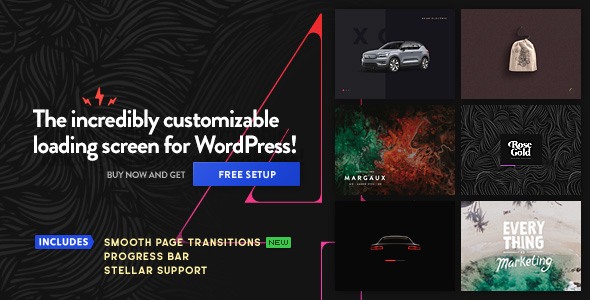
PageLoader: WordPress Preloader and Progress Bar is a plugin that displays a customisable loading screen while a WordPress page loads, then animates the page content into view. It combines animated icons, background images, progress bars and optional loading messages into a single settings panel with live previews. It suits site owners who treat the first second of a page visit as a branding opportunity rather than dead time, and it is particularly relevant to creative portfolios, agency sites and campaigns built around a strong visual identity.
The plugin comes from BonfireThemes, a developer with a long-running presence on CodeCanyon. At the time of writing it has sold 2,113 copies and holds a 4.65 out of 5 rating across 110 reviews, which is a meaningful sample for a niche interface plugin. It costs $21 and the vendor lists the last update as October 2025, with compatibility declared up to WordPress 6.9.
What the plugin actually lets a site owner control
The settings are organised around a few building blocks, and most of the value comes from how freely they can be combined.
Loading icons and images
Ten animated icons ship with the plugin, and each can be resized, recoloured, repositioned anywhere on the screen and given its own animation speed. Blur and fade effects are available, and the icon can be hidden entirely if a background treatment is doing the work instead. A custom image can replace the icon, either uploaded through the media library or referenced by URL, with an optional pulsating animation. In practice this means a logo can sit at the centre of the loading screen and breathe gently while the page assembles behind it.
Backgrounds, gradients and layered screens
The background layer is where the plugin goes well beyond a spinner in the middle of a blank page. A solid colour, a secondary colour for a fade animation, an animated gradient, an uploaded image used as a pattern or full size, and adjustable transparency on both colours and images are all supported. A separate layered background option adds a second visual plane, so a design can stack a colour field behind an image or icon rather than relying on a single flat surface.
Progress bars and percentage loaders
A progress bar can be placed anywhere, resized in width and thickness, rounded at the corners, and coloured with either solid fills or gradients. It can run full screen, be suppressed on touch devices where a loading animation often does more harm than good, or be isolated so that every other element is hidden and only the bar remains. Newer versions add a percentage loader and a “split” loader type, plus centre and right-to-left alignment options for the bar itself.
Page transitions and post-load animation
This is the feature that changes how a site feels rather than how it looks. When smooth page transitions are enabled, the loading screen appears the instant a visitor clicks a link, covering the gap while the next page is fetched. Entrance and exit animations can be mixed freely — fading in and sliding out, sliding in from the left and out to the right, and so on. Once loading finishes, the page content itself can animate in, either the whole body or selected elements such as a post title and its text, with control over direction, distance, scaling and opacity.
Safeguards and display rules
A close function appears if a page takes too long to finish loading, which matters when a third-party embed stalls and would otherwise leave visitors staring at a frozen screen. The timing, wording and button styling are all editable. Beyond that, the loader can be limited to the homepage, shown only once per browser session, restricted to touch devices, given a delay before it disappears, or disabled on specific posts and pages. An unstyled widget area on the loading screen accepts arbitrary content, and version 5.0 added support for Lottie animations, the JSON-based format exported from Adobe After Effects.
Where PageLoader fits, and where it does not
The strongest fit is a site where visual identity carries commercial weight and the theme is already customised. A design studio, a photographer’s portfolio, a restaurant with a strong aesthetic, or a product launch page can use a branded loading screen as part of the first impression. Agencies building client sites will find the per-page disable rules and the multisite compatibility useful for rolling the same treatment across a network. Sites that already animate content on scroll or on entry will get more from the post-load animation than from the preloader itself, because the two can be tuned to feel like one continuous motion.
The plugin is a poor choice for content-heavy publications, documentation sites and anything where perceived speed is the priority. A loading screen does not make a page load faster; it covers the wait. On a slow host, a full-screen overlay can make a site feel slower than a bare page that renders progressively, and visitors returning to read a second article will see the same animation every time unless the once-per-session option is switched on. Sites that rely on aggressive caching and near-instant page loads may find the overlay flashes for a fraction of a second, which looks like a glitch rather than a flourish.
Strengths and limitations
Strengths
- The customisation depth is unusually high for the price. Icons, images, layered backgrounds, gradients, progress bars and text messages can all be combined and positioned independently.
- Real-time previews in the settings panel shorten the trial-and-error loop considerably compared with plugins that require a front-end refresh for every change.
- Smooth page transitions and post-load content animation extend the plugin’s usefulness beyond a decorative splash screen.
- The close-function safeguard is a genuinely thoughtful detail that prevents a stalled third-party embed from trapping visitors behind an overlay.
- Display rules — homepage only, once per session, touch devices only, per-post exclusions — cover the practical cases most site owners run into.
- Source files in JavaScript, CSS and PHP are included, so developers can extend the plugin rather than treating it as a black box.
- The sales volume and review score suggest the plugin has been through enough real-world use to have its obvious rough edges smoothed out.
Limitations
- The plugin is not Gutenberg-optimised according to the vendor’s own specification, so block editor integration is not a selling point here; configuration happens in its own settings screen.
- There is no documented performance budget. A full-screen background image plus a Lottie animation plus a progress bar adds weight to the very moment the site is trying to appear fast, and the vendor does not state asset sizes or loading strategy.
- Browser support is declared from Internet Explorer 9 upward, which tells you the codebase carries legacy compatibility rather than being built purely for modern browsers. That is not a defect, but it hints at the plugin’s age.
- The loading screen is cosmetic by design. It does not lazy-load images, defer scripts or improve Core Web Vitals scores, and anyone buying it expecting a speed boost will be disappointed.
- Because the overlay is global by default, a misconfiguration can affect every page on the site at once. Testing on a staging copy first is advisable.
How it compares with the wider category
Preloader plugins generally fall into two camps. The first is the minimalist type: a spinner, a colour picker and little else, often bundled free inside a theme. The second is the page-builder route, where loading animations are one small panel inside a much larger construction kit. PageLoader sits between them, closer to a dedicated design tool than either. It offers far more control than a free spinner plugin — layered backgrounds, mixed entrance and exit animations, percentage loaders and Lottie support are not standard at this price — without requiring a page builder to function.
Against premium multi-purpose animation plugins, the trade-off is scope. A broader animation toolkit will handle scroll effects, hover states and section reveals alongside a preloader, but it typically costs more, carries more settings to learn and adds more code to every page. PageLoader does one job and does it thoroughly. The closest alternative for many buyers is simply custom CSS and a handful of JavaScript lines in the theme, which costs nothing but demands development time and ongoing maintenance across WordPress updates. For a freelancer billing hourly, the $21 price is easy to justify against that effort; for a developer who enjoys writing the animation by hand, the plugin offers convenience rather than capability.
Frequently Asked Questions
Does PageLoader make a WordPress site load faster?
No. PageLoader does not improve load times; it displays a branded screen while the page loads in the background. Any perceived speed gain comes from the animation masking the wait, not from reduced page weight. Sites that need genuine performance improvements should look at caching, image compression and hosting instead.
Will a preloader hurt SEO or Core Web Vitals?
It can affect metrics indirectly. A full-screen overlay with a large background image adds page weight, and animation can delay the point at which content becomes visible, which may influence Largest Contentful Paint. The plugin’s display rules help — limiting the loader to the homepage or to once per session reduces the impact on returning visitors.
Does PageLoader work with any WordPress theme?
Yes, it is designed to sit on top of any theme rather than being tied to one. The vendor declares compatibility with WordPress 5.8 through 6.9 and lists multisite support. Because it overlays the site rather than replacing theme templates, conflicts are more likely to come from other animation scripts than from the theme itself.
Can the loading screen be turned off on specific pages?
Yes. Settings allow the loader to be disabled on individual posts and pages, restricted to the homepage only, limited to touch devices, or shown just once per browser session. That flexibility means a branded welcome screen can run on the front page while interior pages load normally.
Verdict
PageLoader is worth buying for site owners and agencies who want a branded loading experience and are prepared to tune it carefully. The combination of layered backgrounds, mixed transition animations, progress bars and Lottie support is generous for $21, and the close-function safeguard shows the developer has thought about failure cases. It is the wrong purchase for anyone hoping to speed up a slow site, for content publishers where every millisecond of visible content counts, and for teams that want their loading states configured inside the block editor. Buyers should test on staging, keep an eye on page weight, and use the per-page and per-session rules to stop the effect from becoming repetitive.