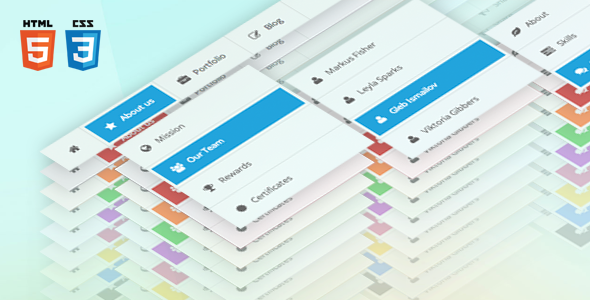
Sky Mega Menu is a CSS and XHTML navigation system sold on CodeCanyon for $7. It produces multi-level dropdown menus with a responsive layout, three mobile presentations, nine colour schemes and built-in form panels, and it is aimed at developers and freelancers who want a ready-made menu layer rather than building one from scratch. The item is listed under Sky Mega Menu Navigation & Menus on the marketplace, has sold 1,991 copies and holds a 4.78 out of 5 rating across 174 reviews.
The author, trading as voky, has built a small family of front-end components around the same visual language, and this menu is the navigation piece of that set. It is a static HTML, CSS and JavaScript package rather than a plugin, so it drops into hand-coded sites and templates instead of installing itself into a CMS.
What the menu package actually delivers
The core of the product is a dropdown that runs on CSS and XHTML with no jQuery dependency for its basic behaviour. That matters for page weight and for anyone maintaining a site where script conflicts are a recurring headache. Nested levels are unlimited, and the vendor states that deep nesting renders correctly, which is the part most hand-rolled menus get wrong first.
Positioning is flexible in a way that suits application-style layouts as much as marketing sites. The bar can sit on any edge of the screen and can be either static in the document flow or fixed to the viewport, so a persistent top navigation or a fixed sidebar are both covered by the same package.
Four CSS3 animation effects — scale, slide, tilt and fade — control how submenus appear. These are pure CSS transitions, so they degrade quietly and cost nothing in JavaScript. Nine colour schemes ship as separate stylesheets, which is the sensible arrangement: each file can be edited or replaced without touching the structural CSS, so rebranding is a matter of overriding a palette rather than rewriting layout rules.
The grid system is a six-column arrangement that reflows with the viewport and stacks its columns below 768 pixels wide. That gives dropdown panels room for multi-column content — link groups, promotional blocks, short descriptions — without extra layout work. The package also bundles search, contact, login and register forms, built on the author’s separate Sky Forms component, so a dropdown can hold a working sign-in panel rather than a link to one.
Three mobile presentations are included: an icon-based bar, a stacked list, and a switcher. Choosing between them is a design decision rather than a technical one, and having all three in the download means the same menu can be tested in each form before committing. Font Awesome supplies 361 vector icons, and the whole package is retina-ready, so graphics stay sharp on high-density screens.
Supporting material is generous for the price. There are 33 example navigations to use as starting points, step-by-step documentation, and source files in JavaScript, HTML and CSS. The vendor lists compatibility with IE8 through IE11, Firefox, Safari, Opera and Chrome, plus testing on iOS and Android devices. Updates are included free.
Where this menu fits, and where it does not
The strongest fit is a hand-coded or statically generated site that needs a substantial navigation layer — a corporate site with deep product hierarchies, a documentation portal, a web application with a fixed sidebar, or a marketing site where the main menu doubles as a content showcase. Agencies building bespoke HTML templates will find the example set and the separate colour stylesheets speed up the first build considerably.
It also suits projects that must support old browsers. The declared IE8 to IE11 range is unusual now and reflects the item’s age, but for a client with an internal audience on legacy Windows machines it is a genuine advantage over modern CSS-only menus that assume flexbox and grid support.
The wrong choice is any WordPress, Joomla or other CMS-driven site where the menu has to be generated dynamically from a content tree. This is a static HTML package; it does not hook into a CMS menu API, and making it do so means writing that integration. Anyone who wants a menu that updates itself when an editor adds a page should look at a CMS-specific mega menu plugin instead. The same applies to sites that need accessibility features beyond basic keyboard operation — the vendor does not state ARIA roles, focus management or screen-reader testing, and that absence should be treated as a gap until verified.
Strengths and limitations in plain terms
Strengths
- No JavaScript framework required for the core dropdown, which keeps the page light and avoids conflicts with other scripts.
- Unlimited nesting levels with the vendor claiming correct rendering at depth — the feature most likely to justify the purchase on complex sites.
- Nine independent colour stylesheets make rebranding a contained job rather than a hunt through one large file.
- Three distinct mobile modes let the same navigation be evaluated in several forms without buying anything extra.
- Forms for search, contact, login and registration are included, so dropdowns can hold functional panels.
- A six-column grid that stacks below 768 pixels gives dropdown content real structure.
- 33 examples and step-by-step documentation shorten the learning curve substantially.
- Strong buyer feedback: 4.78 out of 5 from 174 reviews, with reviewers repeatedly praising the author’s responsiveness.
Limitations
- The last update was January 2014. The package predates modern accessibility expectations and current browser behaviour, and no newer release is listed.
- It is a static HTML, CSS and JavaScript bundle. There is no CMS integration, no admin interface and no dynamic menu generation.
- The vendor does not state ARIA attributes, keyboard focus handling or screen-reader testing, so accessibility compliance cannot be assumed.
- Support runs through an email contact form on the author’s profile rather than a ticket system, which is fine for a $7 item but offers no service-level commitment.
- Font Awesome is bundled at the version current in 2013, so icon coverage differs from what current projects expect.
- IE8-era compatibility comes with the legacy code patterns that support implies; the CSS is not written to present-day conventions.
How it compares with the wider mega menu category
Mega menu products generally fall into three groups: CMS plugins, JavaScript UI library components, and standalone HTML and CSS kits. CMS plugins win on dynamic content and editor-friendly administration but tie the menu to one platform. JavaScript components from larger UI libraries offer richer interaction and documented accessibility, at the cost of a framework dependency and far more configuration.
Sky Mega Menu sits firmly in the standalone kit group, and within that group its differentiators are breadth of nesting, the three mobile modes and the bundled form panels. It competes on being self-contained and inexpensive rather than on extensibility or modern standards. Against a bare CSS menu tutorial it offers far more finished material; against a maintained commercial component it offers less in the way of accessibility guarantees and long-term updates. The honest framing is that it is a well-built artefact of its era, still useful where its constraints do not bite.
Frequently Asked Questions
Does Sky Mega Menu work with WordPress?
No, not natively. It is a static HTML, CSS and JavaScript package with no WordPress integration, so using it in a theme means hard-coding the markup and writing any dynamic behaviour yourself. Sites that need menus generated from WordPress pages should use a dedicated mega menu plugin instead, which will handle content changes automatically.
Is Sky Mega Menu still maintained and updated?
No recent updates are listed. The changelog ends with version 1.2.1 on 6 January 2014, and the marketplace records the same date as the last vendor update. Buyers should treat the package as a finished, stable release rather than an actively developed product, and plan to maintain any fixes themselves.
How many levels of nested menus does it support?
There is no limit. The vendor states that the menu supports an unlimited number of nested levels and that all of them display correctly, which is unusual for CSS-driven dropdowns. In practice, very deep nesting becomes hard for visitors to use regardless of whether the code handles it, so most projects will stop at two or three levels.
Does Sky Mega Menu support mobile devices and retina screens?
Yes to both. The layout is fully responsive with three mobile presentations — icons, stack and switcher — and graphics are optimised for high-density displays. The vendor reports testing on iOS and Android devices alongside desktop browsers, and the six-column grid stacks vertically below 768 pixels wide.
Verdict
Buy this if you build hand-coded HTML sites or templates and need a deep, good-looking navigation layer quickly, particularly where legacy browser support is a requirement and the budget is minimal. The example set, separate colour stylesheets and included form panels make the $7 easy to justify, and the 4.78 rating from 174 buyers reflects a product that has done its job for a lot of people.
Do not buy it if the site runs on a CMS and the menu must follow the content tree, if current accessibility standards are a hard requirement, or if ongoing updates and formal support matter. In those cases a maintained platform plugin or a modern component library is the better fit, and the low price will not compensate for the integration work.