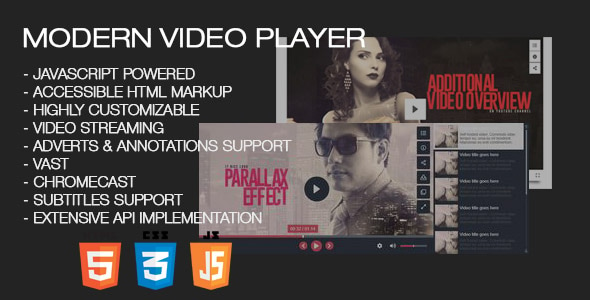
Modern Video Player Media is a self-hosted HTML5 player script sold on CodeCanyon that handles video, audio, images, live streams and embeddable third-party content from a single interface. It is built for site owners who want one player covering self-hosted MP4 files, YouTube and Vimeo sources, Apple HLS and MPEG DASH streams, 360-degree content and folder-based playlists, rather than stitching together separate embeds for each format. Developers and agencies managing media-heavy sites will get the most from it; anyone wanting a free, single-video embed will find it excessive.
The script is developed by Tean and has been purchased 2,269 times, with a 4.33 out of 5 rating across 135 reviews — a healthy volume of feedback for a CodeCanyon item at the $99 price point. The vendor last updated it on 3 March 2026, which suggests ongoing maintenance rather than an abandoned release.
What the player actually does beyond playing a video file
The core proposition is source flexibility. Most players expect one type of media. This one accepts self-hosted video and audio, images, 360-degree virtual reality video and panoramas, Apple HLS and MPEG DASH live streams, YouTube single videos, playlists, channels and 360 videos, Vimeo videos, showcases, groups and channels, Google Drive and OneDrive files, folder playlists, XML and JSON playlists, and any custom iframe — which means DailyMotion, Google Maps or a Facebook video can sit inside the same player chrome.
Playlists are unlimited in number and length, and a single playlist can mix media types. A site could run a playlist containing a self-hosted MP4, two YouTube clips and a still image without any separate configuration. That mixed-media capability is the feature most likely to justify the price for publishers running editorial or portfolio content.
Layout and presentation control
Playlists can sit to the right of the player, below it, or be hidden entirely for a simple single-video presentation. There are also thumbnail grid and lightbox modes. Poster images can be set from any frame of a self-hosted video, and the vendor notes an option to show posters on mobile specifically to preserve bandwidth — a practical detail for sites with heavy mobile traffic.
Monetisation and engagement tools
Advertising support covers pre-roll, mid-roll and end-roll video and audio ads, popup ads and HTML ads, with VAST, VMAP, IMA, VPAID and SIMID formats named in the listing. Ads can be set globally per playlist or individually per video. Google AdSense is supported inside the player, and Google Analytics tracking can be connected for playback reporting.
Annotations display HTML elements over the video area at set time intervals, and popups display HTML when the video is paused — useful for forms, iframes or linked images. Both can be applied per playlist or per video, and both accept shortcodes.
Access, protection and playback details
Individual videos can be password protected. The script also offers URL encryption and video blobs to make direct downloading harder, though no browser-based protection stops a determined user. There is a watch limit feature that restricts viewing time and shows a custom image when the limit is reached.
Subtitles in vtt or srt format work across video, audio, YouTube and Vimeo sources, with multiple language support. Multilanguage audio is supported for live streaming, and desktop and mobile browsers can be served different quality levels. Chapters, transcripts, playback speed control, resume-from-last-position, hover previews, Chromecast and AirPlay round out the playback experience.
Technical foundations
The player is written in plain JavaScript rather than a framework, which the vendor argues keeps it fast and prevents conflicts with other scripts on the page. It uses semantic HTML — real buttons, input ranges for volume and progress elements for the seek bar — which matters for accessibility and keyboard navigation. Only MP4 is required for self-hosted playback across browsers and devices. Source files include JavaScript, HTML, XML, CSS, PHP and SWF/FLV, and multiple player instances can run on the same page.
Where this player fits, and where it does not
The strongest fit is a media publisher or membership site that hosts its own files and also pulls in YouTube or Vimeo content. Mixing sources in one playlist, protecting videos behind passwords, and running mid-roll ads are all things that would otherwise require custom development.
Course platforms and training sites are another natural match. Chapters, transcripts, resume playback, watch limits and annotations map closely onto how instructional video is consumed. Agencies building client sites where the client needs to manage playlists without touching code will also find the admin-side control useful, since individual buttons and social sharing options can be toggled off.
Live streaming operations benefit from the HLS and MPEG DASH support plus multilanguage audio, which is unusual at this price point in a self-hosted script.
Where it is the wrong choice: a site that only ever embeds a single YouTube video, or a small business that wants one background video on a landing page. A free embed or a lightweight theme feature covers that, and $99 plus setup time is not justified. Similarly, anyone who wants a fully managed, hosted video platform with transcoding and adaptive bitrate generation handled for them should look at a SaaS video host instead — this script plays media, it does not encode or store it.
Strengths and limitations
Strengths
- Unusually broad source support in one player: self-hosted files, YouTube, Vimeo, HLS, MPEG DASH, 360 content, cloud storage and arbitrary iframes.
- Mixed-media playlists remove the need to run separate players for different content types on one page.
- Advertising stack covers VAST, VMAP, IMA, VPAID and SIMID, plus AdSense, with per-playlist and per-video placement.
- Granular control: individual player buttons, social sharing options, ads and annotations can each be enabled or disabled.
- Semantic HTML and plain JavaScript foundation, which reduces conflict risk with other scripts and helps accessibility.
- Established track record — 2,269 sales and 135 reviews — with a recent vendor update.
Limitations
- The rating sits at 4.33, meaning a meaningful minority of buyers left less favourable reviews; the listing does not summarise what those complaints covered.
- Configuration depth is the trade-off for flexibility. Ads, annotations, popups, chapters, transcripts and watch limits each have their own settings, and the vendor documentation is linked from the listing rather than summarised in it.
- Download protection relies on URL encryption and video blobs, which deter casual copying but cannot prevent a determined user from capturing the stream.
- The source file list includes SWF/FLV, a legacy Flash format that no current browser supports; it is unlikely to be relevant to modern deployments.
- It is a player, not a hosting or encoding service. Adaptive bitrate streams, storage and bandwidth remain the buyer’s responsibility.
- The vendor does not state performance benchmarks, so load behaviour on very large playlists has to be tested per project.
How it compares with the wider category of video player scripts
Self-hosted HTML5 players generally fall into three groups. The first is lightweight single-file players that do one thing well — play an MP4 with basic controls. The second is framework-dependent players that bring a JavaScript library along with them and offer a plugin ecosystem. The third, where this product sits, is the all-in-one configuration script: broad source support, a settings panel, and advertising and engagement features built in rather than added.
Against the lightweight group, the comparison is straightforward. A basic player is smaller and simpler, but it will not read a folder of files, mix YouTube and self-hosted content in one playlist, or serve pre-roll ads. Buyers who need any of those would end up writing custom code, which usually costs more than the licence.
Against framework-dependent players, the plain JavaScript approach is the differentiator. There is no library to keep updated and no risk of two versions of the same dependency loading on one page. The cost is that there is no plugin ecosystem — what the vendor ships is what exists.
Against hosted video platforms, the comparison is about responsibility rather than features. A hosted service handles encoding, storage, delivery and analytics as one package, usually on a subscription. This script puts all of that on the buyer in exchange for a one-time fee and full control over presentation, monetisation and access rules. Neither is better in the abstract; the deciding factor is whether the buyer wants to own the delivery stack.
Frequently Asked Questions
Does Modern Video Player work with YouTube and Vimeo videos?
Yes. It plays individual YouTube videos, playlists, channels and 360 videos, and Vimeo videos, showcases, groups and channels. Those sources can be mixed with self-hosted files inside the same playlist, so a single playlist can combine an uploaded MP4 with a YouTube clip and a still image without separate configuration.
Can videos be password protected or restricted?
Yes. Individual videos can be password protected, and there is a watch limit feature that restricts how long a viewer can watch before a custom image appears. The script also offers URL encryption and video blobs to make direct downloading harder, though no browser-based method fully prevents a determined user from capturing the stream.
What video formats does it need for self-hosted files?
Only MP4 is required for self-hosted playback across all supported browsers and devices, which simplifies encoding workflows considerably. For live content, Apple HLS and MPEG DASH streaming are both supported, and the player can serve different quality levels to desktop and mobile browsers separately. Subtitles use vtt or srt files.
Does it support advertising and monetisation?
Yes. Pre-roll, mid-roll and end-roll ads are supported in video, audio, popup and HTML formats, along with VAST, VMAP, IMA, VPAID and SIMID. Google AdSense can run inside the player, and Google Analytics can track playback. Ads can be configured globally per playlist or individually per video, giving fine control over placement.
Verdict
Modern Video Player Media is worth buying for publishers, course operators and agencies that need one player to handle a genuinely mixed media library — self-hosted files alongside YouTube, Vimeo, live streams and 360 content — with monetisation and access control built in. The 2,269 sales and 135 reviews indicate a product with a real user base rather than a one-off release, and the March 2026 update shows the developer is still maintaining it.
It is not the right purchase for a site that only needs a single embedded video, nor for anyone who wants encoding, storage and delivery handled by someone else. The configuration depth that makes it powerful also means setup takes real time, and the 4.33 rating suggests not every buyer found that trade-off acceptable.
Buyers should go in expecting to work through the documentation and test their specific source combinations before launch, and should treat the download protection as a deterrent rather than a guarantee.