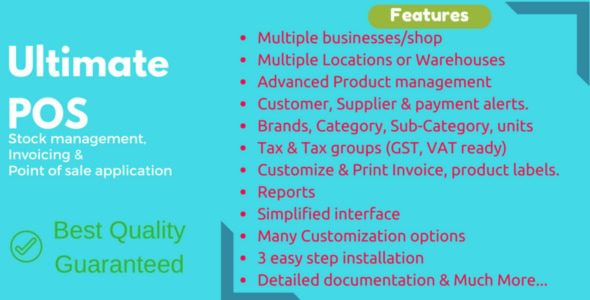
Ultimate POS is a self-hosted business management application built on the Laravel PHP framework, sold as a one-time purchase from the CodeCanyon marketplace. It combines point of sale, inventory control, purchasing, expense tracking and invoicing into a single browser-based system that runs on a standard PHP and MySQL hosting stack. It is aimed at shop owners, retail chains, restaurants and agencies building a client-facing POS solution, rather than at casual users wanting a hosted subscription service.
What Ultimate POS Actually Does
The product is best understood as four connected modules that share one database. The point of sale screen handles the transaction side, the inventory module tracks what is on the shelf, the purchasing module records what was bought from suppliers, and the reporting layer turns all of that into figures a business owner can act on.
Multi-business and multi-location structure
A single installation can host more than one business, and the vendor places no cap on how many. Each business keeps its own inventory and accounting data separate, which matters for anyone running two shops under different names or an agency hosting several client stores on one server. Within each business, locations or warehouses can be created and managed side by side, with stock, purchases and sales tracked per location and invoice layouts customised per site.
Point of sale and checkout behaviour
The selling screen is built on Ajax, meaning the page updates without a full reload between actions, which speeds up queue handling. A walk-in customer record is created automatically so staff never have to stop and add a contact mid-sale, and new customers can be registered directly from the POS screen. Invoices can be saved as drafts before being finalised, and the vendor supports barcode scanners plus receipt and thermal printers that accept ESC/POS commands — the standard instruction set most cheap receipt printers use.
Inventory, products and stock alerts
Both single and variable products are supported, with the latter covering items that come in sizes, colours or other options. Products can be organised by brand, category and sub-category, and sold in different units. SKU numbers — the unique codes that identify each item — can be typed manually or generated automatically with a prefix. The system calculates a selling price from the purchase price and a target profit margin, which removes a repetitive manual step. Low-stock alerts and stock adjustments are included, and variation templates mean a shop does not have to re-enter the same option set every time it adds a new variable product.
Purchasing, contacts and expenses
Purchases can be recorded per location and marked as paid or outstanding. Payment terms can be attached to a contact, and the system issues a reminder a week before a due date, which is a small feature with real cash-flow value. Contacts can be flagged as customer, supplier, or both, and the contact record shows a running credit or debit balance. Business expenses are categorised and can be analysed by category and location.
Reporting and tax handling
Reports cover purchases, sales, tax, contacts, stock, expenses, cash register and sales representatives. Trending products can be drilled down by brand, category, sub-category, unit and date range. Tax is fully configurable: GST, VAT and grouped taxes such as a combined CGST plus SGST can be defined and selected at the point of purchase or sale, with an input-versus-output tax report for a chosen period. For businesses in markets with layered tax rules, that grouping is the difference between a usable report and a manual spreadsheet.
Users, roles and access control
Admin and Cashier roles ship by default, and additional roles can be created with granular permissions. Unlimited users can be assigned to those roles. For a shop with several staff members, this is what prevents a junior employee from editing purchase prices or viewing profit reports.
Where Ultimate POS Fits and Where It Does Not
The strongest fit is a single-site or small-chain retailer that wants to own its data outright. A hardware shop, pharmacy, grocery, clothing store or electronics retailer with a few hundred to a few thousand SKUs would find the inventory and tax tooling proportionate. Restaurants, salons and service centres are also addressed, since the vendor documents tables, service staff, bookings, modifiers and kitchen workflows. Agencies building a POS for a client benefit from the multi-business architecture, because one licence can serve several deployments on separate installations.
A second good fit is a business in a market with unusual currency or tax requirements. The vendor states that any currency can be added on request and that tax is user-defined, which suits regions where off-the-shelf SaaS POS products assume US or EU rules.
The wrong choice is a business that wants zero maintenance. This is a self-hosted script: somebody has to install it, keep PHP and MySQL updated, take backups and apply the free updates the vendor releases. A single-person operation with no technical contact and no willingness to hire one should look at a hosted subscription instead. It is also a poor fit for high-volume enterprise retail with complex warehouse logistics, multi-currency accounting ledgers or integration into an existing ERP — those needs outgrow what a CodeCanyon script is designed to do.
Strengths and Limitations
Strengths
- Genuine multi-business and multi-location support in one installation, with data separation rather than a cosmetic filter.
- Configurable tax engine that handles grouped taxes, not just a single flat rate.
- Offline operation, which matters in locations with unreliable internet.
- Barcode scanner and ESC/POS thermal printer support out of the box.
- Translation-ready, with all currency support claimed by the vendor.
- Lifetime free updates, stated explicitly in the vendor FAQ.
- Source files included (JavaScript, HTML, CSS, PHP), so an agency can modify behaviour rather than work around it.
- Runs on PHP 8.x with Laravel, a widely supported and well-documented framework.
Limitations
- Support is handled through the vendor’s own ticket system, not the marketplace comment section. Buyers expecting marketplace-mediated support will be redirected.
- Self-hosting means the buyer owns installation, security patching, backups and server uptime. The vendor does not state any managed hosting option.
- The rating sits at 4.32 out of 5 across 546 reviews, which is solid but not flawless — a meaningful minority of buyers have found issues worth flagging.
- At $79 the price is well above the typical $19–$39 tier for CodeCanyon POS scripts, and the vendor justifies this by development history rather than by a feature comparison table.
- The listing does not state a mobile app. The interface is browser-based, so tablet or phone use depends on responsive rendering rather than a native application.
- No multi-currency accounting is described in the supplied feature list, which limits suitability for businesses invoicing across currencies.
- Server requirements are listed as PHP 7.2 or higher in one part of the listing and PHP 8.x in the compatibility field, so buyers should confirm the exact target version before deploying.
How It Compares to the Broader Category
POS scripts on CodeCanyon generally fall into two groups. The cheaper tier offers a single-shop sales screen with basic product listing and a receipt, usually without meaningful purchasing, expense or tax reporting. Ultimate POS sits in the upper tier alongside a smaller number of scripts that attempt full back-office coverage: purchasing with payment terms, expense categorisation, role-based permissions, grouped tax rules and a reporting suite that spans cash register and sales representative activity.
The trade-off is weight. A lighter script installs faster and has fewer moving parts to configure, which suits a market stall or a single-counter café. Ultimate POS asks the buyer to configure businesses, locations, tax groups, roles and invoice schemes before it becomes useful, and that setup effort is the price of the additional control. Compared with hosted SaaS POS platforms, the advantage is ownership and one-time cost; the disadvantage is that updates, security and uptime become the buyer’s responsibility rather than the provider’s.
Against other Laravel-based business scripts, the distinguishing factor here is breadth rather than depth in any single module. It is a general-purpose retail and service management tool, not a specialist accounting package or a dedicated restaurant system.
Frequently Asked Questions
Does Ultimate POS work without an internet connection?
Yes. The vendor states that the application works offline, which means a shop can keep processing sales if connectivity drops. This depends on the installation being on a local server or a machine on the same network rather than a remote host, so the deployment architecture matters as much as the software itself.
Are future updates to Ultimate POS free?
Yes. The vendor’s FAQ states that all future updates are lifetime and free, and that no payment is required to move to the latest version. The listing shows version 7.3 released in August 2026, which is consistent with the vendor’s claim of more than 200 releases over four years of development.
What hardware does Ultimate POS support?
It supports barcode scanners and receipt or thermal printers that accept ESC/POS commands. That covers most low-cost receipt printers sold for retail use. The vendor does not list support for cash drawers, scales or card terminals directly, so those would typically be handled through the printer’s pass-through port or separately.
Can Ultimate POS handle GST, VAT and combined taxes?
Yes. Tax is fully customisable, and the vendor explicitly supports GST, VAT and group taxes such as a combination of CGST and SGST. Tax rates and groups are selected when recording a purchase or a sale, and a tax report shows input and output tax for a chosen period.
Verdict
Ultimate POS is worth buying for a retailer, small chain, restaurant or service business that wants to own its POS and inventory data outright and has someone available to install and maintain a PHP application. The multi-business architecture, grouped tax handling and offline operation are the features that justify the higher-than-average price, and the developer, thewebfosters, has a long release history behind the product. The 6,978 sales and 4.32 rating across 546 reviews suggest a mature, widely deployed codebase rather than an abandoned listing. It is the wrong purchase for anyone who wants a managed service with no server responsibility, and for businesses with multi-currency accounting or complex warehouse logistics. Buyers should also budget time for configuration, because the system only pays off once businesses, locations, roles and tax rules are set up properly.