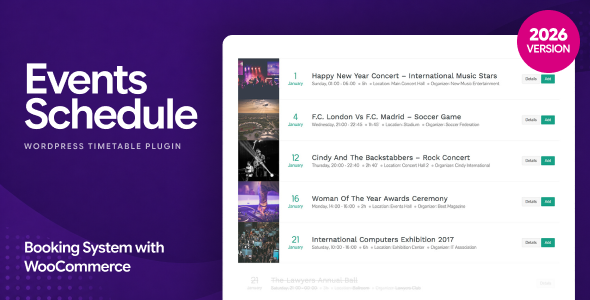
Events Schedule is a WordPress plugin that displays classes, sessions and one-off events in a styled timetable, with twelve layout presets, live filtering and per-entry pop-up details. It is built by CurlyThemes and sold on CodeCanyon for $39, and it targets dance studios, gyms, schools, clinics, conference organisers and similar venues that publish a recurring timetable rather than a blog-style event feed. Buyers who need a simple, self-hosted way to present weekly schedules without a page builder licence or a SaaS subscription are the core audience.
What the plugin actually does
The product’s centrepiece is a schedule builder that treats each class or event much like a WordPress post. Entries are created in the dashboard, given a day, a start time and a duration, and then rendered into whichever timetable style is selected. Durations can run from ten minutes to six hours, which covers everything from a short workshop slot to a long evening class.
Twelve visual styles ship with the plugin, and switching between them is a one-click operation rather than a rebuild. The vendor groups them by use case: weekly tabs and large list layouts suit dance, fitness and sports venues; compact lists suit conferences, speakers and seminars; a weekly schedule grid fits schools, colleges and clinics with repeating hours; and a plain list layout with featured images is aimed at festivals, arenas and exhibition spaces. That range matters because a yoga studio and a three-day conference need very different information density, and a single plugin covering both reduces the number of tools a freelancer has to keep track of.
Filtering is the second major capability. Five filter categories are available — type, location, instructor, day and time of day — and they can be positioned left, right or centre, rendered as checkboxes or toggle switches, and hidden entirely when they would be noise. For a gym with forty weekly classes across three rooms and eight instructors, that filtering is what keeps the page usable. Assigning a type, location and instructor to each entry is what makes those filters meaningful, so the data entry step is not optional if filtering is going to work.
Each entry can also carry its own pop-up modal with text and images, in either a light or dark layout. This is the sensible answer to the classic timetable problem: a grid has room for a class name and a time, and nothing else. The modal keeps the grid clean while holding the description, pricing or instructor biography behind a click. The same modal treatment can be applied to types, locations and instructors, not just to individual classes.
Two further details are worth noting. First, call-to-action buttons can be attached per class and pointed at an iCal download, a mailto link for reservations, or any internal or external URL. The iCal option means visitors can drop a class straight into their own calendar, which is a small feature with an outsized effect on attendance. Second, recurring classes can be set to repeat weekly, and a daily cron job — a scheduled task the server runs automatically — clears out past repetitions so the schedule does not accumulate stale entries.
Where it fits, and where it does not
The clearest fit is a business with a repeating weekly timetable and a modest number of distinct locations or instructors. Dance and fitness studios, martial arts schools, swimming pools, sports centres, tutoring companies, driving schools, medical practices publishing consulting hours, and salons listing staff availability are all natural matches. Conference and workshop organisers with a two- or three-day programme also fit, particularly with the compact list style, though they should expect to work within a weekly grid metaphor rather than a true multi-day agenda view.
It also suits agencies and freelancers building client sites on a budget. The plugin integrates with Elementor, WPBakery and Visual Composer through a dedicated element, and also exposes a shortcode for use anywhere else. WPML compatibility means multilingual timetables are viable, and the interface strings are translatable. For a freelancer delivering five small business sites a year, a $39 plugin that covers all of them is straightforward economics.
Where it is the wrong choice: ticketed events with inventory, attendee lists and check-in. The WooCommerce compatibility listed for the plugin is a general integration statement rather than evidence of a built-in ticketing system, and nothing in the feature set covers seat allocation, QR check-in or attendee management. An organisation selling 500 tickets to a single gala needs an event registration platform, not a timetable display. Similarly, anyone needing a full calendar month view with drag-and-drop rescheduling, or a public event submission form where visitors add their own listings, will find those capabilities absent. This is a presentation tool for schedules the site owner controls.
Strengths and limitations
Strengths
- Twelve distinct layouts cover recurring weekly timetables, conference programmes and one-off event promotion without buying separate tools.
- Filtering by type, location, instructor, day and time of day is unusually thorough for a plugin at this price, and it scales to schedules with dozens of weekly entries.
- Per-entry pop-up modals keep the grid readable while still holding full descriptions and images.
- iCal export, mailto reservation buttons and custom URL buttons give each class a clear next action.
- Recurring weekly classes plus an automatic cron cleanup remove the most tedious part of maintaining a timetable long term.
- Shortcode plus page-builder elements means it drops into almost any WordPress build, including ones already committed to Elementor or WPBakery.
- Sold 9,351 times with a 4.43 out of 5 rating from 162 reviews, which is a meaningful sample for a CodeCanyon item.
Limitations
- Images are not included. The demo screenshots look polished because the vendor supplied their own photography and theme; a buyer starting from scratch will need to source their own visuals to match that result.
- The demo was built with Visual Composer and the vendor’s own Hotel Leisure theme, so the live preview is not a neutral representation of how the plugin looks inside an arbitrary theme. Expect to spend time on styling.
- There is no month-view calendar or drag-and-drop rescheduling. The plugin is built around weekly and list formats, which will frustrate anyone expecting a traditional calendar grid.
- The vendor does not state that the plugin supports visitor-submitted events, ticketing or payment collection, and none of those appear in the feature list.
- Gutenberg optimisation is explicitly marked as not supported, so block-editor-first sites will be relying on the shortcode path rather than a native block.
- Browser support is declared down to Internet Explorer 10 and 11, which signals a conservative front-end codebase rather than a modern one. That is harmless in practice but suggests the markup is not built on the newest foundations.
How it compares with the alternatives
The realistic alternatives fall into three groups. Hosted scheduling services offer more automation — booking, payments, reminders — but charge monthly and keep the data on their servers. Full event-management plugins for WordPress handle ticketing, attendee records and complex multi-day agendas, but they carry far more configuration overhead and often a much higher price. Generic calendar plugins render a month grid and little else, leaving the recurring-timetable problem unsolved.
Events Schedule sits deliberately in the middle. It is narrower than a full event platform and broader than a basic calendar, and its value comes from doing one job — presenting a structured timetable attractively — without asking the site owner to learn a booking system. Compared with hosted tools, the trade-off is that automation is absent and everything is manual. Compared with heavyweight event plugins, the trade-off is that ticketing and attendee management simply are not part of the product. Buyers should choose based on whether the schedule is a display problem or a transaction problem.
Frequently Asked Questions
Does Events Schedule work with Elementor and WPBakery?
Yes. The plugin ships with dedicated elements for Elementor, Elementor Pro, WPBakery Page Builder and Visual Composer, and it also generates a shortcode that can be pasted into any page or post. That means it is not locked to a single builder, which helps agencies standardising on different tools across client projects.
Can visitors add a class to their own calendar?
Yes. Each class can carry a call-to-action button that downloads an iCal file, which most calendar apps accept. The same button slot can instead open the visitor’s mail client for a reservation enquiry, or link to any internal or external page. Only the plain list and weekly tabs styles display the button.
Does the plugin handle ticketing and payments?
No. Nothing in the feature set covers ticket sales, seat allocation, attendee lists or payment collection, and the vendor does not claim otherwise. The plugin displays schedules and links out via call-to-action buttons. Sites that need to sell tickets should pair it with a dedicated booking or e-commerce system, or choose a full event management plugin instead.
Can the same class repeat every week automatically?
Yes. Classes can be configured to appear automatically on a weekly basis, which is the intended workflow for schools, studios and clinics with a fixed timetable. A daily cron job then removes past repetitions, so the schedule stays current without manual editing. The vendor does not state how the cron behaves on low-traffic sites.
Verdict
Events Schedule is a good purchase for studios, gyms, schools, clinics, salons and community venues that publish a recurring weekly timetable and want it to look considered rather than improvised. It also suits freelancers and agencies who need one affordable plugin that covers several small-business clients. Conference and workshop organisers with a short programme will find the compact list styles workable, provided they accept the weekly-grid model. Buyers who need ticket sales, attendee management, visitor-submitted listings or a true month-view calendar should look elsewhere, because those are not gaps the plugin is trying to fill. At $39 with a 4.43 rating across 162 reviews and more than 9,300 sales, the risk is low for anyone whose problem is displaying a schedule rather than selling seats to it.