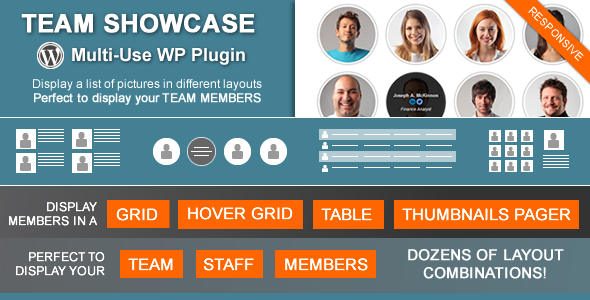
Team Showcase is a WordPress plugin that displays groups of people — staff members, contributors, volunteers — as a grid, a table, or a thumbnail-driven gallery, with each person getting a photo, a set of contact and social fields, and an optional dedicated page. It is aimed at site owners and freelancers who need a structured, filterable people directory without building a custom post type by hand. The product has sold 5,754 copies on CodeCanyon and holds a 4.68 out of 5 rating across 300 reviews, which places it among the more established Team Showcase Interface Elements on the marketplace.
What the plugin actually does
At its core, the plugin registers a custom content type for people entries, then gives the site owner four distinct ways to render those entries on the front end. Each layout solves a different presentation problem, and the choice matters more than most of the cosmetic settings.
- Standard grid — a responsive column-based layout where the photo sits above, left, or right of the text. This is the workhorse layout for a team page where names need to be readable without interaction.
- Grid with hover reveal — the same grid structure, but the biographical detail only appears when a visitor hovers over the image. Useful when the design needs to stay visually clean and the photo is doing the selling.
- Table layout — a plain, responsive table of entries. This is the correct choice for staff directories where a visitor needs to scan a list of names, roles, and phone numbers quickly, and it is the layout most comparable products skip.
- Thumbnails pager — small thumbnails act as navigation, and clicking one loads the larger image and full details into a dedicated area. Functionally this behaves like a gallery, which makes it the most distinctive of the four.
Beyond layout, the plugin handles the practical plumbing that a directory needs. Entries can be grouped into categories, and on the grid and hover-grid layouts a jQuery filter lets visitors narrow the list by group in one click — so a company can publish everyone and still let a visitor isolate a single department. Entries can be reordered by drag and drop from the archive screen rather than by editing publish dates. Each entry can have its own single page, and the site owner decides whether entries link to it.
The entry editor adds structured fields on top of the standard title and content: job title, email, telephone, location, personal website, and links for Twitter, Facebook, Google Plus, LinkedIn, YouTube, and Vimeo. A free HTML field accepts longer text that does not fit the other inputs. Additional fields can be defined in the settings, which means the plugin is not locked to the field list the developer shipped with.
Two implementation details are worth calling out. First, a shortcode and PHP function generator produces the code for any combination of settings, complete with a live preview of the result — shortcodes go into posts, pages, and text widgets, while the PHP function is for hard-coding a layout into a theme template. Second, the plugin can output JSON-LD structured data describing the page and its entries, which is the format search engines read for rich results. The vendor notes compatibility with WordPress 6.0 through 6.8 and lists browsers back to Internet Explorer 9, though IE support is largely academic at this point.
Where it fits, and where it does not
The obvious fit is a company or organisation publishing a staff directory: professional services firms, agencies, clinics, schools, nonprofits with boards and committees, and membership associations listing their people. The category filter is what separates this from a hand-built grid — any organisation with more than about fifteen people will benefit from letting visitors filter rather than scroll.
The table layout extends that fit to internal or public directories where contact details matter more than photography. The thumbnail pager suits a different job entirely: a speaker roster, an artist lineup, or a portfolio of people where browsing images is the point.
The plugin also works as a general-purpose image-and-text list. The vendor explicitly suggests products or services as an alternative use, and since field labels can be renamed — the word “Members” is configurable — a site could reasonably repurpose it for testimonials, project case studies, or a real estate agent roster. That said, treating a people plugin as a product catalogue means accepting its field structure and its layouts; a dedicated catalogue plugin will almost always fit better.
There are two cases where this is the wrong purchase. The first is a site that needs only a handful of static team members that will never change — a page builder or the theme’s own blocks will do that with less overhead. The second is a site that needs deep integration with user accounts, member directories with front-end profiles, or access control. This plugin displays people; it does not manage membership.
Strengths and limitations
Strengths
- Four genuinely different layouts rather than variations on one, including a table view that most competing plugins omit.
- Category filtering on the grid layouts, which turns a static page into something a visitor can navigate.
- Drag-and-drop ordering from the archive screen removes the usual workaround of back-dating posts to control sequence.
- Custom fields can be added in settings, so the entry editor is not fixed to the developer’s original list.
- Shortcode and PHP function generator with a live preview reduces the guesswork in placing a layout.
- JSON-LD output gives search engines structured data about entries without a separate SEO plugin.
- Widget support means a layout can appear in a sidebar or footer, not just in page content.
- Actively maintained: the listing shows an update in May 2025 and declared compatibility up to WordPress 6.8.
Limitations
- The listing does not mark the plugin as Gutenberg-optimized. Layouts are inserted through shortcodes or PHP, not as native blocks, so the editing experience inside the block editor is a shortcode field rather than a visual block with live preview.
- Interface text and settings are only available in the language the plugin ships with; the vendor does not state that translations or a multilingual admin interface are provided.
- There is no stated import or bulk-upload path for entries. A directory of a hundred people has to be entered through the standard WordPress editor, one record at a time.
- Two of the four layouts — the hover grid and the thumbnails pager — hide information behind an interaction, which is a real accessibility concern for keyboard and touch users, and the vendor does not describe a fallback for either.
- Google Plus is still listed as a social field, which signals that parts of the field set have not been revisited recently.
- No front-end submission: entries are added from the WordPress admin only.
How it compares with the alternatives
The realistic alternatives fall into three groups. The first is building the directory manually with a custom post type, custom fields, and a template — more control, considerably more work, and a maintenance burden every time WordPress changes something. The second is a general-purpose content grid or post-grid plugin, which can display images and text but usually lacks people-specific fields like job title, telephone, and per-person social links, and rarely offers a table layout or a category filter tuned for directory browsing. The third is a full member-directory plugin, which offers far more — front-end profiles, user account syncing, access rules — at a much higher price and complexity.
Team Showcase sits deliberately in the middle. It is more purpose-built than a generic grid plugin and far lighter than a membership system. The distinguishing features are the four-layout spread, the category filter, the configurable field set, and the JSON-LD output. Where it loses ground to modern alternatives is the block editor: a plugin that renders through shortcodes feels dated next to one that offers native blocks with in-editor previews, and that gap will matter more over time, not less.
Frequently Asked Questions
Does Team Showcase work with the WordPress block editor?
The vendor does not list the plugin as Gutenberg-optimized. Layouts are placed using a shortcode or a PHP function rather than a native block, so in the block editor a site owner inserts a shortcode block and pastes the generated code. The plugin’s own generator provides a preview of the layout, but that preview lives in the plugin settings, not inside the editor.
Can the plugin display team members grouped by department?
Yes. Entries can be assigned to categories, and a layout can show all entries or a single category. On the grid and hover-grid layouts an optional jQuery filter lets visitors switch between groups themselves, which is the practical way to publish a large directory without splitting it across several pages.
Is it possible to use Team Showcase for something other than staff?
Yes, within limits. The field labels can be renamed in the settings, so the content type does not have to be called “Members”. The vendor suggests using it for testimonials, products, or services. The layouts and fields remain oriented around a photo plus structured details, so it suits image-and-text listings rather than complex catalogue data.
Does the plugin add structured data for search engines?
It can output JSON-LD structured data describing the page and its entries. JSON-LD is a standard format that search engines read to understand page content and potentially display rich results. The vendor describes this as preparation for rich snippets rather than a guarantee that any particular search engine will show them.
Verdict
Team Showcase is a sensible purchase for a site that needs a real people directory — multiple layouts, categories, per-person contact and social fields, and a filter visitors can use. At $24 with a 4.68 rating across 300 reviews and more than 5,700 sales, the track record is strong, and the May 2025 update shows the developer, cmoreira, is still maintaining it. Buy it if the project involves a staff, board, speaker, or contributor listing that will grow and change. Skip it if the need is a handful of static profiles on a single page, if native block editing is a requirement, or if the project needs front-end submission and member accounts — those are different products entirely.