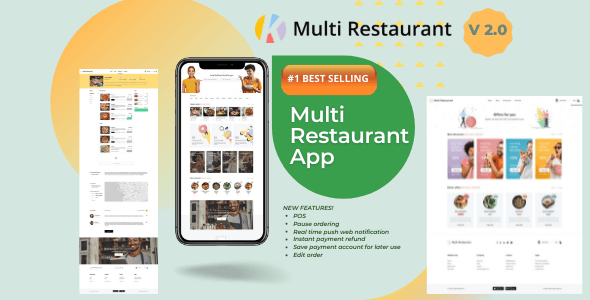
Karenderia Multiple Restaurant System is a self-hosted PHP script that turns a single installation into a multi-vendor food ordering marketplace, complete with an admin back office, individual merchant panels, a customer-facing website and companion mobile apps for customers, restaurants and drivers. It is sold on CodeCanyon under the PHP Scripts > Miscellaneous category for $49, and it targets developers, agencies and entrepreneurs who want to launch a Grubhub-style delivery platform on infrastructure they control rather than paying monthly SaaS fees. The listing carries 5,388 sales and a 4.74 out of 5 rating across 565 reviews, which places it among the more established items in this niche.
What the script actually does across its four interfaces
The architecture is the main selling point. Rather than a single restaurant website, Karenderia ships as a multi-tenant system where one codebase serves many merchants. That distinction matters commercially: an operator can onboard restaurants, set commission rates, and manage payouts centrally, while each merchant logs into a separate panel to handle their own menu, hours, pricing and order flow.
Four surfaces make up the core product:
- Admin panel — the marketplace owner’s control room. This is where commission structures, delivery zones, tax rules, payment gateways, membership plans and merchant withdrawals are configured. The vendor’s own update notes show that withdrawal handling was restructured recently, including options for automatic payouts, which suggests this is an area under active development.
- Merchant panel — restaurant-side tools for building menus with add-ons and options, setting opening hours, pausing ordering when the kitchen is overwhelmed, and tracking earnings.
- Customer website and app — the ordering front end, with address detection, order tracking, favourites, reviews and web push notifications.
- Driver app — dispatch and delivery workflow, including auto-assignment of drivers to orders.
Beyond the base system, the developer offers a set of paid add-ons that materially change what the platform can do. The Kitchen Display App and Tableside Ordering App push the product toward full restaurant management rather than pure delivery. A Thermal Printer add-on handles kitchen tickets. A Menu Clone add-on speeds up onboarding merchants who run similar menus. There is also a Single Restaurant Website and Single Restaurant Mobile App for operators who want one branded storefront instead of a marketplace, plus a location-based search add-on for discovery.
Point-of-sale, kitchen operations and table service
Version 2.0.8 was a substantial release, and its contents are worth calling out because they show the product moving well past simple online ordering. That update added kitchen stations and a kitchen display system, a customer-facing order status display, table management, packaging bags with stock tracking, and a restructured POS interface. Version 2.0.9 followed with table request support and QR code generation and printing for tables.
In practical terms, this means a restaurant can seat dine-in guests, let them scan a QR code at the table, and route the resulting order to a specific kitchen station — while the same installation still handles delivery and pickup. Few scripts at this price point attempt that breadth. The POS module supports auto-printing when an order is placed, and the order history tab was reorganised so the default view shows all orders.
Payments, tax and delivery configuration
Payment coverage includes PayPal, Razorpay and MercadoPago, all of which received API updates in version 2.0.7. Cash on delivery is supported with a cash-required flag, and the system handles full refunds as well as cancellations with partial refunds. Tax configuration supports both a single standard rate and multiple tax rules, which matters for jurisdictions where different item categories are taxed differently.
Delivery logic got more precise in 2.0.7 with the Haversine formula, a standard calculation for distance between two points on a sphere. The vendor states this produces more accurate delivery distance calculations than the previous approach. Delivery providers can be defined as entities, and admin commission per delivery accepts decimal values — a small detail, but one that signals the earnings maths was tightened after real-world use.
Who this fits, and where it does not
The strongest fit is an agency or technical founder building a regional delivery marketplace. The multi-merchant structure, commission handling and withdrawal system exist precisely for that business model, and the mobile apps remove the single largest development cost. A second good fit is an established restaurant group wanting its own ordering channel to reduce dependence on third-party platforms — the Single Restaurant add-ons serve that case directly.
Developers who need to customise heavily will also find the stack approachable. It runs on the Yii framework with PHP and MySQL, and the purchase includes JavaScript, HTML, CSS, PHP and SQL source files, so nothing is encrypted away from the buyer.
Where it is the wrong choice: anyone without server administration experience or a developer on call. This is a self-hosted script, not a managed service. Installation, updates, Google API keys, reCAPTCHA setup and Pusher configuration are all the buyer’s responsibility, and the vendor’s update instructions — extract a ZIP, then run a fixed-database utility from the admin panel — assume comfort with file systems and databases. A solo restaurant owner with no technical help should expect to hire someone.
Strengths and limitations
Strengths
- Genuine multi-vendor architecture rather than a single-store script with extra fields bolted on.
- Unusually broad feature surface for the price, covering marketplace, POS, kitchen display, table ordering and delivery dispatch.
- Source files included, so the codebase can be modified rather than merely configured.
- Long, documented update history with specific, itemised changelogs rather than vague “bug fixes” entries.
- An extensive library of vendor video tutorials covering installation, translation, payments, refunds, tax and notifications.
- Strong review volume relative to sales, which suggests buyers are engaging with the product rather than leaving it dormant.
Limitations
- Several headline capabilities — Kitchen Display, Tableside Ordering, Thermal Printer, Menu Clone, location search — are separate paid add-ons, not part of the $49 purchase. Budget accordingly.
- The declared compatibility list names PHP 7.x and MySQL 5.x, while the version 2.0.9 update notes state a PHP 8.2 requirement. Buyers should confirm the current requirement with the vendor before provisioning a server, because the two statements do not agree.
- Mobile apps are distributed as add-ons, and the listing does not state whether app source code is included or how store submission is handled.
- Setup depends on third-party services — Google Maps APIs, Pusher for real-time notifications, reCAPTCHA — each of which adds its own account, key and potential cost.
- The listing does not state licensing terms for running multiple client installations, which matters for agencies.
- High-resolution assets are explicitly not included, which can matter if a buyer intends to reuse the demo imagery.
How it compares with the wider category
Most items in the CodeCanyon food-ordering space fall into two groups: single-restaurant scripts that produce one branded ordering site, and multi-vendor platforms that attempt a marketplace. Karenderia sits firmly in the second group, and within that group the differentiator is not the ordering flow — most competitors handle carts, delivery fees and payment gateways adequately — but the operational depth around it.
Kitchen stations, a customer display, table QR codes and packaging stock are restaurant-operations features, not e-commerce features. Scripts that stop at “customer orders, restaurant accepts, driver delivers” leave a gap that buyers usually fill with a separate POS. Karenderia’s attempt to close that gap is its main competitive argument.
The trade-off is complexity. A single-restaurant script can be installed and configured in an afternoon. A multi-tenant platform with commission logic, merchant wallets, withdrawal processing and delivery provider routing takes considerably longer to configure correctly, and mistakes in commission or refund logic have financial consequences. Buyers comparing on price alone will find cheaper options; buyers comparing on the number of systems they can retire will find fewer.
Frequently Asked Questions
Is Karenderia a multi-vendor marketplace or a single restaurant system?
It is built primarily as a multi-vendor marketplace, where one installation hosts many restaurants, each with its own merchant panel, menu and earnings. Separate Single Restaurant Website and Single Restaurant Mobile App add-ons exist for operators who want one branded storefront instead. Both models are supported, but the core product and its commission, withdrawal and delivery tooling are designed around the multi-merchant case.
What are the server requirements for Karenderia?
The vendor’s specification sheet lists PHP 7.x and MySQL 5.x, but the version 2.0.9 release notes state a requirement of PHP 8.2. Those two statements conflict, so the safe approach is to confirm the current requirement directly with the developer before provisioning hosting. A standard LAMP or LNMP environment with the Yii framework’s usual extensions should be sufficient once the PHP version is settled.
Are the customer, merchant and driver apps included in the purchase price?
The base script covers the admin panel, merchant panel and website. The Customer Mobile App, Restaurant Mobile App, Driver Mobile App, Kitchen Display App and Tableside Ordering App are listed separately as Karenderia add-ons, which means they carry additional cost. Buyers planning a full delivery platform should price the add-ons alongside the $49 base licence rather than assuming everything is bundled.
How difficult is it to update Karenderia to a newer version?
Updates require extracting an update ZIP on the server, then running the fixed database utility from the admin panel under Utilities, which creates new tables and menu entries. The vendor notes this process changed from version 1.0.7 onward. It is manageable for anyone comfortable with file systems and databases, but it is not a one-click process, and a backup before each update is essential.
Verdict
Karenderia Multiple Restaurant System is a credible choice for developers, agencies and technically capable founders who want to launch a multi-vendor food delivery platform without building one from scratch. The combination of a genuine multi-tenant architecture, source files included, and an actively maintained feature set covering POS, kitchen display and table ordering justifies the $49 base price for that audience, provided they budget for the add-ons they actually need.
It is not suitable for non-technical restaurant owners hoping for a turnkey solution, nor for anyone unwilling to manage a self-hosted server and third-party API accounts. The conflicting PHP version statements and the add-on pricing model are the two details worth resolving with the developer before purchase. Buyers who go in with accurate expectations about setup effort and total cost will find a substantial platform underneath.