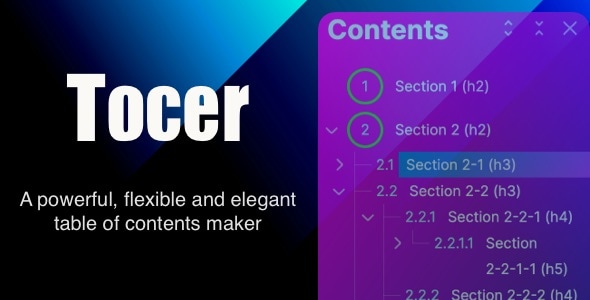
Tocer is a WordPress plugin that builds a table of contents for posts, pages and custom post types, then keeps that list in view while a visitor scrolls. It replaces the older Fixed TOC plugin from the same developer, webvars, and sits in the CodeCanyon interface elements category at $21. Anyone running long-form articles, documentation or knowledge-base style content on WordPress should consider it, particularly if the site is built on the block editor.
The plugin has been purchased 2,929 times and holds a 4.58 out of 5 rating across 149 reviews, which is a meaningful sample for a niche utility rather than a headline theme. The most recent vendor update landed in August 2025, and the package ships two plugins: the current Tocer Interface Elements build and the legacy Fixed TOC.
What Tocer actually does well
The core job is simple and the plugin does it thoroughly: it reads the headings inside a piece of content and outputs a linked list that jumps to each section. Where it goes further than most table of contents plugins is in deciding what goes into that list. Since version 4.2.0, a WP Query feature lets a table be assembled from taxonomies and custom post types rather than only from the current post’s headings. In practice that means a documentation hub can list every page in a category as its contents, or blend a set of pages with the headings of the page currently being viewed. That combination is unusual and is the strongest argument for choosing this plugin over a generic anchor-list generator.
Placement is handled three ways. Auto insertion drops the table into a defined position in the post, a shortcode allows manual placement anywhere, and both methods work on posts, pages and any public post type. Heading levels can be limited so only h2 and h3 appear, and individual headings can be excluded by ID, class name or title — useful when a theme injects decorative headings that should not pollute the list.
Presentation options are the other half of the product, and they are extensive. The list can render as a hierarchical tree or spread across multiple columns for a more compact block. The table can be static, fixed to the window, or sticky at the top of the viewport as the reader scrolls. A scroll indicator highlights the heading currently in view, which is the feature that makes a long article genuinely easier to navigate rather than just adding a list at the top. List markers can be styled with their own colour, background, border, shape, size and spacing, and the first level of the list can be emphasised separately from deeper levels.
Two smaller decisions stand out. Settings can be created once and inherited by other tables, which saves repeating a style configuration across dozens of posts. And the plugin supports separate style rules for desktop, tablet and mobile, so a table that would crowd a phone screen can be collapsed or restyled at that breakpoint instead of being hidden entirely. AMP compatibility and smooth scrolling are also present, and the developer states compatibility with WordPress 6.6 through 7.0 as well as Firefox, Safari, Opera, Chrome and Edge.
Where this plugin fits, and where it does not
The clearest fit is a content site with long articles — tutorials, buying guides, technical explainers — where readers benefit from jumping between sections. The sticky mode and scroll indicator are built for exactly that pattern. A second strong fit is documentation. The WP Query feature was clearly designed with it in mind, letting a single page act as an index of a whole category or custom post type, which is otherwise the kind of thing that requires custom development.
It also suits agencies building sites for clients who will keep publishing after handover. Inherited settings mean a house style can be configured once, and the block editor integration with live preview means a non-technical editor can see the result as they adjust it. The included legacy plugin matters here too: a site migrating from Fixed TOC can keep its existing tables while new ones are built in Tocer, so the change does not have to be a hard cutover.
Where it is the wrong choice is on a site that already has a table of contents solution wired into its theme, or one where the table needs to be generated from something other than WordPress content — a JavaScript-rendered single-page application, for instance, or headings pulled from an external API. Tocer works within WordPress’s content model. It also assumes PHP 7.4 or higher, so a site still running an older PHP version would need to upgrade before installing. And a site with only short posts has little to gain; the plugin adds configuration surface without solving a problem that exists.
Strengths and limitations
Strengths
- Generates tables from post content, taxonomies, custom post types, or a mix — a rare combination that covers documentation use cases.
- Three positioning modes (static, fixed, sticky) plus a scroll indicator, which together handle both short and long content properly.
- Granular styling of list markers and per-level emphasis, so the table can match a theme rather than looking bolted on.
- Separate desktop, tablet and mobile styling, with a collapsible list structure.
- Inherited settings reduce repetitive configuration across large sites.
- Live preview inside the block editor, which shortens the trial-and-error loop considerably.
- Works in non-Gutenberg contexts as well, and the bundled legacy plugin preserves data from the older Fixed TOC.
- Source files are included — JavaScript, HTML, CSS and PHP — so a developer can extend the plugin rather than work around it.
Limitations
- The auto-update feature is still labelled beta in the vendor’s own changelog, so it should not be relied on as the only update path on a production site.
- Two plugins ship in one package, which creates a real decision about which to activate and when. The legacy version receives no new features beyond WordPress compatibility, so sites that start on it will eventually need to migrate.
- Configuration depth is the cost of flexibility. There are many panels and options, and the vendor has added documentation links inside the settings precisely because the interface is not self-explanatory.
- The changelog shows a steady stream of bug fixes across recent releases, including a conflict with WPBakery Page Builder and a PHP error in multi-page setups. That suggests active maintenance, but also that edge cases surface regularly.
- The vendor does not state a tested-up-to WordPress version beyond the listed 6.6 to 7.0 range, and does not publish performance figures for very large tables.
How it compares with the wider category
Most table of contents plugins in the WordPress ecosystem fall into one of two groups. The first is the lightweight anchor generator: it scans headings, prints a list, and offers a handful of style toggles. These are free or cheap, fast, and adequate for a blog with straightforward posts. Tocer competes above that group on control — positioning modes, per-breakpoint styling, marker decoration, heading exclusion rules — and the gap is widest for anyone who cares how the table looks, not just that it exists.
The second group is documentation and knowledge-base tooling, often bundled with a theme or a larger plugin suite. Those tend to be more opinionated and better integrated with their parent product, but they are also harder to use on a site that is not built around them. Tocer sits between the two: more capable than a generic anchor list, less entangled than a documentation suite, and usable on any public post type. The trade-off is that it is a standalone purchase rather than a feature of something already installed, and its more advanced capabilities — WP Query tables, inherited settings — only pay off if the site actually has the content structure to use them.
Frequently Asked Questions
What is the difference between Tocer and Fixed TOC?
They are two plugins bundled in the same package. Tocer is the current version, built around the block editor and receiving new features. Fixed TOC is the legacy version, kept for non-Gutenberg contexts and maintained only for WordPress compatibility. Both can run at once, so existing Fixed TOC tables keep working while new ones are created in Tocer.
Can Tocer build a table of contents from custom post types?
Yes. The WP Query feature added in version 4.2.0 allows a table to be generated from taxonomies and custom post types, such as categories and pages, or from a combination of those and the current post’s headings. This is the feature that makes the plugin suitable for documentation indexes rather than only for single articles.
Does Tocer work without the Gutenberg block editor?
It does. The plugin is built on Gutenberg and offers live preview there, but an alternative mode covers non-Gutenberg contexts, and the plugin works on classic editor setups. The bundled Fixed TOC plugin is also available specifically for sites that are not using the block editor and do not intend to.
What are the server requirements for Tocer?
The vendor lists PHP 7.4 or higher as an extra requirement, and states compatibility with WordPress versions 6.6 through 7.0. It is declared compatible with Firefox, Safari, Opera, Chrome and Edge. The plugin also supports AMP, which matters for sites serving accelerated mobile pages where script behaviour is restricted.
Verdict
Tocer is worth buying for sites where a table of contents is a real navigation aid rather than decoration: long-form publishing, documentation, and any WordPress install with enough structured content to justify building tables from categories or custom post types. The $21 price is low relative to the configuration depth on offer, and the 4.58 rating from 149 reviews suggests buyers generally get what the listing promises. It is a poor fit for sites with only short posts, for anyone who needs tables generated outside WordPress’s content model, or for a site locked to PHP below 7.4. Agencies maintaining client sites should also weigh the two-plugin package carefully, since the legacy version is a dead end for new features and will need replacing eventually.