Project SECURITY is a self-hosted PHP web application firewall that screens incoming traffic to a site, blocks common attack patterns and spam, and records what it stopped in an admin dashboard. It installs alongside an existing PHP site through an installation wizard and is activated by adding two lines of code to one core PHP file. It suits site owners running custom PHP scripts, CMS installations or shopping carts who want a firewall and ban system they control on their own hosting, rather than a subscription service that sits in front of the whole domain.
The script is sold on CodeCanyon under the PHP Scripts > Miscellaneous category, which is where Project SECURITY Miscellaneous searches tend to land. It is developed by Antonov_WEB and priced at $59 as a one-off licence. At the time of writing the listing shows 2,119 sales and a 4.95 out of 5 rating across 175 reviews, with the most recent update (version 5.1.3, January 2026) focused on the bad bots module, the IP lookup tool and general performance.
What the firewall actually does once it is running
The product is best understood as three layers working together: request inspection, visitor control and site administration.
Request inspection and attack detection
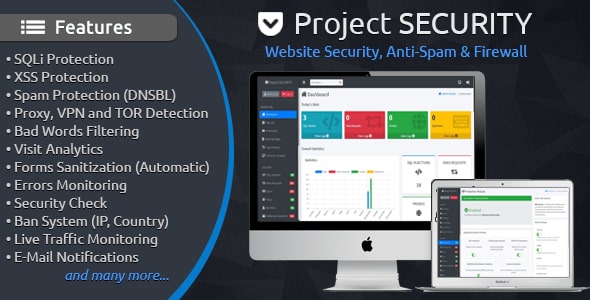
Every request that reaches the protected PHP file is scanned in real time. The script looks for SQL injection attempts (malicious database commands slipped into form fields or URLs) and cross-site scripting payloads (injected JavaScript aimed at other visitors). It also applies pattern recognition intended to catch unknown or newly written exploits rather than only a fixed list of known signatures, and it sanitises incoming and outgoing data as it passes through. Response headers are checked as well, and visitors whose headers look inconsistent or forged can be denied access. A separate bad words filter screens content for profanity, unwanted links and similar material.
Visitor and bot control
The ban system is the most granular part of the product. Administrators can block individual IP addresses, whole IP ranges, countries, internet service providers, browsers, operating systems and referring domains. Proxy, VPN and TOR traffic can be refused outright, which is useful for sites that attract abuse from anonymised connections but worth thinking through carefully if privacy-conscious readers are part of the audience. Search engine crawlers are verified to separate genuine bots from impersonators, and unwanted crawlers that consume bandwidth can be stopped. DNSBL integration adds external spam-blocklist lookups, and an auto-ban rule applies blocks automatically when behaviour crosses a threshold.
Logging, notifications and day-to-day administration
Each incident is stored once in the database with detail including browser, operating system, country, city, user agent and location, so the log is something to investigate rather than just a counter. Email alerts fire when an attack is recorded. The dashboard summarises activity, a live traffic view shows current visitors, and analytics track how they move through the site. Practical extras include an IP lookup tool for checking whether an address is blacklisted, a .htaccess editor for making server-level rules without FTP, a hash generator, a PHP configuration checker that flags risky server settings, and a system information page describing the host environment. IP addresses and specific files can be whitelisted so legitimate services are never caught by a rule.
Where it fits, and where it does not
The strongest fit is a PHP site on shared or mid-range hosting where the owner wants protection without paying monthly for a cloud firewall. Because the script runs inside the application, it works the same on a small brochure site, a custom-built web app or a CMS install, and the two-line integration means it can be added to an existing codebase without restructuring anything. Agencies managing several client sites on separate hosting accounts may find the one-off licence and portable source files attractive, since each installation is independent.
It is also a reasonable choice for sites that need country or ISP-level blocking as a first line of defence — a regional storefront dealing with card-testing traffic, for example, or a forum that keeps attracting the same abusive network.
The wrong choice is a site hosted on infrastructure where the application layer is not the right place to filter traffic. If a host already provides a network-level firewall or a CDN with managed rules, adding a PHP-level tool duplicates effort and can create confusing double blocks. It is also a poor fit for non-PHP stacks: the listing is explicit that it protects PHP software, so a Node, Python or static site gains nothing. Sites that cannot edit core files, such as locked-down managed WordPress hosting, will also struggle with the integration step.
Strengths and limitations
Strengths
- Breadth of the ban system: few tools at this price let an administrator block by country, ISP, browser and referrer from a single panel.
- Self-hosted and one-off: no recurring fee, and all logs stay in the owner’s own database.
- Genuinely detailed logs with geolocation context, deduplicated so repeated attacks do not flood the table.
- Fast, low-resource operation, which matters on shared hosting where CPU and memory are capped.
- Compatibility is stated clearly — PHP 7.x and 8.x, MySQL 5.x and 8.x — and the source files include the SQL schema, so the database can be inspected or migrated.
- Active maintenance: the January 2026 release shows the developer is still shipping improvements rather than abandoning the script.
- Strong buyer feedback, with 175 reviews averaging 4.95, which is unusually consistent for this category.
Limitations
- Protection only applies to requests that pass through the protected PHP file. Direct hits on static assets, other entry points or admin panels outside that file are not covered.
- Pattern-based detection carries a false-positive risk. Legitimate form submissions containing code-like strings, or security researchers testing inputs, can be blocked, which is why the whitelist matters.
- Blocking VPN and TOR traffic will turn away some genuine readers; there is no stated middle ground such as challenge pages in the supplied material.
- The vendor does not state how frequently the attack signature set is refreshed between script releases, so detection of brand-new exploits depends on the pattern logic rather than a live threat feed.
- Running a security tool inside the application it protects is a structural trade-off; a compromised site can take the firewall down with it, whereas an external firewall keeps working.
- Setup assumes FTP access, a manually created MySQL database and the ability to edit a core PHP file — reasonable for a developer, less so for a non-technical owner.
How it compares with the alternatives
The realistic alternatives fall into three groups. Cloud-based firewalls that sit in front of the domain offer network-level filtering, managed rule updates and no code changes, but they charge monthly and route traffic through a third party. Host-level firewalls, where the provider offers one, are effectively free but usually limited to IP and rate rules with little visibility. Plugin-based security for a specific CMS is easy to install but only protects that CMS.
Project SECURITY occupies the gap between the last two and the first. It offers more control and more detailed logging than a typical host firewall, works across any PHP application rather than one CMS, and costs a single payment. What it does not offer is the architectural separation of a cloud firewall or the hands-off rule maintenance. Buyers comparing on capability should weigh three things: whether they can edit a core PHP file, whether they want to own the logs and the ban decisions, and whether the site’s traffic profile makes country or proxy blocking sensible. On those criteria the product is competitive; on managed protection with zero maintenance it is not trying to be.
Frequently Asked Questions
Does Project SECURITY work with WordPress?
Yes, because WordPress runs on PHP, but integration is manual rather than a plugin install. The script is added to a core PHP file, and updates to WordPress or the theme could overwrite that edit, so the change needs documenting. Sites on managed hosting that blocks core file edits are a poor fit.
Will a PHP firewall slow down a website?
Only marginally if the script is as lightweight as claimed. Every protected request passes through extra inspection, so some overhead is unavoidable, but the vendor describes the code as optimised for low resource use and the listing targets shared hosting. Real impact depends on traffic volume and server capacity.
Can it block visitors from specific countries?
Yes. The ban system includes country-level blocking alongside IP addresses, IP ranges, ISPs, browsers, operating systems and referrers. Blocks can be applied manually or triggered automatically when behaviour is flagged. Country blocking is blunt, so whitelisting known legitimate IPs first is advisable.
Is the $59 price a one-time payment?
Yes, it is a single CodeCanyon licence purchase rather than a subscription. That covers the script and future updates while the item remains supported on the marketplace. There are no stated recurring fees, though each separate installation on a different site requires its own licence under standard marketplace terms.
Verdict
Buy Project SECURITY if the site runs on PHP, the owner or developer is comfortable editing a core file and creating a database, and there is a real need for granular blocking by country, ISP or proxy alongside SQL injection and XSS filtering. The one-off price, detailed logs and consistently high review score make it a sensible purchase for freelancers and agencies managing client sites on ordinary hosting. Skip it if the site is not PHP, if the host already provides a capable network firewall, or if nobody on hand can maintain a self-hosted security tool and respond to its email alerts. It is a competent, well-maintained layer of defence, not a replacement for keeping the underlying application patched.