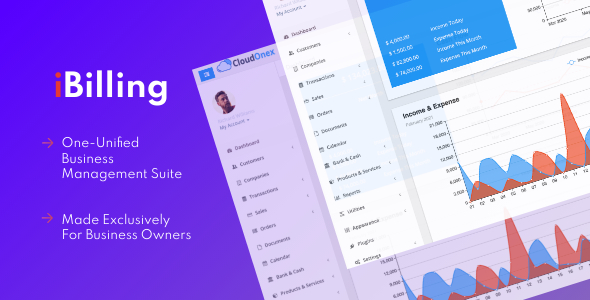
iBilling is a self-hosted PHP application that combines customer relationship management, invoicing and double-entry-style bookkeeping in a single dashboard. It is sold on CodeCanyon as an iBilling Miscellaneous script under the PHP Scripts category, costs $59 as a one-off licence, and is developed by CloudOnex. Small agencies, freelancers and service businesses that want invoicing, expense tracking and a customer database on their own server — without a monthly SaaS subscription — are the core audience.
The product has moved 2,106 sales and holds a 4.28 out of 5 rating across 197 reviews, which is a meaningful sample for a CodeCanyon item and suggests the core workflows hold up in real use. The vendor’s most recent update landed in May 2023, so buyers should weigh the feature set against the fact that active development appears to have slowed.
What the platform actually lets a business do
iBilling is best understood as three tools sharing one login and one database. The value comes from the fact that a customer record, an invoice and an accounting entry all point at the same object, so a payment recorded against an invoice immediately affects the income ledger.
Invoicing with payment collection built in
Invoices can be created through an Ajax-driven quick-entry form, which means line items are added and totals recalculated without a page reload — a small detail that matters when a business issues dozens of invoices a week. Each invoice can carry a logo, notes and a QR code, and customers receive a unique tokenised URL rather than a login. That link lets them view the invoice, download a PDF version and print a clean copy. Recurring invoices are supported for retainer arrangements, partial payments can be logged against a single invoice, and each invoice keeps a full history of related transactions and sent-email logs. Payment gateways are integrated so customers can pay online, and the system sends payment reminders and confirmations automatically using customisable templates over SMTP.
Bookkeeping that stays readable
The accounting side records income and expenses by category and by contact, so a transaction is attributed to both a payer or payee and a type. An accounting snapshot shows current bank balances at a glance, and a separate statement view can be filtered to a single account. Income versus expense is presented as a comparison graph, and reports can be run by date range. Net worth is calculated from the ledger, and the vendor includes a goal-setting field for a target net worth figure — a motivational feature rather than a financial one, but harmless.
Customer records with history attached
Each contact profile can hold a photo, social profile links, free-text notes, custom fields defined per business type and tags used for filtering. Activity logging is the more useful part: phone calls, interests and other interactions can be recorded against a contact, and the profile surfaces that contact’s invoices, transactions and accounting summary in one place. Email can be sent directly from the portal, and the message log keeps a record of what went out.
Administration and deployment
The script supports multiple user accounts, keeps audit logs, and ships with a one-click database backup. Branding can be stripped of the vendor’s copyright notice, which matters for agencies reselling or white-labelling the tool to clients. Source files are included in PHP, JavaScript, HTML, CSS and SQL, so the codebase can be modified. The vendor states the application is compatible with PHP 7.x, with version 5 requiring PHP 7.4 or higher, and lists IE11, Firefox, Safari, Opera and Chrome as supported browsers.
Where iBilling fits, and where it does not
The strongest fit is a small service business — a design studio, consultancy, IT support outfit or freelance developer — that bills a modest number of clients on retainer or per project and wants invoicing and bookkeeping in one place. It also suits agencies that host client sites and would rather install a billing tool on their own infrastructure than pay per seat for cloud accounting. Because the source is included and branding is removable, a developer can adapt it into a niche billing product for a specific industry.
It is a poor choice for a business that needs statutory compliance. iBilling is not a certified accounting package: the vendor makes no claim of tax filing, VAT returns, payroll or country-specific reporting standards, and none of that appears in the feature set. A company that must produce audit-ready statements for a regulator should use dedicated accounting software and treat this as an invoicing front end at most.
It is also the wrong pick for teams that have no one comfortable with server administration. Installing a PHP script means managing a web server, a MySQL database, PHP version compatibility and your own backups and security patching. Businesses without that capability will find a hosted subscription cheaper in real terms once maintenance time is counted.
Strengths and limitations
Strengths
- One database for contacts, invoices and accounting entries, which removes the double entry of copying payment data between tools.
- Client-facing invoice links with token authentication mean customers never need an account to view or pay a bill.
- Recurring invoices, partial payments and automated reminders cover the practical mechanics of getting paid.
- Full source code in PHP, JavaScript, HTML, CSS and SQL, with vendor branding removable.
- Audit logs, multiple users and one-click database backup are included rather than sold as extras.
- A $59 one-off cost with no per-user or per-invoice fees, and a 4.28 rating across 197 reviews as evidence of real-world use.
Limitations
- The last vendor update was May 2023. Buyers evaluating it now should check whether the PHP version requirements match a current server, since PHP 7.4 reached end of life and newer hosts may default to PHP 8.
- No statutory accounting, tax filing or payroll functionality is declared. It tracks income and expense; it does not produce compliant financial statements.
- Self-hosting shifts security patching, backups and uptime entirely onto the buyer. There is no managed update channel.
- Payment gateway support is not itemised in the listing, so the specific providers available must be confirmed on the demo before purchase.
- The browser compatibility list includes IE11, which signals an older front-end codebase rather than a modern JavaScript stack.
- Multi-currency handling, tax rules per jurisdiction and inventory management are not described in the supplied specifications and should be verified directly if required.
How it compares with the wider category
The realistic alternatives fall into two groups: hosted SaaS accounting and invoicing platforms, and other self-hosted PHP business scripts sold on marketplaces like CodeCanyon.
Against SaaS platforms, iBilling wins on cost structure and data ownership. There is no monthly fee, no seat limit and no per-invoice charge, and the database sits on infrastructure the buyer controls. It loses on maintenance, on integration breadth — hosted platforms typically connect to banks, payroll providers and dozens of payment gateways — and on compliance, where certified software has a clear advantage. For a business with simple books and technical capacity, the trade is favourable; for one with complex reporting obligations, it is not.
Against other self-hosted business scripts, the differentiator is breadth. Many marketplace items do invoicing well or CRM well; fewer combine the two with a working ledger and a client-facing payment portal. The 2,106 sales figure puts it among the more established items in its niche, which usually means more community answers and a clearer picture of bugs. The counterweight is the update cadence: a script that has not shipped a release in over a year carries more risk than one updated quarterly, regardless of how complete the feature list looks.
Frequently Asked Questions
What is iBilling used for?
iBilling is used to run the billing and bookkeeping side of a small business from one dashboard. It stores customer records, creates and sends invoices, collects online payments, records income and expenses, and reports on net worth. It replaces a patchwork of spreadsheet invoicing and separate expense tracking with a single self-hosted application.
Does iBilling require coding knowledge to install?
Installation requires basic server skills rather than coding. A buyer needs to set up a PHP 7.4 or newer environment with a MySQL database, upload the files and run the installer. Day-to-day use is entirely through the browser interface. Customising templates or adding features does require PHP knowledge, since the source is included.
Can iBilling handle recurring invoices and partial payments?
Yes, both are supported. Recurring invoices can be configured for retainer or subscription-style billing, and partial payments can be recorded against a single invoice so a balance remains visible until it is settled. Payment reminders and confirmations are sent automatically, and each invoice keeps a log of related transactions and emails.
Is iBilling suitable for tax filing and official accounting?
No. iBilling records income, expenses and net worth, but the vendor declares no tax filing, VAT reporting, payroll or jurisdiction-specific compliance features. It works as a billing and cash-flow tool, not as certified accounting software. Businesses with statutory reporting duties should keep a qualified accounting package for official filings.
Verdict
iBilling is worth buying for a small service business or agency that wants invoicing, a customer database and simple bookkeeping on its own server at a one-off cost, and that has someone available to handle PHP hosting and updates. The combination of client-facing payment links, recurring invoices and an integrated ledger is genuinely useful at this price, and the review volume suggests it works in practice. It is not the right purchase for anyone needing compliant financial statements, multi-currency complexity or a vendor-managed, always-current platform. The stalled update cycle since May 2023 is the single biggest reason to check the demo and confirm PHP 8 compatibility before committing.